
Nissan Juke Service and Repair Manual : P0403 EGR volume control valve
DTC Logic
DTC DETECTION LOGIC

Diagnosis Procedure
1.CHECK EGR VOLUME CONTROL VALVE CONTROL CIRCUIT
1. Turn ignition switch OFF.
2. Disconnect EGR volume control valve harness connector and ECM harness connector.
3. Check the continuity between EGR volume control valve terminal harness connector and ECM harness connector
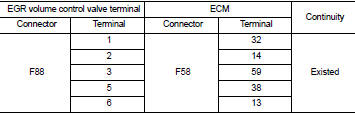
4. Also check harness for short to ground and short to power.
OK or NG OK >> GO TO 2.
NG >> Repair open circuit or short to ground or short to power in harness or connectors.
2.CHECK EGR VOLUME CONTROL VALVE
Refer to EC-941, "Component Inspection".
OK or NG OK >> GO TO 3.
NG >> Replace EGR volume control valve.
3.CHECK EGR VOLUME CONTROL VALVE CONTROL POSITION SENSOR
Refer to EC-941, "Component Inspection".
OK or NG OK >> GO TO 4.
NG >> Replace EGR volume control valve.
4.CHECK EGR PASSAGE
Check the following for clogging and cracks.
• EGR tube
• EGR hose
• EGR cooler
OK or NG OK >> GO TO 5.
NG >> Repair or replace EGR passage.
5.CHECK INTERMITTENT INCIDENT
Refer to GI-42, "Intermittent Incident".
>> INSPECTION END
Component Inspection
EGR VOLUME CONTROL VALVE
1. Disconnect EGR volume control valve harness connector.
2. Check resistance EGR volume control valve harness connector.

If NG, replace EGR volume control valve. Refer to EC-881, "Work Procedure".
EGR VOLUME CONTROL VALVE CONTROL POSITION SENSOR
1. Disconnect EGR volume control valve harness connector.
2. Check continuity EGR volume control valve harness connector.

If NG, replace EGR volume control valve. Refer to EC-881, "Work Procedure".
 P0402 EGR volume control valve
DTC Logic
DTC DETECTION LOGIC
Diagnosis Procedure
1.CHECK GROUND CONNECTIONS
1. Turn ignition switch OFF.
2. Check ground connection E38. Refer to Ground inspection in GI-44, "Circuit
In ...
 P0409 EGR volume control valve control position sensor
DTC Logic
DTC DETECTION LOGIC
Diagnosis Procedure
1.CHECK GROUND CONNECTIONS
1. Turn ignition switch OFF.
2. Check ground connection E38. Refer to Ground inspection in GI-44, "Circuit
In ...
Other materials:
System Temporarily Unavailable
When the advanced safety sensors detect radar blockage, the Nissan Leaf safety suite will automatically deactivate affected systems to ensure reliability. These features will remain unavailable until the environmental conditions clear and the sensors can once again accurately monitor the vehicle's s ...
Additional service when replacing ECM
Description
When replacing ECM, this procedure must be performed.
Work Procedure
1.PERFORM INITIALIZATION OF NATS SYSTEM AND REGISTRATION OF ALL NATS
IGNITION KEY IDS
Refer to SEC-50, "BCM : Special Repair Requirement" (With intelligent key
system), SEC-190, "BCM : Work
Proce ...
Blower fan on signal
Component Function Check
1.CHECK BLOWER FAN ON SIGNAL
With CONSULT-III
1. Turn ignition switch ON.
2. Select “AIR CONDITIONER� of “BCM� using CONSULT-III.
3. Select “FAN ON SIG� in “DATA MONITOR� mode, and check status under the
following condition.
Is the inspection result ...
