
Nissan Juke Owners Manual : Opening the fuel-filler door
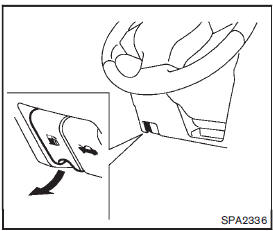
To open the fuel-filler door, pull the release handle located below the instrument panel. To lock, close the fuel-filler door securely.
 Fuel-filler door
CAUTION
Do not place your foot on or step on the front bumper. Also, do not step on
the side sill extensions when getting in or out of the vehicle. Doing so may result
in damage to the front bu ...
 Fuel-filler cap
To remove the fuel-filler cap:
1. Turn the fuel-filler cap counterclockwise 1 to remove.
2. Put the fuel-filler cap on the cap holder A while refueling.
To install the fuel-filler cap:
1. Insert ...
Other materials:
U1000 can comm circuit
Description
CAN (Controller Area Network) is a serial communication line for real time
applications. It is an on-vehicle multiplex
communication line with high data communication speed and excellent error
detection ability. Modern
vehicle is equipped with many electronic control unit, and eac ...
C1601 battery power supply
DTC Logic
DTC DETECTION LOGIC
DTC CONFIRMATION PROCEDURE
1.PRECONDITIONING
If “DTC CONFIRMATION PROCEDURE� has been previously conducted, always turn
ignition switch OFF and
wait at least 10 seconds before conducting the next test.
>> GO TO 2.
2.DTC REPRODUCTION PROCEDURE
W ...
Tire chains
Use of tire chains may be prohibited according to location. Check the local laws
before installing tire chains. When installing tire chains, make sure they are the
proper size for the tires on your vehicle and are installed according to the chain
manufacturer’s suggestions. Use only SAE Clas ...
