
Nissan Juke Service and Repair Manual : Light & rain sensor
Exploded View
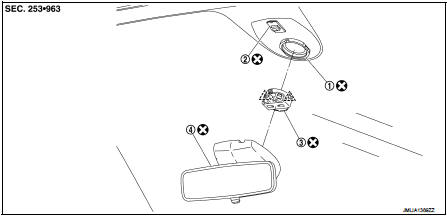
1. Light & rain sensor bracket
2. Mirror base
3. Light & rain sensor
4. Inside mirror assembly
 : Pawl
 : Do not reuse
Removal and Installation
CAUTION:
When the light & rain sensor is removed from windshield, the light & rain sensor
cannot be reused.
REMOVAL
1. Remove inside mirror assembly. Refer to MIR-41, "Removal and Installation".
2. Disconnect light & rain sensor connector.
3. Disengage both sides fixing pawls, and remove the light & rain sensor from the windshield.
INSTALLATION
Note the following items, and then install in the reverse order of removal.
CAUTION:
• Surface of windshield should be cleaned.
• Never touch gel/adhesive of new part.
 Front wiper drive assembly
Exploded View
REMOVAL
LHD models
1. Front wiper arm cap
2. Front wiper arm LH
3. Front wiper blade LH
4. Front wiper arm RH
5. Front wiper blade RH
6. Front wiper drive assembly
: Pawl
...
 Wiper and washer switch
Exploded View
The washer level switch must be replaced together with the washer tank as an
assembly. Refer to WW-67,
"Removal and Installation". ...
Other materials:
Replacing
Replace the wiper blades if they are worn.
Before replacing the wiper blades, the wiper should be in the fully up position
to avoid scratching the engine hood or damaging the wiper arm. To pull up the wiper
arm, see “Windshield wiper and washer switch� .
1. Lift the wiper arm away from t ...
Symptom diagnosis
Squeak and rattle trouble diagnoses
Work Flow
CUSTOMER INTERVIEW
Interview the customer if possible, to determine the conditions that exist
when the noise occurs. Use the Diagnostic
Worksheet during the interview to document the facts and conditions when the
noise occurs and any of
the cu ...
Emission control not satisfactory
Description
CHART 22: EMISSION CONTROL NOT SATISFACTORY
Diagnosis Procedure
1.CHECK ECM POWER SUPPLY AND GROUND CIRCUIT
Check ECM power supply and ground circuit. Refer to EC-885, "Diagnosis
Procedure".
Is the inspection result normal?
YES >> GO TO 2.
NO >> Repair ...
