
Nissan Leaf 2018-2025 (ZE1) Owner's Manual : Lane Departure Warning (LDW)
WARNING
Failure to strictly follow the safety warnings and operational instructions for the proper use of the Lane Departure Warning (LDW) system could result in an undetected drift, loss of vehicle control, and subsequent serious injury or death.
- This safety system functions solely as an electronic warning device to proactively inform the driver of a potential, unintended departure from the current traveling lane. It will not actively steer the vehicle, apply corrective steering inputs, or mechanically prevent a total loss of control. It remains the driver's absolute personal responsibility to stay fully alert, practice safe driving habits, explicitly keep the vehicle centered within the designated traveling lane, and maintain complete physical control of the vehicle at all times.
The intelligent LDW system is engineered to operate seamlessly when the Nissan Leaf is driven at forward speeds of approximately 37 mph (60 km/h) and above, and its functionality relies entirely on the condition that the painted lane markings are clearly visible on the road surface.
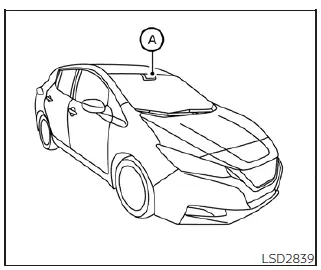
To track the road geometry, the LDW system continuously monitors the structural lane markers on the traveling lane using an integrated, high-resolution optical camera unit A securely mounted inside the cabin directly above the interior rearview mirror.
When active, the LDW system warns the driver through a clear visual indicator graphic inside the vehicle information display accompanied by a distinct haptic steering wheel vibration, alerting the operator that the vehicle is beginning to unintentionally cross or leave the driving lane.
LDW system operation
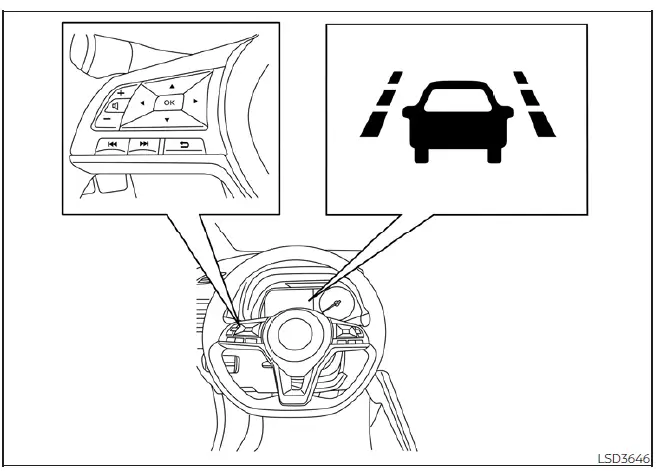
The integrated LDW system provides its automated lane departure warning function exclusively when your Nissan Leaf is driven at cruise speeds of approximately 37 mph (60 km/h) and above, provided that the surrounding lane markings are distinct and unbroken. When the onboard sensors detect that the vehicle is closely approaching or riding over either the left or the right outer boundary side of the traveling lane, the steering wheel column will immediately vibrate and the dedicated LDW indicator light in the center vehicle information display will blink rapidly to alert the driver to take immediate corrective action.
The automated haptic and visual warning functions will stop instantly the moment the vehicle is steered safely back inside the parameters of the painted lane markers.
How to enable/disable the LDW system
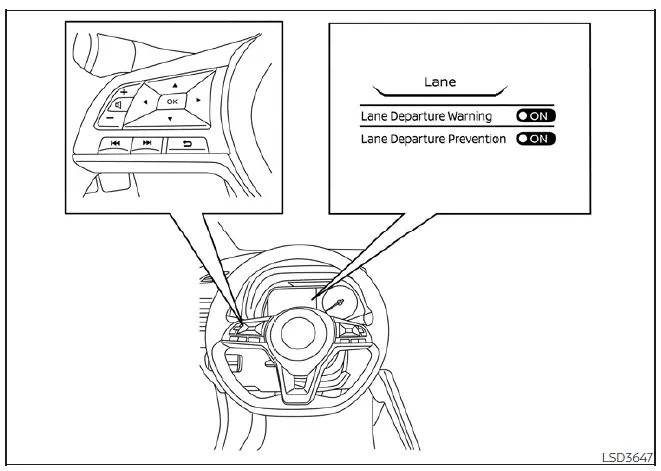
Perform the following sequential configuration steps to manually enable or disable the active LDW system through the onboard computer interface:
1. Press the steering wheel multi-navigation arrow
 button repeatedly until the main
"Settings" menu screen displays prominently
in the central vehicle information display cluster.
button repeatedly until the main
"Settings" menu screen displays prominently
in the central vehicle information display cluster.
Use the vertical scroll
 toggle button to highlight the option labeled "Driver
Assistance." Then press the core OK button to confirm your selection.
toggle button to highlight the option labeled "Driver
Assistance." Then press the core OK button to confirm your selection.
2. Navigate to select the "Lane" sub-menu item and press the OK button once more.
3. Highlight the specific line item for "Lane Departure Warning" and use the OK button to toggle the system status to either on or off based on your driving preference.
LDW system limitations
WARNING
Listed below are the technical and environmental boundaries that restrict the functionality of the LDW system. Failure to recognize and accommodate these strict system limitations could result in an unmitigated collision, causing serious bodily injury or death.
- The tracking software will not initiate operation at low travel speeds below approximately 37 mph (60 km/h), nor can it function if the optical sensor fails to clearly detect or distinguish the physical lane markers.
- Do not attempt to rely on or use the active LDW system under the following specialized environmental or mechanical conditions, as the sensor apparatus may fail to function properly or deliver false readings:
- During periods of severe bad weather that compromise visibility (such as heavy rain, dense fog, blowing snow, or road spray).
- When driving the vehicle on highly slippery or un-sanded roads, such as surfaces covered in black ice or hard-packed snow.
- When traversing tight winding roads, sharp mountain passes, or severely uneven asphalt surfaces.
- When there is a temporary lane closure or shifting traffic pattern due to ongoing road construction and repairs.
- When driving through a highly irregular, makeshift, or temporary construction lane detour.
- When operating the vehicle on narrow rural routes where the total lane width is significantly below standard highway sizes.
- When driving without normal, factory-specified tire conditions (for example, operating with excessive tire wear, incorrect low tire pressure, an uncalibrated spare tire, wrapped tire traction chains, or fitted with nonstandard wheels).
- When the vehicle chassis is currently modified or equipped with non-original aftermarket brake components or modified suspension parts.
- The optical camera's tracking accuracy may be severely degraded or fail entirely under the following structural conditions:
- On complex highway sections where there are multiple parallel lane markers painted; lane markers that are heavily faded, chipped, or not clearly applied; non-standard yellow painted lines; unusual non-standard geometric markings; or when the lines are obscured by standing water, mud, slush, or heavy snowpack.
- On older highways where obsolete, discontinued lane markers from previous construction zones remain visible alongside new markings.
- On extreme twisty roads featuring sharp, back-to-back curves.
- On paved roads where there are sharply contrasting objects or dark patterns, such as deep tree shadows, melting snow patches, standing pools of water, localized wheel ruts, asphalt seams, or dark tar lines remaining after structural road repairs.
(The internal LDW processing logic could mistakenly identify these high-contrast items as actual road lane markers, resulting in false haptic alarms.)
- On dynamic road structures where the traveling lane rapidly merges, fans out, or separates.
- When the vehicle's momentary traveling direction is skewed or does not align straight with the trajectory of the lane marker.
- When traveling too closely behind the vehicle directly in front of you, which heavily obstructs and limits the open line-of-sight detection range of the upper camera unit.
- When heavy rain streaks, caked snow, road dirt, or an external object adheres directly to the outer windshield glass surface situated in front of the lane camera lens.
- When driving at night and the headlights are not bright enough due to heavy grime accumulation on the outer lenses, or if the physical headlight aiming angle is not adjusted to factory specifications.
- When intense, blinding light directly enters the forward-facing lane camera aperture (for example, when low-angle sunlight shines directly into the front of the vehicle during sunrise or sunset).
- When a rapid, extreme change in ambient brightness occurs in a short time window (for example, when the Nissan Leaf enters or exits a dark tunnel or passes under a wide bridge structure).
System temporarily unavailable
If your Nissan Leaf is parked for an extended period in direct summer sunlight under high ambient temperature conditions exceeding approximately 104ºF (40ºC) and is then turned on, the internal diagnostic circuit may deactivate the LDW system automatically to protect the electronics. If this occurs, the following warning message will display prominently on the screen: "Unavailable: High Cabin Temperature." Once the cabin interior and upper glass area have been sufficiently cooled by the climate control system, the sensor array will automatically reset and the LDW system will resume operating normally. Furthermore, the LDW system logic is deliberately engineered not to issue alerts under the following intended operational scenarios:
- When you actively operate the turn signal lever to execute a legal lane change in the direction of that signal. (The tracking software will automatically become fully operable again approximately 2 seconds after the turn signal is deactivated.)
- When the vehicle's recorded road speed drops below the operational threshold of approximately 37 mph (60 km/h).
As soon as the above driving behaviors conclude and all required technical operating conditions are completely satisfied, the automated LDW warning functions will instantly resume.
System malfunction
If an internal hardware or software fault occurs within the tracking system, it will cancel its operation automatically and the warning message "Malfunction: See Owner's Manual" will flash within the vehicle information display. If this specific fault message appears while driving, safely pull off the active road to a secure location and bring the vehicle to a full stop. Push the physical P (Park) switch on the center console shift lever, turn the power switch completely to the OFF position, wait briefly, and then restart the EV system. If the "Malfunction: See Owner's Manual" alert continues to persist after restarting the vehicle, have the safety system diagnosed immediately. For this specialized diagnostic work, it is highly recommended that you visit an authorized, NISSAN certified LEAF dealer.
System maintenance
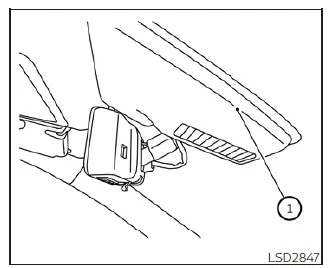
The specialized optical lane camera unit O1 used by the LDW system is housed behind the upper windshield glass directly above the interior mirror assembly. To preserve the accurate long-term operation of the LDW hardware on your Nissan Leaf and prevent unexpected system malfunctions, ensure you strictly adhere to the following maintenance practices:
- Always keep the outer windshield glass thoroughly clean and free of dead bugs, grime, ice, or window film.
- Do not apply aftermarket window tints, attach adhesive stickers (including completely transparent materials), or mount toll transponder accessories anywhere near the immediate field-of-view housing of the camera unit.
 e-Pedal system
WARNING
Never rely solely on the innovative e-Pedal system to manage your speed or bring the vehicle to a halt, as there is a clear physical performance limit to the system's automated decelerati ...
 Intelligent Lane Intervention (I-LI)
WARNING
Failure to strictly follow the safety warnings and operational instructions for the proper use of the I-LI system could result in an unintended vehicle path, loss of ...
Other materials:
Calibration of decel G sensor
Description
TCM stores calibration data (inherent characteristic value) of G sensor to
provide accurate control. Therefore,
it is required to perform calibration of G sensor after the following work is
performed.
• Removal/installation or replacement of G sensor
• Replacement of TCM
P ...
Keyfob battery
Exploded View
1. Upper case
2. Key
3. Switch cover
4. Switch rubber
5. Board surface
6. Battery
7. plate
8. Lower case
9. Screw
Removal and Installation
REMOVAL
1. Remove screw (9) on the rear of keyfob.
2. Place the key with the lower case (8) facing up. Set a screw-driver wrap ...
Door lock and unlock switch
Driver side : Component Function Check
1.CHECK FUNCTION
1. Select “DOOR LOCK� of “BCM� using CONSULT-III.
2. Select “CDL LOCK SW�, “CDL UNLOCK SW� in “DATA MONITOR� mode.
3. Check that the function operates normally according to the following
conditions.
Is the inspectio ...
