
Nissan Leaf 2018-2025 (ZE1) Owner's Manual : e-Pedal system
WARNING
Never rely solely on the innovative e-Pedal system to manage your speed or bring the vehicle to a halt, as there is a clear physical performance limit to the system's automated deceleration functions. Always drive carefully, maintain full situational awareness, and remain highly attentive to your surroundings. The traditional hydraulic brake pedal should always be actively operated by your foot to slow down or stop the vehicle instantly, depending on surrounding traffic patterns, sudden hazards, or slick road conditions.
The advanced e-Pedal system enables the driver to effortlessly slow down, bring the vehicle to a complete stop, or keep the vehicle safely stopped by operating only the primary accelerator pedal. This intelligent driving system helps to optimize convenience and comfort, dramatically reducing fatigue by keeping the driver from constantly moving his/her foot back and forth between the accelerator pedal and the traditional mechanical brake pedal during daily commutes or heavy traffic.
e-Pedal system operation
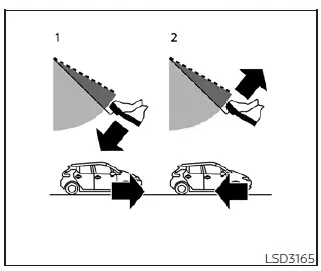
- Linear Acceleration: Smoothly depressing the pedal increases motor torque and vehicle speed.
- Controlled Deceleration: Gradually lifting your foot off the pedal engages the motor as a generator to slow the vehicle down (instead of using the brake pedal).
- Making a complete stop: Easing off the pedal entirely brings the car to a smooth standstill and engages the brakes automatically (instead of using the brake pedal).
When the unique e-Pedal system is manually activated by the driver, the electric vehicle's regenerative brake torque profile is heavily enhanced, and the driver can modulate the vehicle speed intuitively by only depressing or smoothly returning the accelerator pedal. When you release or completely take your foot off the accelerator pedal, the vehicle slows down rapidly yet comfortably and comes to a stop smoothly without ever depressing the brake pedal. After a complete stop is achieved, the vehicle automatically remains at a secure standstill via an electronic brake-hold feature.
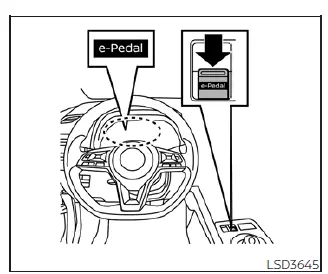
To safely activate or deactivate the e-Pedal system on your Nissan Leaf, first place the main power switch in the active ON position and then pull up on the dedicated e-Pedal switch located cleanly on the center console. The integrated e-Pedal system turns on or off explicitly each time the spring-loaded e-Pedal switch is pulled by the driver. (The dedicated e-Pedal indicator icon displayed in the central vehicle information display area clearly shows the current operational status of the e-Pedal system at any given moment.) To turn the e-Pedal system completely off while the vehicle is currently being held at a stop by the e-Pedal system function, firmly depress the standard brake pedal with your foot first and then pull the center console e-Pedal switch.
NOTE:
- When the intelligent e-Pedal system is actively switched on or off by the driver, the baseline degree of vehicle deceleration feedback experienced upon lifting off the accelerator will instantly change.
- The integrated e-Pedal system automatically resets and turns off by default every time the EV system is shut down and restarts.
- To permanently keep the e-Pedal system activated even after the EV system restarts without having to pull the switch every time, you can manually turn on the "Retain Mode" option located in the "Driver Assistance" sub-menu of the main vehicle information display. For additional detailed information regarding menu navigation, see the "Vehicle information display" section of this manual.
- The driver's custom setting for the "Retain Mode" configuration does not reset or erase even after selecting the comprehensive "Factory Reset" option in the main "Settings" menu of the vehicle information display.
When the e-Pedal system is fully activated on the console, the structural resistance and feedback characteristics of the accelerator pedal change significantly, and the accelerator pedal operates quite differently than a conventional internal combustion vehicle's accelerator pedal operates. Be absolutely sure to visually confirm the active status of the e-Pedal system in the cluster vehicle information display before driving onto public roads.
The intuitive e-Pedal system provides the following specialized driving features during everyday operation: When actively driving, modulating speed, and stopping the vehicle:
- Depressing or smoothly returning the accelerator pedal alters the real-time degree of electric motor acceleration and deceleration torque accordingly.
- Returning the accelerator pedal partially backward generates significantly more deceleration force than a normal vehicle coasting function. (The maximum available deceleration force changes automatically according to current vehicle speed metrics.)
- Releasing or taking your foot completely off the accelerator pedal continuously reduces the vehicle speed until the vehicle comes to a complete, balanced stop.
- The vehicle's rear brake lights will automatically illuminate when the electronic deceleration level reaches a threshold equivalent to an ordinary mechanical braking operation, ensuring drivers behind you are safely warned.
If the automatic electronic deceleration force provided is not sufficient when the accelerator pedal is returned or released, immediately depress the hydraulic brake pedal manually. The vehicle's standard brake pedal can be operated to aggressively reduce the vehicle speed in the exact same way as normal braking, even when the e-Pedal system is fully activated.
When restarting the vehicle:
- After your Nissan Leaf comes to a complete standstill by the e-Pedal system function, the vehicle remains safely held at a stop as long as the accelerator pedal is left completely released.
- The vehicle's rear brake lights remain continuously illuminated to protect your position when the vehicle is held at a stop by the e-Pedal system logic.
- Simply depress the accelerator pedal smoothly to launch and start the vehicle moving again from a complete stop.
When the vehicle needs to be left stopped or stationary for a prolonged period of time, always place the vehicle transmission into the structural P (Park) position and securely apply the primary parking brake.
CAUTION
When the e-Pedal system is manually turned off, always remember to depress the hydraulic brake pedal firmly to prevent the vehicle from creeping or moving with the shift lever sitting in any operational position other than P (Park).
When backing up the vehicle:
- With the selector shift lever placed firmly in the R (Reverse) position, operating the single accelerator pedal adjusts the vehicle speed (including smooth reverse acceleration, progressive deceleration, or bringing the car to a complete stop) in the exact same single-pedal fashion as the forward D (Drive) position.
Other driving tips for the e-Pedal system:
- For the smoothest possible deceleration transitions when the e-Pedal system is activated, it is highly recommended that you carefully adjust the accelerator pedal position by either slightly depressing or returning it smoothly, rather than abruptly releasing or lifting your foot completely off the pedal.
- Moving the electronic shift lever smoothly from the standard D (Drive) position to the high-regen B mode, or conversely from B mode back to the D (Drive) position, does not affect or alter the active e-Pedal system features.
- The e-Pedal system does not function or apply braking hold under the following operational conditions:
- When the vehicle transmission is actively placed in the P (Park) or N (Neutral) position.
- When the standard cruise control system (if so equipped), the advanced ProPILOT Assist system (if so equipped), or the Automatic Emergency Braking with Pedestrian Detection system actively operates and takes over throttle or braking commands.
e-Pedal system limitations
WARNING
Listed below are the critical system boundaries and environmental limitations for the e-Pedal system. Failure to manage and operate your Nissan Leaf in strict accordance with these system limitations could result in a loss of control, serious personal injury, or death.
- If the specific "Press brake pedal to prevent rolling" emergency warning message appears in the vehicle information display screen, immediately depress the primary foot brake pedal firmly. The electronic hold may be slipping, and the vehicle may start moving unexpectedly.
- If the automated deceleration force provided by the regenerative e-Pedal system is not sufficient for current traffic situations, immediately depress the foot brake pedal to slow down.
- If the vehicle begins to roll or move while it is supposedly held at a standstill by the e-Pedal system, depress the hydraulic brake pedal immediately to re-secure the car.
- Under the following specific operational conditions, you must place the vehicle in the secure P (Park) position and make sure the parking brake is securely applied, as the e-Pedal system cannot hold the vehicle safely in these scenarios and the vehicle may start moving suddenly:
- When passengers or the driver are getting in and out of the vehicle
- When loading heavy cargo or unloading items from the vehicle
- When stopping and leaving the vehicle idle for a long period of time
- Under the following driving conditions, the e-Pedal system may not decelerate the vehicle or stop the vehicle sufficiently to maintain safety. Depress the mechanical brake pedal whenever necessary to control your speed:
- When excessively heavy baggage, cargo, or passengers are loaded inside the vehicle
- When driving down exceptionally steep downhill mountain roads
- When driving on slick, icy, snowy, or wet mud-covered roads
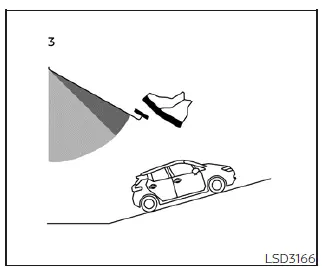
- On a steep incline or slope, the e-Pedal system software may not be able to stop the vehicle completely or may fail to keep the vehicle stopped securely over time.
Depress the standard hydraulic brake pedal manually whenever necessary to remain safely anchored on hills.
CAUTION
- Always turn the e-Pedal system completely off and place the vehicle transmission into the N (Neutral) position under the following explicit conditions to avoid physical vehicle damage:
- When the vehicle enters a mechanized automatic conveyor car wash
- When the vehicle is being lifted, winched, or towed
- Be very careful not to flip, press, or operate the center console e-Pedal switch mistakenly or unintentionally while driving or adjusting cabin controls.
System malfunction
If a critical error or software glitch occurs within the electronic e-Pedal system loop, the distinctive "e-Pedal system failure! Press brake pedal to slow or stop" text warning message will immediately appear in red or yellow on the vehicle information display screen. When this diagnostic warning message appears, the e-Pedal system will be deactivated and turned off automatically by the vehicle computer for safety reasons. You must have the vehicle checked by a technician as soon as possible. It is highly recommended that you visit a NISSAN certified LEAF dealer to receive factory-approved diagnostics and service for this system.
 Parking brake
WARNING
Be absolutely sure that the mechanical or electronic parking brake is completely released before driving your vehicle. Failure to do so could cause rapid brake overheating, subs ...
 Lane Departure Warning (LDW)
WARNING
Failure to strictly follow the safety warnings and operational instructions for the proper use of the Lane Departure Warning (LDW) system could result in an undetect ...
Other materials:
Diagnosis system (ipdm e/r) (with intelligent key system)
Diagnosis Description
AUTO ACTIVE TEST
Description
In auto active test mode, the IPDM E/R sends a drive signal to the following
systems to check their operation.
• Oil pressure warning lamp (only for K9K engine models)
• Rear window defogger
• Front wiper motor
• Parking lamp
• ...
Door cable
Exploded View
LEFT SIDE
1. A/C unit assembly
2. Intake door lever
3. Intake door link
4. Intake door cable
5. Air mix door cable
6. Upper air mix door rod
7. Upper air mix door lever
8. Lower air mix door lever
9. Lower air mix door rod
10. Air mix door link
A. To A/C control
RI ...
P0014 EVT control
DTC Logic
DTC DETECTION LOGIC
NOTE:
If DTC P0014 is displayed with DTC P0078, first perform trouble diagnosis for
DTC P0078. Refer to EC-
585, "DTC Logic".
DTC CONFIRMATION PROCEDURE
1.PRECONDITIONING
If DTC Confirmation Procedure has been previously conducted, always perform
...
