
Nissan Leaf 2018-2025 (ZE1) Owner's Manual : Parking brake
WARNING
- Be absolutely sure that the mechanical or electronic parking brake is completely released before driving your vehicle. Failure to do so could cause rapid brake overheating, subsequent friction brake failure, and lead to a serious accident.
- Do not attempt to release the parking brake system from outside the vehicle profile under any circumstances, as the car may roll immediately.
- To help avoid the catastrophic risk of injury or death through the unintended operation of the vehicle and/or its electronic systems, never leave children, vulnerable individuals who require the assistance of others, or pets unattended in your vehicle. Additionally, the interior temperature inside a fully closed vehicle on a warm day can quickly climb to extreme levels, creating a significant and fatal risk of heatstroke or death to people and pets alike.
- When permanently leaving the vehicle unattended, always manually apply the secure parking brake system and explicitly push the P (Park) position switch on the electronic shift lever.
Pedal type
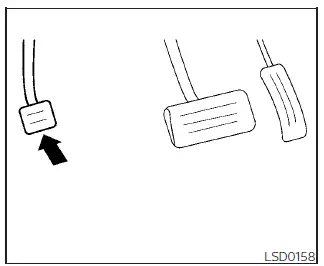
To engage: Firmly depress the foot-activated parking brake pedal down as far as it can travel until it locks mechanically in place.
To release:
1. Firmly apply and hold down the primary hydraulic foot brake pedal.
2. Push the physical P (Park) position switch located on top of the console shift lever.
3. Firmly depress the auxiliary parking brake pedal a second time slightly further down, and it will click to release and return upward.
4. Before initiating forward movement, always verify that the red instrument cluster brake warning light goes out entirely.
Switch type (models with electronic parking brake system)
The advanced electronic parking brake can be smoothly applied or released automatically by the vehicle control modules or manually by operating the physical electronic parking brake toggle switch on the center console.
Automatic operation
The electronic parking brake is engineered to automatically release as soon as the driver starts moving the vehicle and gently depresses the main accelerator pedal while in a forward or reverse gear.
In order for this automated electronic parking brake release to safely disable when the driver pushes down on the accelerator, the vehicle sensors must explicitly confirm that the driver's seat belt is securely fastened and all doors are closed.
WARNING
- The electronic parking brake mechanism will not be automatically applied if the high-voltage EV system is suddenly stopped or shut down without using the primary dashboard power switch button (for example, during an unexpected EV system stalling event or technical failure).
- Before fully exiting and leaving the vehicle, always push the physical P (Park) position switch on the shift lever assembly and verify that the red electronic parking brake indicator light (
 or
PARK) is brightly illuminated to confirm that the electronic parking brake is successfully applied and holding weight.
or
PARK) is brightly illuminated to confirm that the electronic parking brake is successfully applied and holding weight.
The electronic parking brake status indicator light (
 or PARK) is designed to remain turned on for a specific safety period of time even after the driver's door is locked.
CAUTION
- When parking your Nissan Leaf in an environment where the outside ambient temperature drops below freezing at 32ºF (0ºC), the rear caliper parking brake components, if left fully applied, may physically freeze in place due to moisture and may become extremely difficult to release later.
- For safe winter parking in freezing conditions, it is highly recommended that you place the vehicle securely in the P (Park) position and place heavy-duty blocks or chocks under the wheels to keep it stationary without engaging the calipers.
NOTE:
- If an electronic malfunction or power failure occurs within the electronic parking brake system loop (for example, due to a severe 12V auxiliary battery discharge), it is recommended that you contact or visit a NISSAN certified LEAF dealer for specialized service diagnostics.
- When the optional Intelligent Cruise Control (ICC) system is actively canceled or overridden while the vehicle is sitting at a complete standstill, the integrated electronic parking brake will be automatically activated by the computer under the following specific conditions:
- When any passenger or driver door is unlatched or open.
- When the driver's safety seat belt is unfastened.
- When your vehicle has been held in a stationary stop by the active ICC system for approximately 3 consecutive minutes or longer.
- When the selector shift lever is shifted out of the D (Drive) position or high-regeneration B mode.
- When the master Vehicle Dynamic Control (VDC) system is manually turned off by the driver.
- When the front radar or camera distance measurement becomes impaired due to the adhesion of road mud, dirt, or ice obstruction directly to the physical sensor housing.
- When the active radar frequency signal is temporarily interrupted or blocked by environmental structures.
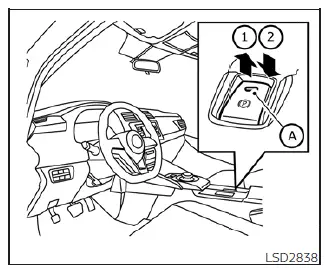
Manual operation
The electronic parking brake system will not automatically apply itself if the EV system propulsion loop is stopped without using the designated dashboard power switch button (such as during a system stall or safety shutoff). In such a scenario, you must apply the parking brake manually using the center console switch control.
To apply: Pull the console switch toggle straight up 1. The dedicated indicator light marker A on the switch and the dashboard icon will illuminate immediately.
To release: With the main push-button power switch sitting in the active ON position, firmly depress the foot brake pedal with your foot and press the console switch toggle straight down 2. The integrated indicator light marker A will turn off.
Before initiating any travel, check the dashboard display to make sure that the red electronic parking brake indicator light (
 or
PARK)
goes out completely.
or
PARK)
goes out completely.
NOTE:
- An audible warning buzzer will sound continuously inside the cabin if the vehicle is driven while the parking brake remains engaged.
- While the electronic parking brake actuator motors are physically applying or releasing the pads, a faint mechanical operating sound can be heard from the lower rear side of the vehicle cabin near the rear seat. This is a completely normal motor sound and does not indicate an equipment malfunction.
- When the electronic parking brake switch is frequently and repeatedly applied and released within a very short period of time, the system software may temporarily disable operation in order to prevent the electric actuator motors from overheating.
If this protection override occurs, simply avoid pressing the switch and operate the electronic parking brake switch again normally after waiting approximately 1 minute for the thermal limits to reset.
- If an emergency situation requires the electronic parking brake to be manually applied while actively driving the vehicle down the road, you must pull up and continuously hold the electronic parking brake switch toggle. The moment you release your finger from the electronic parking brake switch, the system logic will immediately release the rear brakes.
- While pulling up and holding the electronic parking brake switch during active driving travel, the electronic emergency deceleration profile is applied and a caution chime sounds. The electronic parking brake indicator light (
 or PARK) in the driver's meter assembly and inside the console toggle switch housing will illuminate simultaneously. This behavior is normal safety feedback. The electronic parking brake indicator light (
 or
PARK) in the meter display and on the console switch turns off automatically when the emergency switch toggle is released.
or
PARK) in the meter display and on the console switch turns off automatically when the emergency switch toggle is released. - When manually pulling the electronic parking brake switch up to set the brake while the main power switch is sitting in the complete OFF or ACC position, the red indicator light built into the console switch button will continue to illuminate for a short period of safety tracking time before going dark.
 Driving the vehicle
Electric shift control system
This sophisticated vehicle is electronically controlled by an advanced powertrain management unit to produce maximum available torque, rapid throttle acceleration, ...
 e-Pedal system
WARNING
Never rely solely on the innovative e-Pedal system to manage your speed or bring the vehicle to a halt, as there is a clear physical performance limit to the system's automated decelerati ...
Other materials:
General Precautions
• Always use a 12 volt battery as power source.
• Do not attempt to disconnect battery cables while engine is
running.
• Before connecting or disconnecting the ECM harness connector,
turn ignition switch OFF, wait 3 minutes and disconnect
battery negative cable. Failure to do so may damag ...
Basic inspection
1.INSPECTION START
1. Check service records for any recent repairs that may indicate a related
malfunction, or a current need for
scheduled maintenance.
2. Open engine hood and check the following:
- Harness connectors for improper connections
- Wiring harness for improper connections, pinche ...
Upper link
Exploded View
1. Rear suspension member
2. Adjusting bolt
3. Upper link
4. Eccentric disk
5. Lower link
6. Suspension arm bracket
7. Suspension arm
: Vehicle front
: Always replace after every
disassembly.
: N·m (kg-m, ft-lb)
Removal and Installation
REMOVAL
1. Remove tires. WT ...
