
Nissan Leaf 2018-2025 (ZE1) Owner's Manual : Intelligent Driver Alertness (I-DA)
WARNING
The Intelligent Driver Alertness (I-DA) system is a supportive technology designed to monitor driving patterns; relying on this system to manage your fatigue or failing to adhere to the provided instructions could result in an accident, potentially causing serious injury or death.
- The I-DA system serves exclusively as a warning tool to notify the driver of potential signs of inattention or drowsiness. It does not possess autonomous steering capabilities and cannot prevent a loss of vehicle control.
- Be aware that the I-DA system is not a failsafe monitor; it cannot detect or provide alerts for every instance of driver fatigue or lack of concentration.
- It remains the driver's absolute responsibility to:
- Stay fully alert and focused on the driving task,
- Adhere to all traffic laws to drive safely,
- Maintain the Nissan Leaf securely within the traveling lane,
- Retain control of the vehicle at all times,
- Refrain from operating the vehicle when feeling tired or impaired,
- Avoid all secondary distractions, such as texting or mobile phone usage.
The I-DA system in your Nissan Leaf is engineered to provide an essential safety check by monitoring your driving style and steering behavior over an extended period. By comparing your current inputs against a learned baseline, the system can detect subtle deviations that indicate decreasing attention or onset of fatigue. Should the system determine that your concentration is waning, it will issue both audible and visual warnings, proactively suggesting that you take a necessary break.
I-DA system operation
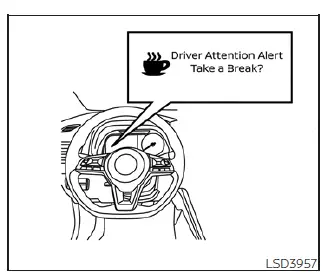
If the I-DA system identifies indicators of fatigue or reduced vigilance while the Nissan Leaf is traveling at speeds above 37 mph (60 km/h), it will trigger a "Take a break?" message in the vehicle information display and emit an audible chime to refocus your attention.
The system is designed to provide persistent monitoring throughout your journey and is capable of issuing multiple alerts per trip if it detects recurring patterns of inattention.
To ensure accuracy, the I-DA system resets its baseline assessment of your driving style and steering habits whenever the vehicle's power switch is cycled from ON to OFF and back to the ON position.
How to enable/disable the I-DA system
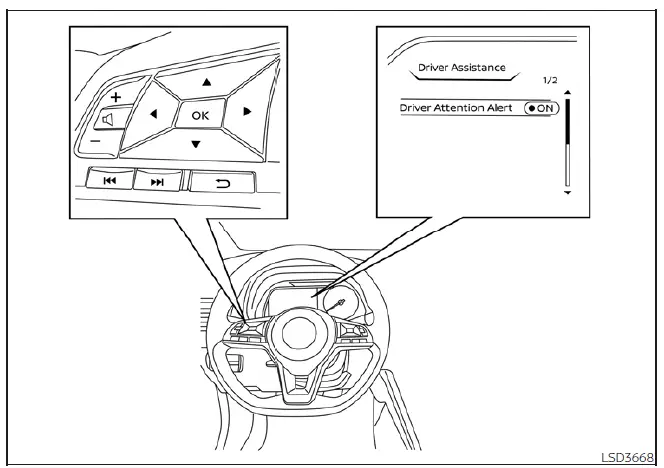
You can customize the activity of the I-DA system by following these steps through the vehicle information display:
1. Press the  button repeatedly until "Settings" appears on the display. Use the
  buttons to highlight "Driver Assistance," then press the OK button.
2. Select "Driver Attention Alert" and use the OK button to toggle the system's status to your preference.
Note: Your chosen setting for this feature is stored in the vehicle's memory and will be retained even after the EV system is restarted.
I-DA system limitations
WARNING
Operating your Nissan Leaf without understanding the limitations of the I-DA system could lead to a false sense of security or a failure to receive critical alerts. Below are the conditions where system performance may be degraded, which could result in serious injury or death.
- The I-DA system may experience performance degradation or fail to issue an alert under the following environmental or driving conditions:
- Poor road quality, including surfaces with significant potholes or uneven pavement that affects steering consistency.
- High-intensity side winds that require constant steering corrections.
- A more aggressive or sporty driving style, characterized by high-speed cornering or rapid acceleration/deceleration.
- Frequent lane changes or erratic fluctuations in vehicle speed.
- The system is not designed to provide alerts in these specific scenarios:
- Driving at speeds lower than 37 mph (60 km/h).
- Short, momentary lapses in concentration.
- Instantaneous physical distractions, such as dropping an object inside the vehicle.
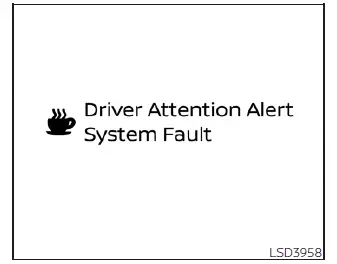
System malfunction
If the Intelligent Driver Alertness system detects an internal failure, a system warning message will appear in your Nissan Leaf information display, and the function will automatically cease operation.
Action to take
If this alert appears, find a secure location to stop the vehicle, shift into P (Park), and cycle the EV system off and back on again. If the warning message persists after a restart, the system requires professional diagnostics. We recommend that you visit a NISSAN certified LEAF dealer for a thorough inspection and service.
 System temporarily unavailable
Condition A
In specific scenarios where the radar sensor encounters electromagnetic interference from an external radar source, the system may find it impossible to accurate ...
 ECO Mode
The ECO mode is a specialized driving setting designed to optimize your energy consumption. By smoothing out throttle response—effectively reducing acceleration compared to the ...
Other materials:
Rear disc brake
Brake pad : Exploded View
1. Sliding pin bolt
2. Cylinder body
3. Inner shim cover
4. Inner shim
5. Inner pad (with pad wear sensor)
6. Pad retainer
7. Torque member
8. Outer pad
9. Outer shim
10. Outer shim cover
1 Apply rubber grease.
2: Apply MOLYKOTE® AS880N or
silicone-ba ...
Precaution
Precaution for Supplemental Restraint System (SRS) "AIR BAG" and "SEAT
BELT
PRE-TENSIONER"
The Supplemental Restraint System such as “AIR BAG� and “SEAT BELT PRE-TENSIONER�,
used along
with a front seat belt, helps to reduce the risk or severity of injury to the
...
How to charge/discharge using the quick charge port
The advanced V2X (Vehicle-to-Everything) technology allows your Nissan Leaf to act as a powerful mobile energy resource, enabling the vehicle to supply electricity to a variety of external systems, including residential homes, commercial buildings, and other infrastructure.
The "V2X" ecosystem ...
