
Nissan Leaf 2018-2025 (ZE1) Owner's Manual : ECO Mode
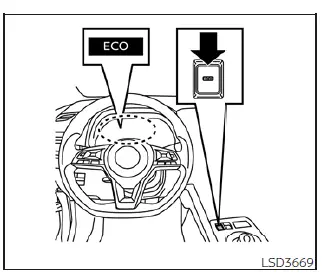
The ECO mode is a specialized driving setting designed to optimize your energy consumption. By smoothing out throttle response—effectively reducing acceleration compared to the same accelerator pedal input in the standard D (Drive) position—this mode helps you extract the maximum possible driving range from your vehicle. It is an ideal choice for navigating dense city traffic or maximizing efficiency during your daily commute in your Nissan Leaf.
To engage ECO mode, simply push the ECO switch located in the cabin. Once active, the ECO mode indicator will illuminate on your vehicle information display to confirm the setting is engaged.
To return to standard driving dynamics, press the ECO switch again. The indicator will extinguish, and the vehicle will revert to its normal performance profile.
- The system intelligently remembers your preference; the selected ECO mode (ON or OFF) is retained even after the EV system is powered down and restarted.
- Be mindful that turning off ECO mode while driving will alter the vehicle's responsiveness. Before disabling the mode, ensure traffic conditions permit, release the accelerator pedal, and then operate the ECO switch for a smooth transition.
- There are specific scenarios where you should deactivate ECO mode to access full power and responsiveness, such as:
- When driving with a heavy load of passengers or substantial cargo, where extra torque is beneficial.
- When you are driving on a steep uphill slope that requires more immediate power delivery.
- It is important to note that when cruise control is engaged, the Nissan Leaf prioritizes maintaining a consistent set speed regardless of the selected drive mode. Consequently, the driving range will not be extended in this scenario, even if the ECO mode indicator remains visible.
Note: While designed to assist in conservation, selecting this drive mode does not guarantee a specific improvement in power economy, as real-world efficiency is influenced by a multitude of dynamic driving factors.
ECO drive report
The ECO Drive Report provides valuable insights into your driving efficiency. This summary screen appears for approximately 30 seconds after you place the power switch in the OFF position, provided you have driven the vehicle for at least 0.3 miles (500 m) and pressed the  button on the steering wheel.
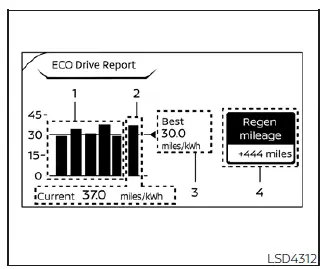
- Previous 5 times (History): Displays your average energy economy across your five most recent trips.
- Current energy economy: Shows the average energy efficiency achieved during your most recent journey.
- Best energy economy: Highlights your highest energy efficiency record from your trip history.
- Regenerated energy (mileage): Represents the total energy captured by the regenerative braking system and stored back into the Li-ion battery, expressed as an equivalent distance.
If your route includes extensive downhill sections, the system captures a higher volume of kinetic energy. This may result in the regenerated energy (mileage) (4) display showing a distance greater than the actual mileage driven, or the current energy economy (2) showing a value of "99.9 miles/kWh," reflecting exceptional efficiency.
When the  button is pressed while the ECO Drive Report is active, the interface switches to a timer view. Both displays remain visible for another 30 seconds following the button press. Please note that if you lock the vehicle doors after powering off, the display will automatically turn off immediately, bypassing the preset duration.
If you prefer not to see this data, you can configure the ECO Drive Report to be disabled upon powering off your Nissan Leaf through the "Settings" menu.
 Intelligent Driver Alertness (I-DA)
WARNING
The Intelligent Driver Alertness (I-DA) system is a supportive technology designed to monitor driving patterns; relying on this system to manage your fatigue or failing to adhere to the p ...
 Increasing power economy
The total driving range of your Nissan Leaf is not a fixed number and will fluctuate based on several real-world factors:
Driving speed
Total vehicle weight/load
Elect ...
Other materials:
Li-ion battery available charge gauge
This gauge provides an accurate real-time indication of the available energy stored in the Li-ion battery, which is necessary to power your Nissan Leaf.
This figure represents the current state of charge (SOC) of the battery expressed as a percentage.
...
Diagnosis system (navi control unit)
Diagnosis Description
On-Board Diagnosis Item
• On-board diagnosis is performed in service test mode.
• On-board diagnosis checks if the system operates normally.
Service test mode
METHOD OF STARTING
1. Start the engine.
2. Turn OFF audio.
3. While pressing the “SET UP� switch, ...
Blower fan resistor
Exploded View
1. A/C unit assembly
2. Fan control amp.*1
3. Blower fan resistor*2
4. Blower motor
5. Blower motor cover
• *1: Automatic air conditioner
• *2: Manual air conditioner
Removal and Installation
REMOVAL
1. Remove instrument panel assembly. Refer to IP-13, "Removal ...
