
Nissan Leaf 2018-2025 (ZE1) Owner's Manual : I-LI system operation
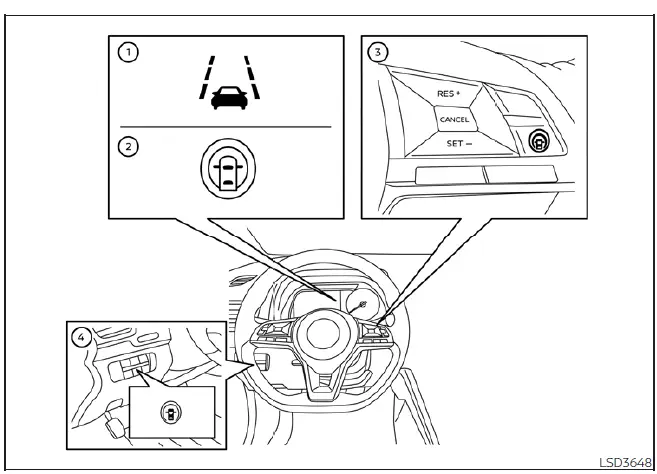
- Lane Departure Warning (LDW) indicator icon.
- Intelligent Lane Intervention (I-LI) status indicator.
- ProPILOT Assist control switch (for Nissan Leaf models equipped with advanced driver assistance).
- Dynamic driver assistance master switch (for models lacking the full ProPILOT package).
The I-LI system is engineered to engage at speeds above approximately 37 mph (60 km/h). When the Nissan Leaf senses the vehicle is tracking toward either the left or the right side boundary of the traveling lane, the steering wheel will vibrate as a primary warning, and the LDW indicator light within the vehicle information display will flash to alert the driver. If the drift persists, the I-LI system will automatically apply selective, short-duration braking to help gently guide the vehicle back to the center of the lane.
To activate the I-LI system, simply push the ProPILOT Assist switch located on the steering wheel (in models with ProPILOT Assist) or the dynamic driver assistance switch (in models without ProPILOT Assist). A dedicated I-LI indicator will illuminate on your dash to confirm the system is now standing by.
To disable, press the ProPILOT Assist switch or the dynamic driver assistance switch again; the I-LI indicator will extinguish, confirming the intervention system is now inactive.
How to enable/disable the I-LI system
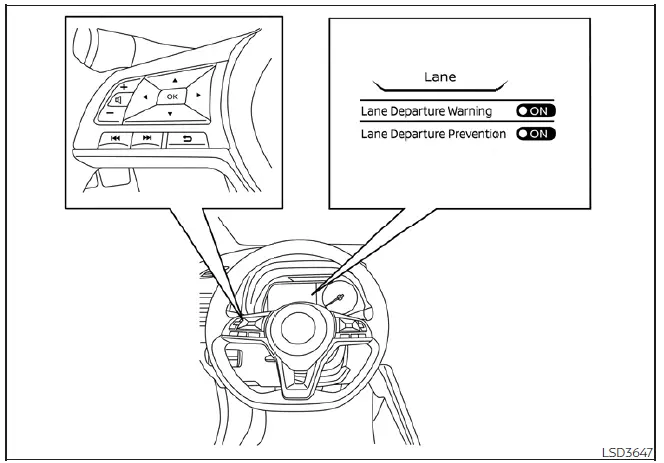
Follow these structured steps to configure the I-LI system status within your settings menu:
1. Press the steering wheel multi-navigation
 button repeatedly until the "Settings" menu appears on the vehicle information display.
Use the vertical selection
 button to highlight "Driver Assistance," then press the OK button to enter the submenu.
2. Use the controls to select "Lane" and press the OK button to proceed.
3. Highlight the "Lane Departure Prevention" option and press the OK button to enter that configuration.
4. Push the ProPILOT Assist switch (if equipped) or the dynamic driver assistance switch to toggle the system status between ON and OFF.
NOTE:
When Lane Departure Prevention is set to ON in your user profile, enabling the ProPILOT Assist system will automatically engage the Intelligent Lane Intervention (I-LI) system for integrated protection. Conversely, if Lane Departure Prevention is toggled to OFF in the vehicle settings, the I-LI system will still engage automatically the moment the ProPILOT Assist system is set to "SET" or when the Steering Assist feature is actively engaged, ensuring safety remains a priority during automated driving sessions.
 Intelligent Lane Intervention (I-LI)
WARNING
Failure to strictly follow the safety warnings and operational instructions for the proper use of the I-LI system could result in an unintended vehicle path, loss of ...
 I-LI system limitations
WARNING
The following points outline the critical operational boundaries and inherent limitations of the Intelligent Lane Intervention (I-LI) system. Failure to adhere strictly to these warnings ...
Other materials:
Removal and Installation Procedure for CVT Unit Connector
REMOVAL
• Rotate bayonet ring (A) counterclockwise. Pull out CVT unit harness
connector (B) upward and remove it.
INSTALLATION
1. Align marking (A) on CVT unit harness connector terminal with
marking (B) on bayonet ring. Insert CVT unit harness connector.
2. Rotate bayonet ring clockwise.
...
P0520 EOP sensor
DTC Logic
DTC DETECTION LOGIC
DTC CONFIRMATION PROCEDURE
1.PRECONDITIONING
If DTC Confirmation Procedure has been previously conducted, always perform
the following procedure
before conducting the next test.
1. Turn ignition switch OFF and wait at least 10 seconds.
2. Turn ignition swit ...
Remote keyless entry system
Remote keyless entry function
REMOTE KEYLESS ENTRY FUNCTION : System Diagram
REMOTE KEYLESS ENTRY FUNCTION : System Description
DOOR LOCK AND UNLOCK OPERATION
• When door lock and unlock button of keyfob is pressed, door lock and unlock
signal transmits from keyfob to
BCM via remote keyle ...
