
Nissan Leaf 2018-2025 (ZE1) Owner's Manual : I-BSI system operation
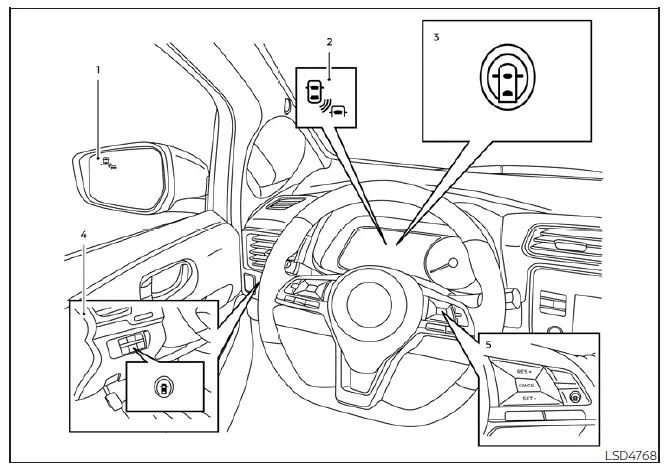
- Side Indicator Light
- Blind Spot Warning (BSW) indicator
- Intelligent Blind Spot Intervention (I-BSI) indicator
- Dynamic driver assistance switch (models without ProPILOT Assist)
- ProPILOT Assist switch (models with ProPILOT Assist)
The I-BSI system automatically initiates its active monitoring and assistance features once your Nissan Leaf reaches a forward speed of approximately 37 mph (60 km/h).
If the rear radar sensors detect a vehicle lurking within your detection zone, the corresponding Side Indicator Light (1) will illuminate to capture your attention.
If you activate your turn signal while a vehicle is detected, the system will escalate the warning: a double chime sounds, and the Side Indicator Light begins to flash. This visual warning persists until the detected vehicle clears the zone. To ensure visibility in varied environments, the intensity of the Side Indicator Light is automatically modulated based on ambient lighting conditions.
If the I-BSI system is enabled and your Nissan Leaf drifts toward a lane marker while a vehicle remains in the detection zone, the system will sound three chimes and flash the side indicator light. Simultaneously, the I-BSI system will apply light steering torque to help guide your vehicle back to the center of the lane. Notably, this intervention occurs regardless of whether or not you have activated your turn signal.
NOTE:
- The active warning and steering assistance intervention will only engage if the side indicator light was already illuminated prior to your vehicle approaching the lane marker. If another vehicle enters the detection zone only after your Nissan Leaf has already crossed the lane marker, neither the warning nor the active intervention will trigger.
- The I-BSI system is engineered to provide alerts and interventions earlier than the Intelligent Lane Intervention (I-LI) system when your vehicle approaches a lane boundary.
To activate the I-BSI system, engage the ProPILOT Assist switch on your steering wheel (if equipped) or press the dynamic driver assistance switch (for models without ProPILOT Assist) immediately after starting the EV system. The I-BSI indicator will illuminate on your display to confirm activation.
To deactivate, simply push the ProPILOT Assist or dynamic driver assistance switch again; the I-BSI indicator will turn off, confirming the system is no longer active.
How to enable/disable the I-BSI system
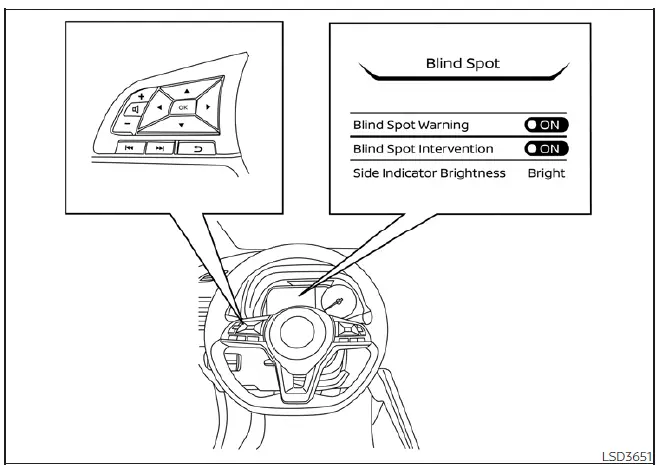
To manage your I-BSI system preferences, follow these configuration steps:
1. Toggle the
 button until the "Settings" menu appears on the vehicle information display.
Use the
 button to highlight "Driver Assistance," then confirm your selection by pressing the OK button.
2. Navigate to "Blind Spot" and press the OK button.
3. Highlight "Blind Spot Intervention" and press OK to toggle the system status to ON or OFF.
4. Finally, press the ProPILOT Assist switch (on ProPILOT models) or the dynamic driver assistance switch (on non-ProPILOT models) to complete the master activation/deactivation of the system.
NOTE:
When Blind Spot Intervention is configured to ON in the settings menu, simply activating the ProPILOT Assist switch (where equipped) will simultaneously engage the Intelligent Blind Spot Intervention (I-BSI) system, providing seamless safety integration for your Nissan Leaf.
 Intelligent Blind Spot Intervention (I-BSI)
WARNING
Failure to strictly adhere to these safety warnings and operational instructions for the Intelligent Blind Spot Intervention (I-BSI) system could result in unpredictable vehicle behavior, ...
 I-BSI system limitations
WARNING
The following points outline critical operational limitations for the Intelligent Blind Spot Intervention (I-BSI) system. Failing to operate your Nissan Leaf in strict accordance with the ...
Other materials:
Diagnosis system (BCM) (with intelligent key system)
Description
Air conditioning system performs self-diagnosis, operation check, function
diagnosis, and various settings
using diagnosis function of each control unit.
Common item : consult-III Function (BCM - COMMON ITEM)
APPLICATION ITEM
CONSULT-III performs the following functions via CAN ...
Intelligent Around View Monitor
system operation
To display the multiple synchronized perspective views, the advanced Intelligent Around View Monitor system utilizes a network of four ultra-wide-angle digital cameras strategically located in the center of the front grille assembly, embedded on the lower housings of the vehicl ...
Service data and specifications (SDS)
Wheel Bearing
Drive Shaft
2WD
*: For measuring position, refer to FAX-26, "WHEEL SIDE : Disassembly and
Assembly" (Wheel side), FAX-
29, "TRANSAXLE SIDE : Disassembly and Assembly" (Transaxle side).
4WD
*: For measuring position, refer to FAX-26, "WHEEL SIDE : ...
