
Nissan Leaf 2018-2025 (ZE1) Owner's Manual : How to charge/discharge using the quick charge port
The advanced V2X (Vehicle-to-Everything) technology allows your Nissan Leaf to act as a powerful mobile energy resource, enabling the vehicle to supply electricity to a variety of external systems, including residential homes, commercial buildings, and other infrastructure.
The "V2X" ecosystem encompasses a comprehensive suite of energy transfer capabilities:
- Vehicle-to-Home (V2H): Powering your household appliances or residential grid.
- Vehicle-to-Building (V2B): Supporting energy needs for commercial or facility operations.
- Vehicle-to-Grid (V2G): Contributing energy back to the public utility network.
- Vehicle-to-Load (V2L): Supplying power to portable devices or camping equipment.
- Vehicle-to-Vehicle (V2V): Sharing energy directly with another electric vehicle.
To facilitate these energy transfer operations, the Nissan Leaf utilizes a specialized, certified V2X device.
WARNING
- Always ensure that you are utilizing a quick charger or V2X device that is explicitly certified as compatible with your Nissan Leaf. The use of incompatible charging hardware or unauthorized V2X devices may induce electrical fires, severe system malfunctions, or damage that can result in serious personal injury or death.
- Before initiating any quick charging or V2X discharge sequence, thoroughly review the operational documentation provided by the manufacturer of the quick charger or V2X device. Confirm that the quick charge connector is correctly seated and fully locked into the vehicle's inlet. Failure to verify connection integrity or follow the manufacturer’s operating instructions could result in significant damage to your Nissan Leaf electrical architecture or the external charging equipment.
NOTE:
- Charging or discharging via the quick charge port is supported for multiple daily cycles, provided that the Li-ion battery temperature remains within the optimal operating range and does not approach the red zone. If the battery management system detects temperatures in the red zone, the vehicle will disable charging and discharging operations to protect battery health, triggering a power limitation mode.
- Please be aware that the state-of-charge, discharge availability, and total battery capacity metrics displayed on the external V2X device or quick charger may occasionally differ from the data reported on the Nissan Leaf instrument panel, as the two systems may apply different telemetry algorithms.
- Upon connection to the inlet, the Nissan Leaf automatically outputs 12-volt power to initiate communication with the V2X device. In many cases, the device may begin operation autonomously if it is configured to receive this 12-volt auxiliary power from the vehicle.
The 12-volt power output from the Nissan Leaf will terminate automatically after a 5-minute interval.
Should you need to re-initialize the power-delivery handshake, simply remove the connector and re-insert it firmly into the inlet.
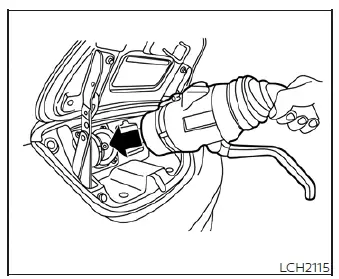
To start charging/discharging:
1. Ensure the vehicle is fully secured by shifting into the P (Park) position and firmly engaging the parking brake.
2. For all charging and discharging operations involving the Li-ion battery, ensure the vehicle power switch is in the OFF position. The Nissan Leaf will not initiate an energy transfer session if the power switch is left in the ON position.
3. Safely open both the exterior charge port lid and the internal charge port cap to access the inlet for your V2X or quick charging session.
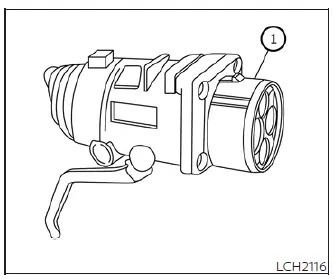
4. Carefully align the guide mark on the connector with the corresponding groove in the charge port of your Nissan Leaf, then insert the charge connector steadily until it is firmly seated.
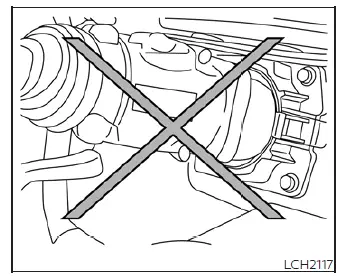
CAUTION
Always insert the charge connector straight into the quick charge port, ensuring it is pushed in fully until it reaches the base. Any misalignment or failure to seat the connector completely may prevent the Li-ion battery from charging or discharging correctly and could result in physical damage to the vehicle's port or the connected charging equipment.
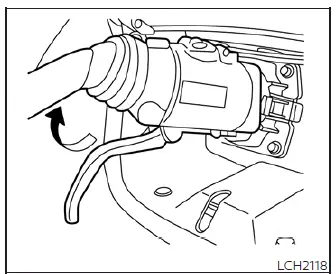
5. Once the connector is properly inserted, grasp the mechanical lock lever firmly and engage it to lock the charge connector securely to the vehicle.
6. Proceed to follow the specific operational prompts provided by the quick charging station interface or your V2X device to initiate the energy transfer process. When the Nissan Leaf successfully establishes a secure connection with the equipment and is ready to commence charging or discharging, the vehicle will emit two distinct audible beeps, and the charging status indicator light on your instrument panel will shift to indicate active operation.
Charging or discharging sequences will conclude automatically under the following conditions:
- When the battery reaches its intended charge state or full capacity.
- When the maximum duration pre-programmed into the quick charger or V2X system has been reached.
NOTE:
- Charging or discharging may terminate automatically before completion if the system detects an interruption in communication or a change in battery operating parameters.
- Should a session stop unexpectedly, you can typically restart the process by re-engaging the start sequence on the quick charger interface.
- The connector is automatically locked to the Nissan Leaf charge port during the entire session for safety; it cannot be disconnected while the session is active. You must use the interface on the quick charger or V2X device to terminate the operation. Always verify that the process has fully ceased by checking the status indicators on the vehicle's instrument panel before attempting to remove the connector.
The charge connector is released for removal from the vehicle only after the system confirms that all charging or discharging activity has fully stopped.
- During V2X operations, the energy transfer rate will naturally modulate and gradually slow down as the Li-ion battery's available charge percentage increases, ensuring optimal power management.
To finish charging/discharging:
1. Before attempting to disconnect, verify that the charging or discharging session has successfully stopped by observing the status indicators located on the instrument panel. The connector can only be safely removed from the Nissan Leaf when the system indicates the session is terminated.
2. Disengage the mechanical lock on the connector, remove it carefully from the vehicle inlet, and return it to its designated storage location.
3. Securely close the protective quick charge port cap to prevent debris or moisture ingress.
4. Firmly shut the exterior charge port lid until it clicks into the locked position.
 How to quick charge
Quick charging allows you to replenish your Nissan Leaf battery in a significantly shorter period by utilizing public high-capacity charging stations. Depending on your specific vehicle configuration, ...
 Charge connector lock system
To provide enhanced security and peace of mind during public charging sessions, the Nissan Leaf is equipped with an integrated charge connector lock system. This feature allows y ...
Other materials:
HR16DE : Exploded View
REMOVAL
1. Cylinder block
2. “B� terminal harness
3. “S� terminal harness
4. Starter motor
: Vehicle front
: N·m (kg-m, in-lb)
: N·m (kg-m, ft-lb)
DISASSEMBLY
Type: M000T32172ZE
1. “M� terminal nut
2. Magnetic switch assembly
3. Adjusting plate
4. Metal FR
5. Gea ...
P183F gear position signal
DTC Logic
DTC DETECTION LOGIC
DTC CONFIRMATION PROCEDURE
1.PRECONDITIONING
If “DTC CONFIRMATION PROCEDURE� has been previously conducted, always turn
ignition switch OFF and
wait at least 10 seconds before conducting the next test.
>> GO TO 2.
2.DTC REPRODUCTION PROCEDURE
W ...
Key out interlock door unlock function does not operate
Diagnosis Procedure
1.CHECK “AUTOMATIC LOCK/UNLOCK SELECT� SETTING IN “WORK SUPPORT�
1. Select “DOOR LOCK� of “BCM� using CONSULT-III.
2. Select “AUTOMATIC LOCK/UNLOCK SELECT� in “WORK SUPPORT� mode.
3. Check “AUTOMATIC LOCK/UNLOCK SELECT� in “WORK SUPPORT�.
Re ...
