
Nissan Juke Service and Repair Manual : Encoder circuit
Component Function Check
1.CHECK ENCODER OPERATION
Check that front driver side door glass perform AUTO UP/DOWN operation normally when power window main switch is operated.
Is the inspection result normal? YES >> INSPECTION END
NO >> Refer to PWC-30, "Diagnosis Procedure".
Diagnosis Procedure
1.CHECK ENCODER PULSE SIGNAL
1. Turn ignition switch ON.
2. Check signal between power window main switch harness connector and ground with oscilloscope.

(): RHD models
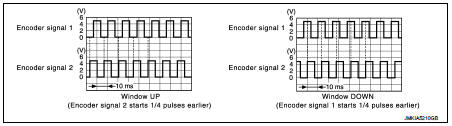
Is the inspection result normal? YES >> Replace power window main switch.
NO >> GO TO 2.
2.CHECK ENCODER SIGNAL CIRCUIT
1. Turn ignition switch OFF.
2. Disconnect power window main switch connector and front power window motor (driver side) connector.
3. Check continuity between power window main switch harness connector and front power window motor (driver side) harness connector.

4. Check continuity between power window main switch harness connector and ground.

(): RHD models Is the inspection result normal? YES >> GO TO 3.
NO >> Repair or replace harness.
3.CHECK ENCODER POWER SUPPLY
1. Connect power window main switch connector.
2. Turn ignition switch ON.
3. Check voltage between front power window motor (driver side) harness connector and ground.

(): RHD models Is the inspection result normal? YES >> GO TO 5.
NO >> GO TO 4.
4.CHECK ENCODER POWER SUPPLY CIRCUIT
1. Turn ignition switch OFF.
2. Disconnect power window main switch connector.
3. Check continuity between power window main switch harness connector and front power window motor (driver side) harness connector.

4. Check continuity between power window main switch harness connector and ground.

(): RHD models Is the inspection result normal? YES >> Replace power window main switch.
NO >> Repair or replace harness.
5.CHECK ENCODER GROUND CIRCUIT 1
1. Turn ignition switch OFF.
2. Disconnect power window main switch connector.
3. Check continuity between power window main switch harness connector and front power window motor (driver side) harness connector.

4. Check continuity between power window main switch harness connector and ground.

(): RHD models
Is the inspection result normal? YES >> GO TO 6.
NO >> Repair or replace harness.
6.CHECK ENCODER GROUND CIRCUIT 2
1. Connect power window main switch connector.
2. Check continuity between power window main switch harness connector and ground.

(): RHD models
Is the inspection result normal? YES >> Replace front power window motor (driver side).
NO >> Replace power window main switch.
 Power window motor
DRIVER SIDE
DRIVER SIDE : Component Function Check
1. CHECK FRONT POWER WINDOW MOTOR (DRIVER SIDE) OPERATION
Check front power window motor (driver side) operation with power window main
switch.
...

Other materials:
Manual air conditioner (if so equipped)
1. Air intake lever (Outside air circulation
/Air recirculation
)
2. Air flow control dial
3. Fan speed control dial
4. A/C (Air Conditioner) button
5. Temperature control dial
6. Rear window defroster button (See
“Rear window and outside mirror defroster switch� .)
To turn off th ...
Intelligent key
Component Function Check
1.CHECK FUNCTION
1. Select “INTELLIGENT KEY� of “BCM� using CONSULT-III.
2. Select “RKE OPE COUN1� in “DATA MONITOR� mode.
3. Check that the function operates normally according to the following
conditions.
Is the inspection result normal?
YES >& ...
Normal operating condition
Description
FRONT WIPER MOTOR PROTECTION FUNCTION
• IPDM E/R may stop the front wiper to protect the front wiper motor if any
obstruction (operation resistance)
such as a large amount of snow is detected during the front wiper operation.
• At that time turn OFF the front wiper and remove t ...
