
Nissan Juke Service and Repair Manual : Electric controlled coupling oil seal
Exploded View
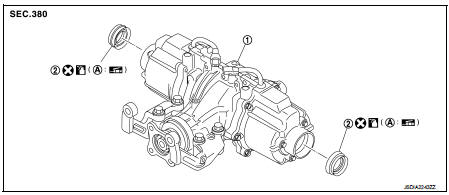
1. Rear final drive assembly 2. Electric controlled coupling oil seal
A. Oil seal lip
 : Vehicle front
 : Always replace after every
disassembly.
 : Apply multi purpose grease
 : Apply gear oil.
Removal and Installation
REMOVAL
1. Remove rear drive shafts. Refer to RAX-17, "Removal and Installation".
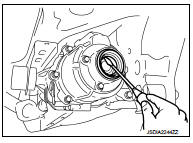
2. Remove electric controlled coupling oil seals from electric controlled coupling, using a suitable tool.
CAUTION:
Never damage electric controlled coupling.
INSTALLATION
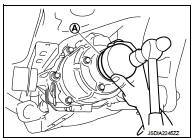
1. Install electric controlled coupling oil seals to electric controlled coupling, using the drift (A) (SST: KV38109700).
NOTE
:
The use of the special service tool satisfies the mounting dimensions.
CAUTION:
• Never reuse oil seals.
• When installing, never incline oil seals.
• Apply multi-purpose grease onto oil seal lips, and gear oil onto the circumference of oil seal.
2. Install rear drive shafts. Refer to RAX-17, "Removal and Installation".
3. When oil leaks while removing, check oil level after the installation. Refer to DLN-132, "Inspection".
 Electric controlled coupling
Exploded View
1. Sub-harness
2. Rear final drive assembly
3. Electric controlled coupling (right)
4. Reamer bolt
5. Electric controlled coupling (left)
A. Gear carrier mouting face
: Vehic ...
 Unit removal and installation
REAR FINAL DRIVE ASSEMBLY ...
Other materials:
Stall test
Work Procedure
INSPECTION
1. Check the engine oil level. Replenish if necessary. Refer to LU-25,
"Inspection".
2. Check for leak of the CVT fluid. Refer to TM-480, "Inspection".
3. Drive for about 10 minutes to warm up the vehicle so that the CVT fluid
temperature is 50 t ...
B1138, B1139, B1140, B1141, B1142, B1143 diagnosis sensor unit
DTC Logic
DTC DETECTION LOGIC
DTC CONFIRMATION PROCEDURE
1.CHECK SELF-DIAG RESULT
With CONSULT-III
1. Turn ignition switch ON.
2. Perform “Self Diagnostic Result� mode of “AIR BAG� using CONSULT-III.
Without CONSULT-III
1. Turn ignition switch ON.
2. Check the air bag warning la ...
How to normal charge (AC 220-240 volt) by charging device
WARNING
If you utilize any medical electronic devices, such as an implantable cardiac pacemaker or an implantable cardiovascular defibrillator, please consult with the manufacturer of that device regarding the potential effects that the electromagnetic environment during charging may ...
