
Nissan Juke Service and Repair Manual : ECU diagnosis information
4WD control module
Reference Value
VALUES ON THE DIAGNOSIS TOOL
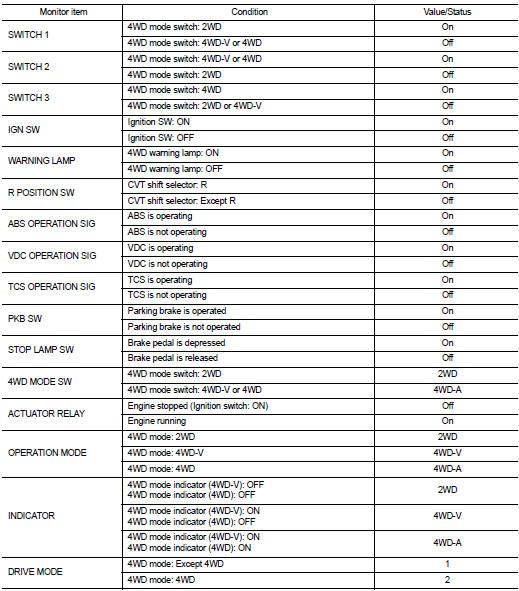
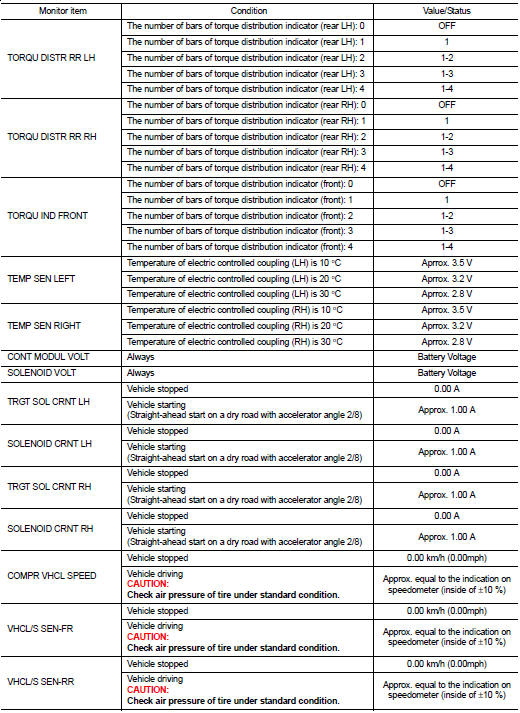
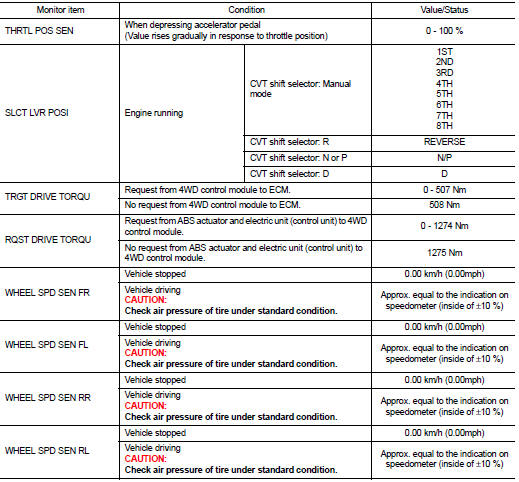
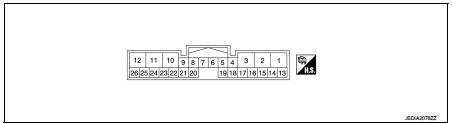
TERMINAL LAYOUT
PHYSICAL VALUES
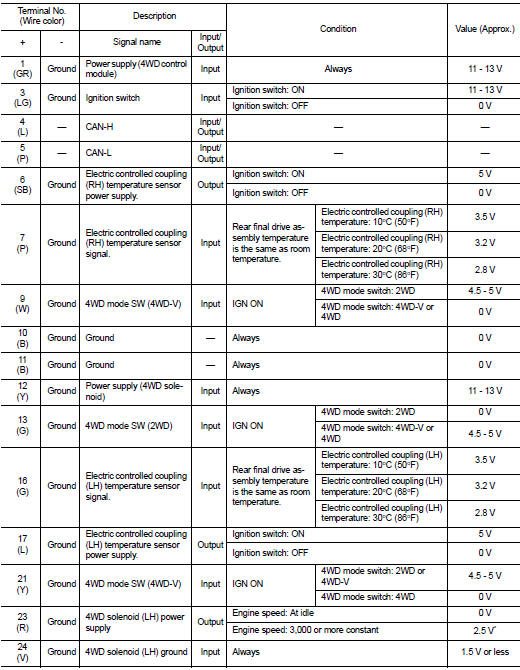
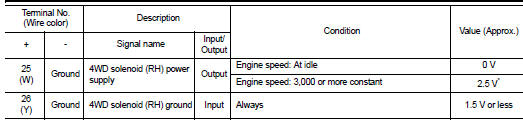
*: The values are changed by throttle opening and engine speed.
CAUTION:
When using circuit tester to measure voltage for inspection, be sure not to
extend forcibly any connector
terminals.
Fail-safe
When a system malfunction occurs, the 4WD warning lamp turns ON and the 4WD control becomes 2WD state.
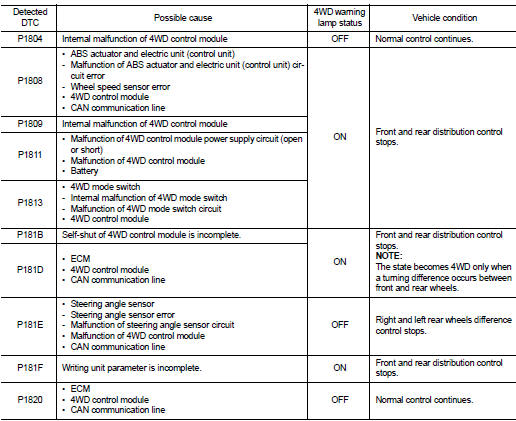
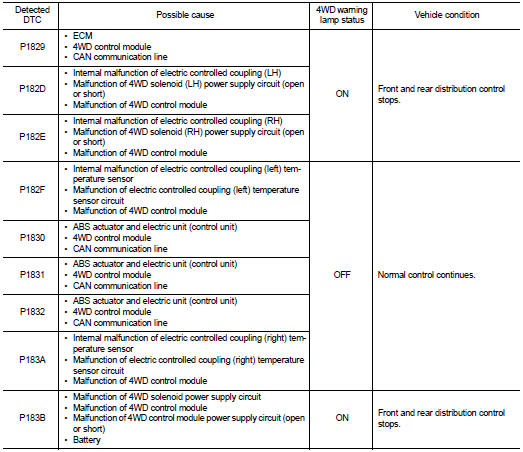
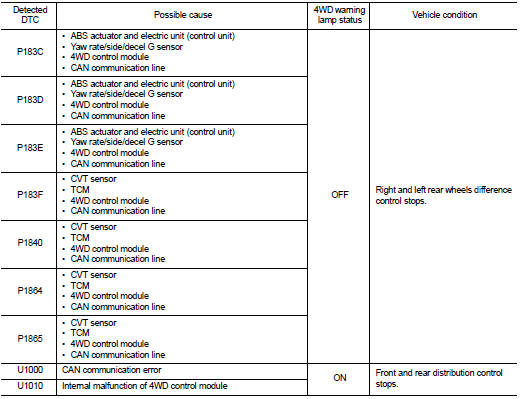
Protection Function
4WD system activates its protection function (shuts down 4WD system temporarily) if 4WD system detects high load continuously, the front wheel tire size differs from the rear tire size or the rear RH wheel tire size differs from the rear LH tire size. (4WD system is automatically restored if 4WD system no longer detects any overload or the tire size difference is eliminated.)
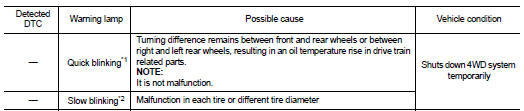
*1: 2 times/second (blinking for approximately 1 minute and then turned
OFF)
*2: 1 time/2 seconds (continuing to blink until ignition switch is turned OFF)
NOTE
:
• If the warning lamp blinks slowly during driving but remains OFF after the
engine is restarted, the system is
normal. If it again blinks slowly after driving for some time, vehicle must be
inspected.
• When there is a difference of revolution speed between the front and rear wheel the shift occasionally changes to direct 4-wheel driving conditions automatically. This is not a malfunction.
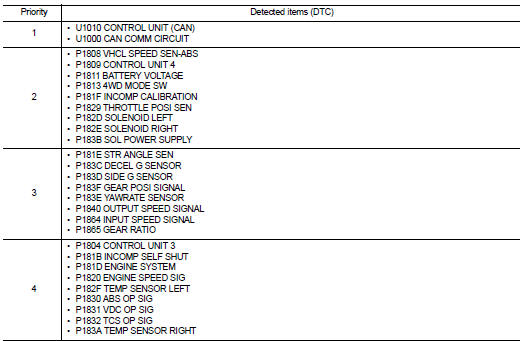
DTC Inspection Priority Chart
If some DTCs are displayed at the same time, perform inspections one by one based on the following priority chart.
DTC Index
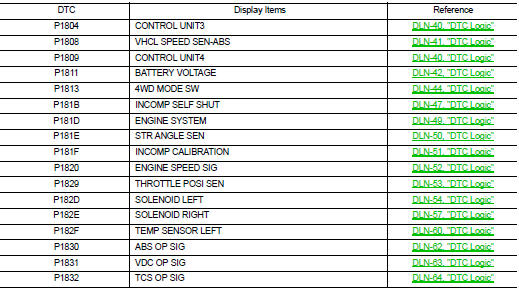
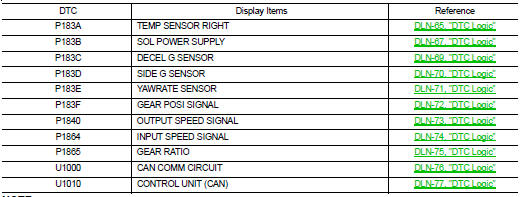
NOTE
:
If some DTCs are displayed at the same time, refer to DLN-33, "DTC Inspection
Priority Chart".
 Diagnosis system (4WD control module)
CONSULT-III Function
APPLICATION ITEMS
CONSULT-III can display each diagnostic item using the diagnostic test modes
as follows.
*: The following diagnosis information is erased by erasing.
â ...
 Wiring diagram
4WD SYSTEM
Wiring Diagram
For connector terminal arrangements, harness layouts, and alphabets in a
(option abbreviation; if not
described in wiring diagram), refer to GI-12, "Connector Inform ...
Other materials:
P0651 sensor power supply
DTC Logic
DTC DETECTION LOGIC
Diagnosis Procedure
1.CHECK GROUND CONNECTION
1. Turn ignition switch OFF.
2. Check ground connection E38. Refer to Ground Inspection in GI-44, "Circuit
Inspection".
Is the inspection result normal?
YES >> GO TO 2.
NO >> Repair or r ...
DTC/circuit diagnosis
Blower motor
Diagnosis Procedure
1.CHECK SYMPTOM
Check symptom (A or B).
Which symptom is detected?
A >> GO TO 2.
B >> GO TO 7.
2.CHECK FUSE
1. Turn ignition switch OFF.
2. Check 15A fuses (Nos. 14 and 16, located in fuse block (J/B)].
NOTE:
Refer to PG-22, "Fuse, ...
U1010 control unit (CAN)
Description
Initial diagnosis of A/C auto amp.
DTC Logic
DTC DETECTION LOGIC
DTC CONFIRMATION PROCEDURE
1.PERFORM DTC CONFIRMATION PROCEDURE
With CONSULT-III
1. Turn ignition switch ON.
2. Select “Self Diagnostic Result� mode of “HVAC� using CONSULT-III.
3. Check DTC.
Is DTC de ...
