
Nissan Juke Service and Repair Manual : Diagnosis system (BCM) (without intelligent key system)
Common item
COMMON ITEM : CONSULT-III Function (BCM - COMMON ITEM)
APPLICATION ITEM
CONSULT-III performs the following functions via CAN communication with BCM.
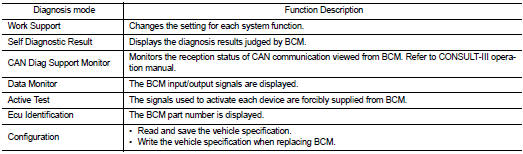
SYSTEM APPLICATION
BCM can perform the following functions for each system.
NOTE
:
It can perform the diagnosis modes except the following for all sub system
selection items.
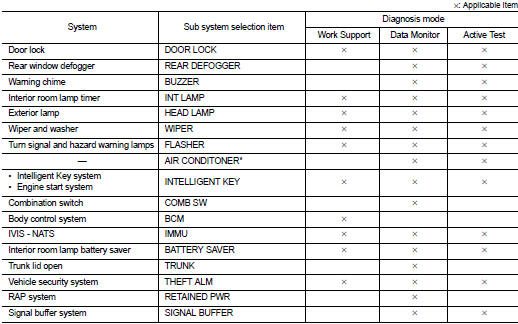
*: This item is not used.
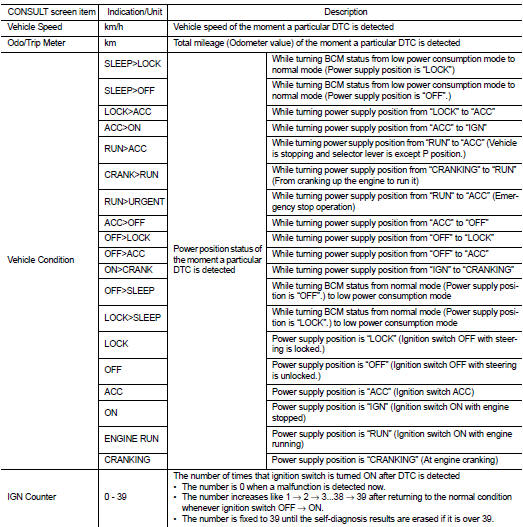
FREEZE FRAME DATA (FFD)
The BCM records the following vehicle condition at the time a particular DTC is detected, and displays on CONSULT-III.
INT lamp
INT LAMP : CONSULT-III Function (BCM - INT LAMP
)
WORK SUPPORT
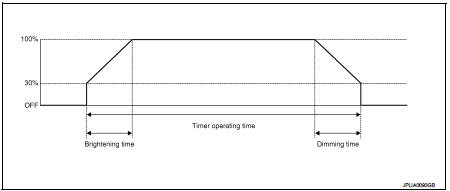
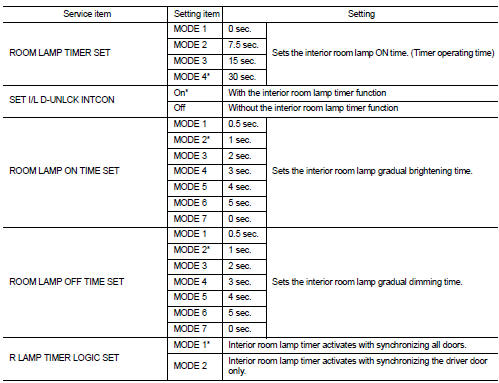
*: Factory setting
DATA MONITOR
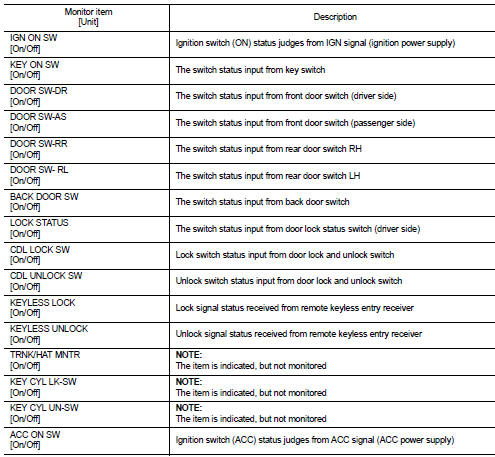
ACTIVE TEST

Battery saver
BATTERY SAVER : CONSULT-III Function (BCM - BATTERY SAVER)
WORK SUPPORT


*:Factory setting
DATA MONITOR
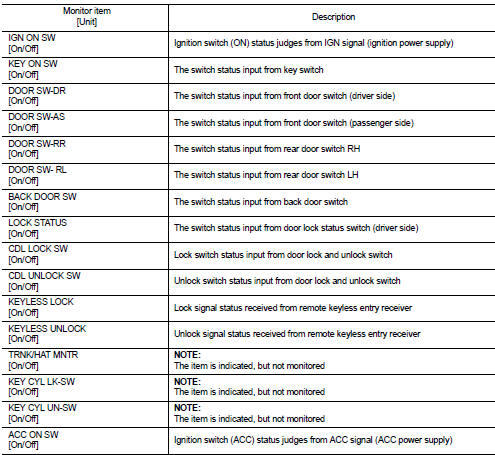
ACTIVE TEST

*: Each lamp switch is in ON position.
 Diagnosis system (BCM) (with intelligent key system)
Common item
COMMON ITEM : CONSULT-III Function (BCM - COMMON ITEM)
APPLICATION ITEM
CONSULT-III performs the following functions via CAN communication with BCM.
SYSTEM APPLICATION
BCM can perfo ...
 Ecu diagnosis information
BCM
With intelligent key
WITH INTELLIGENT KEY : List of ECU Reference
Without intelligent key
WITHOUT INTELLIGENT KEY : List of ECU Reference
...
Other materials:
P1564 ASCD steering switch
DTC Logic
DTC DETECTION LOGIC
NOTE:
If DTC P1564 is displayed with DTC P0605, first perform the trouble diagnosis
for DTC P0605. Refer to
EC-683, "DTC Logic".
DTC CONFIRMATION PROCEDURE
1.PRECONDITIONING
If DTC Confirmation Procedure has been previously conducted, always turn
...
In-cabin microfilter
The air conditioning system is equipped with an in-cabin microfilter which collects
dirt, pollen, dust, etc. To make sure the air conditioner heats, defogs, and ventilates
efficiently, replace the filter according to the specified maintenance log shown
in the NISSAN Service and Maintenance Gui ...
Seats
WARNING
• Do not ride in a moving vehicle when the seatback is reclined. This can
be dangerous. The shoulder belt will not be against your body. In an accident, you
could be thrown into it and receive neck or other serious injuries. You could also
slide under the lap belt and receive seri ...
