
Nissan Juke Service and Repair Manual : Diagnosis system (BCM)
Common item
COMMON ITEM : CONSULT-III Function (BCM - COMMON ITEM)
APPLICATION ITEM
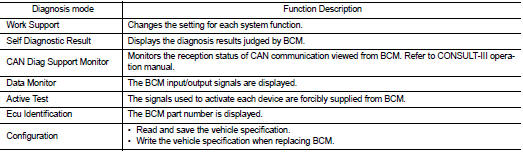
CONSULT-III performs the following functions via CAN communication with BCM.
SYSTEM APPLICATION
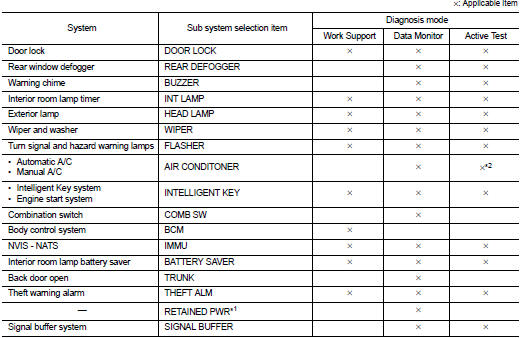
BCM can perform the following functions for each system.
NOTE
:
It can perform the diagnosis modes except the following for all sub system
selection items.
NOTE
:
• *1: This item is displayed, but not used.
• *2: For models with automatic A/C, this diagnosis mode is not used.
FREEZE FRAME DATA (FFD)
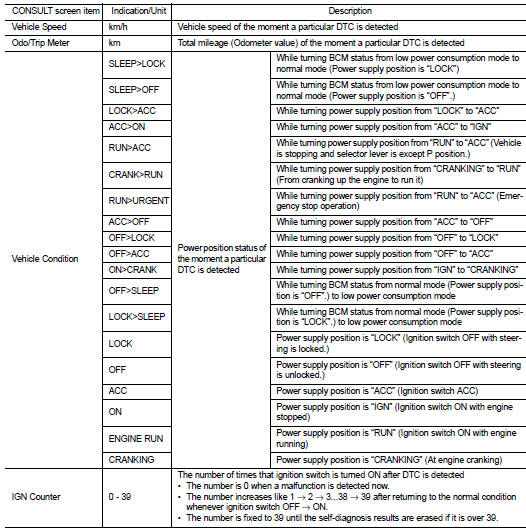
The BCM records the following vehicle condition at the time a particular DTC is detected, and displays on CONSULT-III.
Intelligent key
INTELLIGENT KEY : CONSULT-III Function (BCM - INTELLIGENT KEY) (With Super Lock)
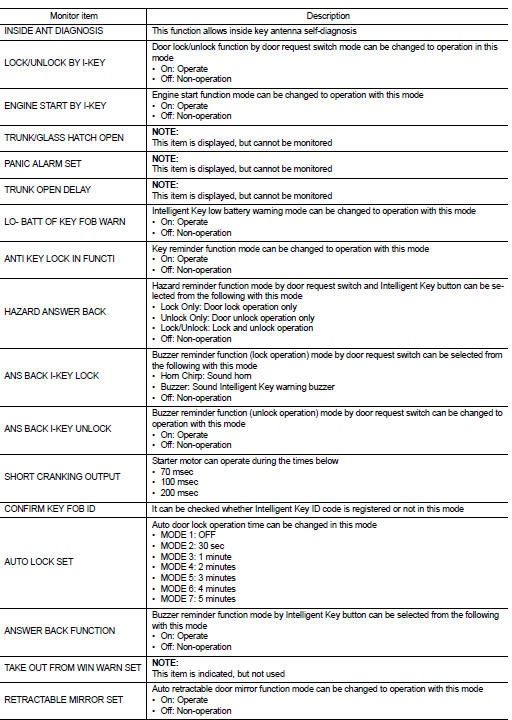
WORK SUPPORT
SELF-DIAG RESULT
Refer to BCS-67, "DTC Index".
DATA MONITOR
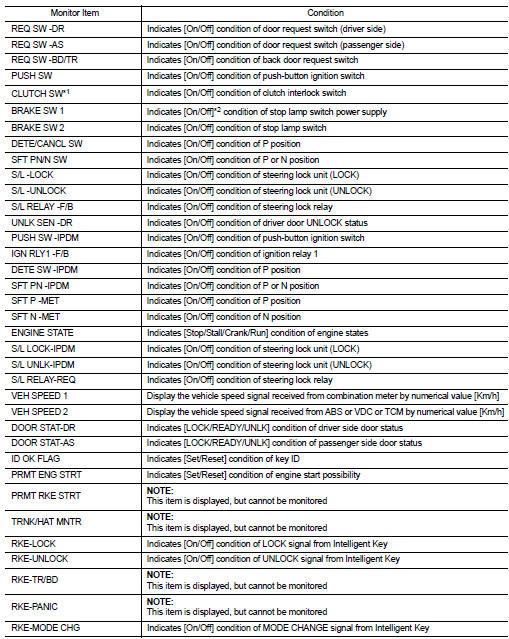

*1: It is displayed but does not operate on CVT models.
*2: OFF is displayed when brake pedal is depressed while brake switch power supply is OFF.
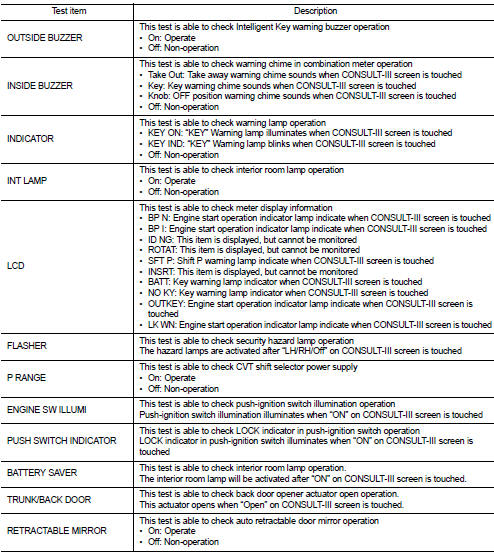
ACTIVE TEST
INTELLIGENT KEY : CONSULT-III Function (BCM - INTELLIGENT KEY) (Without Super Lock)
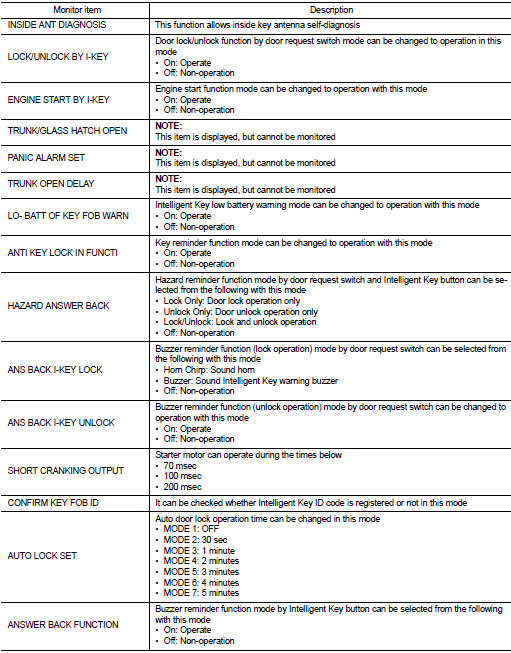
WORK SUPPORT

SELF-DIAG RESULT
Refer to BCS-67, "DTC Index".
DATA MONITO
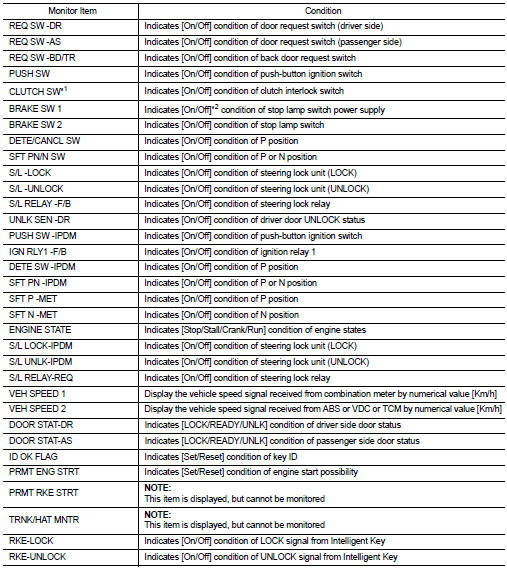
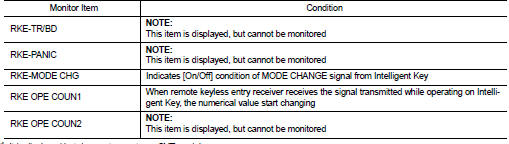
*1: It is displayed but does not operate on CVT models.
*2: OFF is displayed when brake pedal is depressed while brake switch power supply is OFF.
ACTIVE TEST
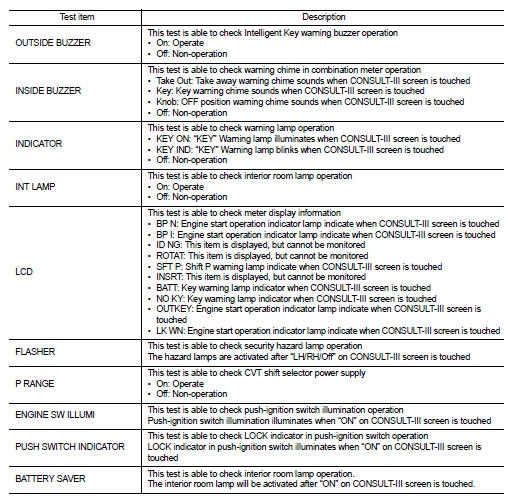

 System
POWER DISTRIBUTION SYSTEM
POWER DISTRIBUTION SYSTEM : System Description
SYSTEM DESCRIPTION
• PDS (POWER DISTRIBUTION SYSTEM) is the system that BCM controls with the
operation of the pushbutto ...
 ECU diagnosis information
BCM
List of ECU Reference
...
Other materials:
Radiator : Inspection
Check radiator for mud or clogging. If necessary, clean radiator as follows.
CAUTION:
• Be careful not to bend or damage radiator fins.
• When radiator is cleaned without removal, remove all surrounding parts such as
radiator cooling fan
assembly and horns. Then tape harness and harness ...
Body construction
Body Construction (RHD Models)
1. Outer side body
2. Outer front pillar reinforcement
3. Upper inner front pillar
4. Lower dash
5. Hoodledge reinforcement
6. Lower front pillar hinge brace
7. Weld nut
8. Side dash
9. Upper hinge plate
10. Lower hinge plate
11. Inner front pillar ...
Back door opener actuator
Component Function Check
1.CHECK FUNCTION
1. Select “INTELLIGENT KEY� of “BCM� using CONSULT-III.
2. Select “TRUNK/BACK DOOR� in “ACTIVE TEST� mode.
3. Check that the function operates normally according to the following
conditions.
Is the inspection result normal?
YES > ...
