
Nissan Juke Service and Repair Manual : Diagnosis system (BCM)
Common item
COMMON ITEM : CONSULT-III Function (BCM - COMMON ITEM)
APPLICATION ITEM
CONSULT-III performs the following functions via CAN communication with BCM.
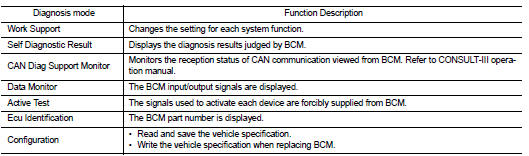
SYSTEM APPLICATION
BCM can perform the following functions for each system.
NOTE
:
It can perform the diagnosis modes except the following for all sub system
selection items.
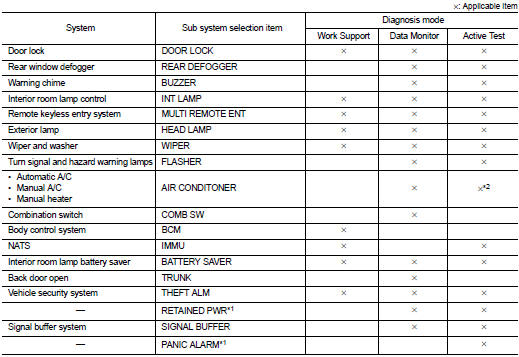
• *1: This item is displayed, but is not used.
• *2: For models with automatic A/C, this mode is not used.
Door lock
DOOR LOCK : CONSULT-III Function (BCM - DOOR LOCK) (Without Super Lock)
WORK SUPPORT
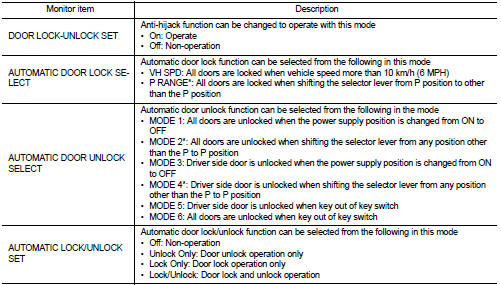
*: P range interlock door lock/unlock can be selected for M/T models, but automatic door lock/unlock function does not operate.
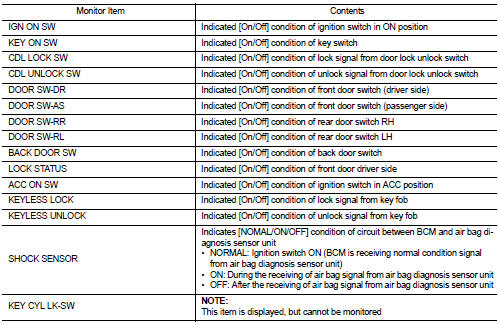
DATA MONITOR

ACTIVE TEST
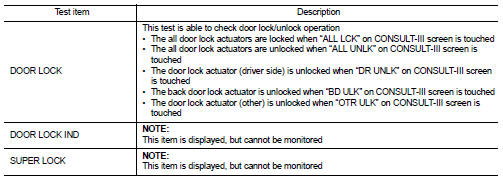
Multi remote ent
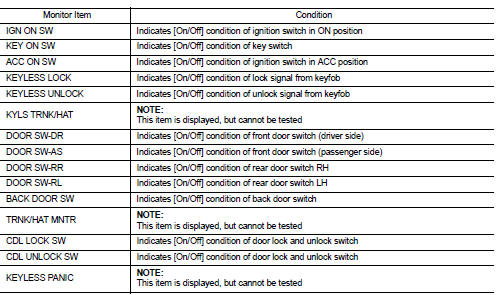
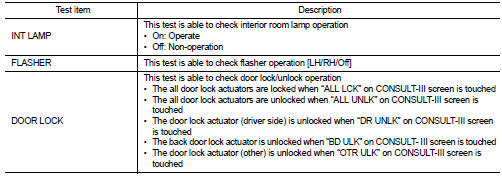
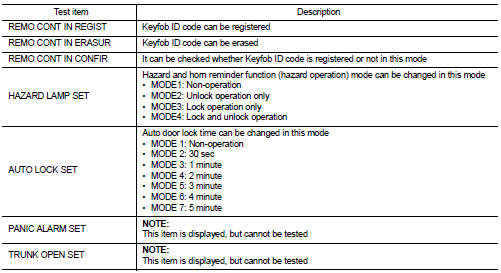
MULTI REMOTE ENT : CONSULT-III Function (BCM - MULTI REMOTE ENT) (Without Super Lock)
DATA MONITOR
ACTIVE TEST
WORK SUPPORT
Trunk
TRUNK : CONSULT-III Function (BCM - TRUNK) (Without Super Lock)
DATA MONITOR
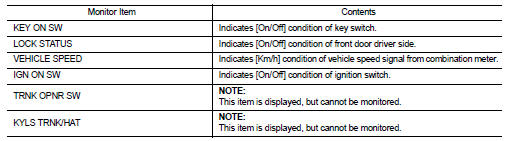
 Back door opener system
System Diagram
System Descr
BACK DOOR OPENER OPERATION
When back door opener switch is pressed, BCM operates back door opener
actuator.
NOTE:
Back door opener actuator is not for locking th ...
 ECU diagnosis information
BCM
List of ECU Reference
...
Other materials:
Removal and installation
ALTERNATOR
HR16DE
HR16DE : Exploded View
REMOVAL
1. Alternator bracket mounting bolt
2. Alternator bracket
3. Alternator mounting bolt
4. Alternator
5. “B� terminal harness
6. “B� terminal nut
7. Alternator connector
: N·m (kg-m, ft-lb)
DISASSEMBLY
Type: A002TJ1291ZE
1 ...
Key reminder function does not operate
Diagnosis Procedure
1.CHECK DOOR LOCK AND UNLOCK SWITCH
Check door lock and unlock switch. Refer to the following.
• Driver side: Refer to DLK-391, "DRIVER SIDE : Component Function Check".
• Passenger side: Refer to DLK-392, "PASSENGER SIDE : Component Function Check". ...
HR16DE : Inspection and Adjust
INSPECTION
Magnetic Switch Check
• Before starting to check, disconnect the battery cable from the negative
terminal.
• Disconnect “M� terminal of starter motor.
1. Continuity test [between “S� terminal (A) and switch body]
B : “B� terminal
C : “M� terminal
• Replace ...
