
Nissan Juke Service and Repair Manual : Back door opener system
System Diagram
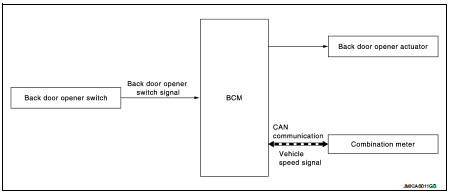
System Descr
BACK DOOR OPENER OPERATION
When back door opener switch is pressed, BCM operates back door opener actuator.
NOTE
:
Back door opener actuator is not for locking the back door. The function is only
to open the back door.
OPERATION CONDITION
If the following conditions are satisfied, back door opener operation is performed.

NOTE
:
• When battery terminal is disconnected and reconnected during all doors unlock
state, back door may not
open.
• Regardless of door lock actuator state, BCM resets recognition of all doors unlock state approximately 30 seconds after battery terminal is disconnected and BCM recognizes that all doors are in lock state.
• When battery terminal is reconnected and back door does not open, have BCM recognize that all doors are in unlock state.
 Remote keyless entry system
System Diagram
System Description
DOOR LOCK AND UNLOCK OPERATION
• When door lock and unlock button of keyfob is pressed, door lock and unlock
signal transmits from keyfob to
BCM via remote ...
 Diagnosis system (BCM)
Common item
COMMON ITEM : CONSULT-III Function (BCM - COMMON ITEM)
APPLICATION ITEM
CONSULT-III performs the following functions via CAN communication with BCM.
SYSTEM APPLICATION
BCM can perfo ...
Other materials:
Radiator core supporT
HR16DE
HR16DE : Exploded View
1. Radiator core support upper
2. Air guide RH (MT models)
3. Radiator core support lower
4. Air guide LH
5. Air guide (upper)
6. Air guide LH (CVT models)
7. Air guide RH (CVT models)
: N·m (kg-m, ft-lb)
HR16DE : Removal and Installation
RADIATOR CORE ...
Air breather hose
Removal and Installation
REMOVAL
1. Remove air cleaner case. Refer to EM-26, "Removal and Installation".
2. Remove clip from bracket.
3. Remove air breather hose from transaxle assembly.
INSTALLATION
Note the following, and install in the reverse order of removal.
CAUTION:
Chec ...
Hood
WARNING
• Make sure the hood is completely closed and latched before driving.
Failure to do so could cause the hood to fly open and result in an accident.
• If you see steam or smoke coming from the engine compartment, to avoid injury
do not open the hood.
When opening the hood:
1. Pull ...
