
Nissan Juke Service and Repair Manual : Component parts
Charging system
CHARGING SYSTEM : Component Parts Location
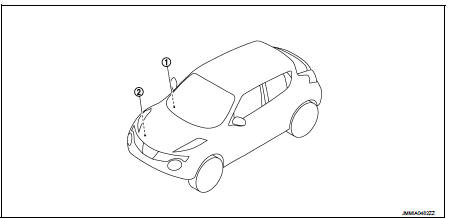
1. Charge warning lamp (On the combination
meter)
2. Alternat
CHARGING SYSTEM : Component Description
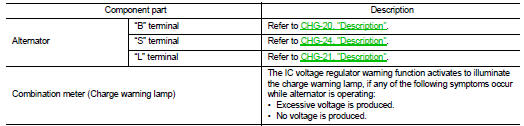
Power generation voltage variable control system
POWER GENERATION VOLTAGE VARIABLE CONTROL SYSTEM : Component Parts Location
NOTE:
This system is applied only for models with battery current sensor. The battery current sensor is installed to the battery cable at the negative terminal.
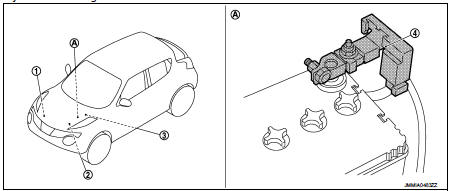
1. Alternator
2. ECM
Refer to EC-25, "ENGINE CONTROL
SYSTEM :
Component Parts Location"
(MR16DDT), EC-455, "ENGINE
CONTROL SYSTEM :
Component Parts Location"
(HR16DE), EC-813, "Component
Parts Location" (K9K).
3. IPDM E/R Refer to PCS-5, "Component Parts Location" (with Intelligent Key system), PCS-37, "Component Parts Location" (without Intelligent Key system).
4. Battery current sensor (with battery temperature sensor)
A. Battery
POWER GENERATION VOLTAGE VARIABLE CONTROL SYSTEM : Component Description
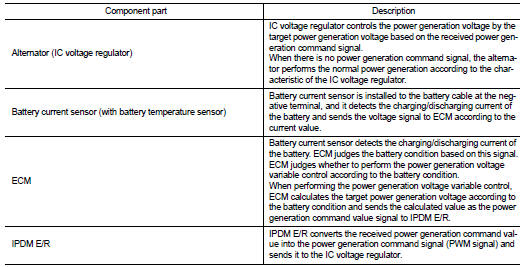

 System
Charging system
CHARGING SYSTEM : System Diagram
GASOLINE ENGINE MODELS
DIESEL ENGINE MODELS
CHARGING SYSTEM : System Description
The alternator provides DC voltage to operate the vehicle's e ...
Other materials:
P0657 ECM relay
DTC Logic
DTC DETECTION LOGIC
NOTE:
When IPDM E/R DTC is indicated with DTC P0657, IPDM E/R DTC must be checked
first.
Diagnosis Procedure
1.CHECK GROUND CONNECTION
1. Turn ignition switch OFF.
2. Check ground connection E38. Refer to Ground Inspection in GI-44, "Circuit
Inspection ...
P0470 exhaust gas pressure sensor 1
DTC Logic
DTC DETECTION LOGIC
NOTE:
If DTC P0470 is displayed with DTC P0651 or P2263, first perform trouble
diagnosis for DTC P0651 or P2263.
Refer to EC-975, "DTC Logic" (P0651), EC-1003, "DTC Logic" (P2263).
Diagnosis Procedure
1.CHECK GROUND CONNECTIONS
1. Turn i ...
Cylinder Block
AVAILABLE PISTON
PISTON RING
PISTON PIN
CONNECTING ROD
*: After installing in connecting rod
CRANKSHAFT
*: Total indicator reading ...
