
Nissan Juke Service and Repair Manual : Combination switch
Exploded View
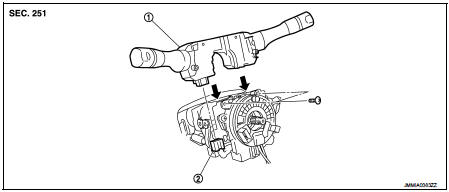
1. Combination switch 2. Combination switch connector
Removal and Installation
REMOVAL
1. Remove steering column cover. Refer to IP-13, "Removal and Installation".
2. Remove screws.
3. Disconnect the connector.
4. Pull up the combination switch to remove it.
INSTALLATION
Install in the reverse order of removal.
 BCM
BCM
Removal and Installation
CAUTION:
Before replacing BCM, perform “READ CONFIGURATION� to save or print current
vehicle specification.
Refer to BCS-80, "ADDITIONAL SERVICE WHEN REPLACING C ...

Other materials:
Fuel tank
Exploded View
1. Fuel filler cap
2. Grommet
3. Fuel filler tube
4. Vent hose
5. Clamp
6. Fuel filler hose
7. Clamp
8. Fuel tank
9. Fuel tank mounting band (RH)
10. Fuel tank mounting band (LH)
11. EVAP canister
12. EVAP canister hose
A. To fuel tube
: Vehicle front
: N·m (k ...
Secondary speed sensor
Exploded View
1. Transaxle assembly
2. O-ring
3. Secondary speed sensor
: Vehicle front
: Always replace after every
disassembly.
: N·m (kg-m, in-lb)
: Genuine NISSAN CVT Fluid NS-2
Removal and Installation
REMOVAL
1. Disconnect battery cable from negative terminal. Refer to PG-124, ...
Charging system preliminary inspection
Inspection Procedure
1.CHECK BATTERY TERMINALS CONNECTION
Check if battery terminals are clean and tight.
Is the inspection result normal?
YES >> GO TO 2.
NO >> Repair battery terminals connection.
2.CHECK FUSE
Check for blown fuse and fusible link.
Is the inspection resu ...
