
Nissan Juke Owners Manual : Clock (if so equipped)
The digital clock (in the audio unit) displays time when the ignition switch is in the ACC or ON position. The clock ON or OFF mode can be selected. For details of the digital clock in the NAVIGATION SYSTEM, refer to “Clock� .
If the power supply is disconnected, the clock will not indicate the correct time.
Readjust the time.
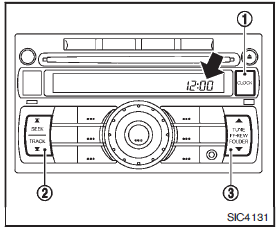
ADJUSTING THE TIME
Push the CLOCK button1 to turn the clock on or off.
1. Push and hold the CLOCK button 1 until the clock display starts to flash.
2. Push the SEEK/TRACK button2 to adjust the hours.
3. Push the TUNE/FF·REW button 3 to adjust the minutes.
4. Push the CLOCK button 1 again to exit the clock set mode.
The display will return to the regular clock display after 5 seconds.
 Heated seats (if so equipped)
WARNING
Do not use or allow occupants to use the seat heater if you or the occupants
cannot monitor elevated seat temperatures or have an inability to feel pain in body
parts that contact the sea ...
 Power outlet
The power outlet is located in the instrument panel.
CAUTION
• The outlet and plug may be hot during or immediately after use.
• Do not use with accessories that exceed a 12 volt, 120W (10A) ...
Other materials:
Door motor
Diagnosis Procedure
NOTE:
If all of door motor DTCs are detected, check this circuit.
1.CHECK DOOR MOTOR POWER SUPPLY
1. Turn ignition switch ON.
2. Check voltage between intake door motor harness connector and ground.
Is the inspection result normal?
YES >> GO TO 2.
NO >> ...
Child safety
WARNING
Do not allow children to play with the seat belts. Most seating positions
are equipped with Automatic Locking Retractor (ALR) mode seat belts. If the seat
belt becomes wrapped around a child’s neck with the ALR mode activated, the child
can be seriously injured or killed if the seat ...
B2014 chain of STRG-IMMU
DTC Logic
DTC DETECTION LOGIC
DTC CONFIRMATION PROCEDURE
1.PERFORM DTC CONFIRMATION PROCEDURE
1. Lock steering.
NOTE:
3. Press the push-button ignition switch.
4. Check DTC in “Self Diagnostic Result� mode of “BCM� using CONSULT-III.
Is DTC detected?
YES >> Go to SEC-7 ...
