
Nissan Leaf 2018-2025 (ZE1) Owner's Manual : Climate ctrl. timer
This advanced pre-conditioning function is engineered to pre-heat or pre-cool the passenger compartment of the vehicle to a comfortable, tailored temperature before driving. By managing the cabin environment while the vehicle is stationary, this intelligent system drastically helps reduce high auxiliary power consumption from the core Li-ion battery once your journey begins, directly optimizing your driving efficiency.
The specialized Climate Ctrl. Timer operates the onboard air conditioner or heating loops using electrical power drawn directly from either the connected external charger or the high-voltage Li-ion battery pack. While the EVSE charging connector is physically connected to the vehicle charging port, electric power from the primary Li-ion battery is safely bypassed and not used, allowing you to preserve maximum battery capacity for the road.
To provide optimal flexibility for varying schedules, the integrated Climate Ctrl. Timer function allows for up to two independent, fully customizable timer settings to be stored in the vehicle system memory simultaneously.
Once your preferred Climate Ctrl. Timer is properly configured, the automated management system will precisely calculate and complete the necessary air conditioning or heating cycles by your designated departure time. Because the internal schedule remains active in the vehicle computer memory, it is not necessary to manually reset or re-configure the Climate Ctrl. Timer every day.
WARNING
Even if the integrated Climate Ctrl. Timer is actively set, the actual temperature inside the passenger compartment may still become exceptionally high or dangerously low if the climate control system automatically stops due to timeout parameters or external power changes. Do not leave infants, children, or adults who would normally require the physical support of others unattended or alone in your vehicle. For safety reasons, pets should never be left alone inside the cabin either. On hot, sunny days, internal temperatures inside a closed vehicle could rapidly escalate to extreme levels, high enough to cause severe, permanent, or possibly fatal heat-related injuries to people or animals. Similarly, on freezing days, the temperature in a static vehicle could plummet low enough to cause severe or possibly fatal hypothermic injuries to passengers or animals.
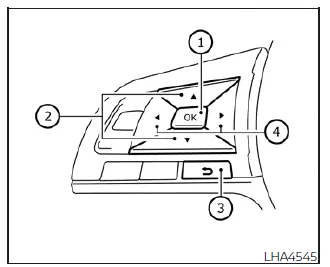
How to set Climate Ctrl. Timer
- OK button (used to confirm highlighted menu entries and toggle selections)
-
 button (navigates upward through the menu listings)
-
 Back button (reverts back to the previous screen or menu level)
-
 button (navigates downward through the menu listings)
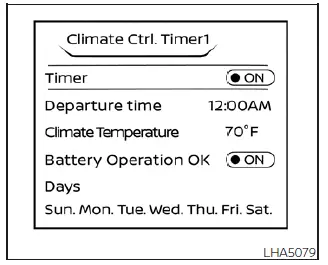
Type A (models with Navigation
System)
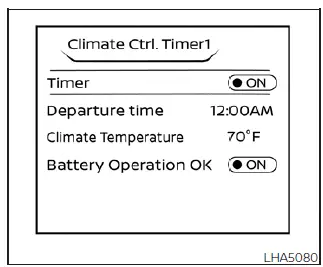
Type B (models without Navigation
System)
- Press the
 button on the steering wheel pad to navigate and select the "Settings" menu gear icon visible on the vehicle information display screen.
- Press the
 button to highlight the specific "EV Settings" line item option, and then press the physical OK button to enter the sub-menu.
- Press the
 button to choose either "Climate Ctrl. Timer1" or "Climate Ctrl. Timer2" to configure, and then press the OK button to open the configuration parameters.
- Press the
 button to select the primary "Timer" line item, then press the OK button to turn on and activate the automated profile. The system indicator light will turn on when the designated timer schedule is actively armed.
- Press the
 button to highlight the "Departure time" configuration parameter field, and then press the central OK button to change the clock value.
- Press the
 button to set the target departure "Hour" digit to match your morning or evening routine, and then press the OK button to save the hour choice.
- Press the
 button to set the target departure "Minute" value, and then press the OK button. For quick user configuration, the time schedule setting can be adjusted forward or backward with an increment step of exactly 10 minutes.
- Press the
 button to scroll down and highlight the "Climate Temperature" option field, and then press the central OK button to modify the target value.
- Press the
 button to select your specific baseline Climate Temperature for cabin pre-conditioning, and then press the OK button to lock in your comfort level.
- * Press the
 button to select the specific "Days" of the week that you want this pre-conditioning profile to run automatically, and then press the OK button to finalize your regular driving schedule.
On the calendar layout screen, the current day of the week is prominently displayed with a distinct underline indicator for easy visual verification.
Press the corresponding adjustment button to highlight and select the specific days of the week you wish to activate the pre-conditioning Climate Control system on your Nissan Leaf, and then press the central OK button to confirm. The dedicated selection indicator light of the chosen button will turn on to show it is successfully included in the schedule.
As a visual confirmation of your schedule, each set day of the week is clearly lit in white on the dashboard cluster display.
* Available only on models with an integrated Navigation System
Info
As a baseline rule, the intelligent Climate Ctrl. Timer does not activate automatically if the physical charge connector is not connected to the vehicle port. However, when the custom "Battery Operation OK" setting is enabled inside the menu and the charging connector remains disconnected from the vehicle, the onboard computer allows the Climate Ctrl. Timer to activate and run on standalone traction battery power for a maximum duration of 15 minutes.
Please note that when the outside ambient temperature is excessively high or extremely low, the interior cabin temperature may not fully reach your target set temperature within this restricted 15-minute battery-powered window.
It is highly recommended to turn the "Battery Operation OK" safety toggle to the OFF position when it is not necessary to run the cabin pre-conditioning program, preventing the high-voltage Li-ion battery pack from experiencing accidental or unnecessary energy discharge while parked.
For any standalone Nissan Leaf models without an integrated Navigation System, the automated Climate Ctrl. Timer operates repeatedly every single day at the designated time once the program checkbox is turned on.
Operating tips for using Climate Ctrl. Timer
- The onboard Climate Ctrl. Timer will only initialize its countdown and start operating when the vehicle main power switch is turned completely to the LOCK/OFF position or set to the ACC (Accessory) power position.
- To temporarily deactivate the automated Climate Ctrl. Timer function without losing your metrics, turn off the individual "Climate Ctrl. Timer1" and "Climate Ctrl. Timer2" options in the vehicle information display screen by using the
 button on the steering wheel assembly. Your previously configured start and stop time parameters will remain safely saved in the system memory even if the global timer function is toggled off.
- While the automated Climate Ctrl. Timer is actively pre-conditioning the cabin, the physical Climate Ctrl. Timer dashboard indicator and the exterior charging status indicator lights on the dashboard top deck will flash sequentially. If the system is merely armed and waiting to activate at a later hour, the single Climate Ctrl. Timer status indicator remains steadily illuminated.*
- If the internal Climate Ctrl. Timer initializes its climate cycle while your vehicle is currently being actively charged, a portion of the incoming electrical current will be diverted to the climate system, meaning the total time required to complete charging the battery will be longer.
- Operating the advanced Climate Ctrl. Timer or engaging the remote climate control system via an application in an environment where the ambient temperature is extremely low may temporarily decrease the actual rate of the high-voltage battery charge due to thermal protection management.
- Your primary timer scheduling profiles can be safely updated or changed even while the Climate Ctrl. Timer is currently running an active cycle. When the vehicle power position is subsequently switched back to OFF, the air conditioner unit immediately initializes a fresh run or enters a waiting mode depending entirely on the newly saved timer settings.
- When the environmental thermal difference between your selected air conditioner setting temperature and the actual real-time temperature outside the vehicle is exceptionally large, the final temperature inside the passenger cabin may not fully stabilize at the exact setting temperature within the automated timeframe.
- The blue charging status indicator lights on top of the dash will illuminate in a highly specific flash pattern whenever the integrated high-voltage Li-ion battery warmer operates. It is important to note that the charging status indicator lights share this exact same flashing sequence to indicate 12-volt battery charging, active Climate Ctrl. Timer operation, or real-time Remote Climate Control execution.
Because of this shared display configuration, the flashing pattern of the charging status indicator lights does not change or alter if the internal Li-ion battery warmer operates at the exact same time as any of the above climate features.
- The final perceived temperature in the passenger compartment may not be perfectly comfortable if you enter your Nissan Leaf too soon before or too long after your scheduled time of departure, as the system targets a specific comfort window.
- The overall capacity of the heating and cooling elements is strictly limited to the maximum delivery rate of the available electrical power source when the charge connector is connected. Therefore, the cabin may not reach the exact set temperature due to these localized restrictions in air conditioning performance if the outside ambient temperature is excessively high or low, or if the vehicle charge connector is plugged into a low-power 120-volt household outlet.
- The internal Climate Ctrl. Timer intelligently regulates the climate control functions dynamically so that a comfortable interior temperature is perfectly provided in the passenger compartment at the exact scheduled time of departure. To conserve grid and battery power, the climate control cycle is hardcoded to stop automatically at the scheduled time of departure.
- Depending on the specific hardware or software facilities of your local charging station, there may be automated times or utility windows when grid power is temporarily unavailable for charging. Always confirm the real-time availability of the grid charging facility before configuring your internal schedule. Additionally, be completely sure that the physical power switch of the external wall charger is turned on when setting up the Climate Ctrl. Timer.
- When the vehicle main power switch is turned back to the OFF position after changing any cluster parameter, the new configuration details will be written to memory and applied to the next climate cycle.
*Applicable to specific models equipped with the integrated Navigation System
Remote climate control
The innovative Nissan Leaf incorporates an advanced onboard communication device designated as the TCU (Telematics Control Unit). The permanent, secure wireless communication connection established between this specialized telematics unit and the centralized Nissan Data Center enables owners to access a comprehensive suite of remote function services and vehicle management utilities.
Even when you are physically away from your vehicle, the cabin climate control system can be initialized or adjusted remotely by accessing the official Web Owner Portal or utilizing a compatible smartphone application on a cellular phone, tablet, or personal computer.
The moment a remote operation request is submitted, or at a pre-configured schedule start time, the centralized Nissan Data Center securely accesses the vehicle telematics system. As soon as the vehicle receives and authenticates this specific command for remote operation, the primary climate control hardware immediately turns ON and operates continuously for the specified period of time. Dynamic confirmation of the current active ON/OFF status of the air conditioning or heating loop can be verified at any time by accessing the Web Owner Portal interface directly or by checking your automated e-mail notification status alerts.
Completing a primary account registration for the proprietary NissanConnect EV Services is strictly necessary before you can utilize this remote utility. For additional step-by-step setup details and system manual requirements, please refer directly to your dedicated NissanConnect Manual.
WARNING
- The active cellular radio waves emitted by the internal telematics system could adversely affect the operation of certain electrical medical equipment. For additional safety information and detailed guidelines, please refer directly to your electrical medical equipment manufacturer or consult a doctor regarding the possible cellular signal effect on medical pacemakers before initializing the remote climate control system.
- Even if the remote climate control system is successfully activated and scheduled, the actual temperature in the passenger room may still rise to dangerous levels if the heating or cooling system automatically stops due to runtime limits or power disruptions. Never leave young children, infants, or vulnerable adults who would normally require the physical support of others alone inside your vehicle. Domestic pets should not be left alone under any circumstances either. On hot, sunny days, internal cabin temperatures within a closed vehicle could quickly become high enough to cause severe, permanent, or possibly fatal heatstroke injuries to people or animals.
NOTE:
- To successfully check the current Li-ion battery charging status or initialize cabin pre-conditioning using an internet-enabled smartphone or a personal computer, the following connectivity conditions must be met:
- The Nissan Leaf vehicle must be physically parked and located within an active, stable cellular phone network coverage area.
- The personal mobile phone or smartphone device must also be located within an area with reliable cellular phone coverage.
- The personal computer or laptop must be fully connected to a functioning internet connection network.
- Please be aware that certain legacy cellular phones or specific mobile network plans are not fully compatible with this telematics system and cannot be reliably used to check the Li-ion battery charging status or trigger automated events. It is recommended to confirm your mobile hardware compatibility beforehand.
Operating tips
- When the external EVSE charge connector is physically connected to the charging port, the climate control module operates efficiently by drawing electrical power directly from the external utility source. Conversely, when the charge connector is disconnected from the vehicle, the climate control loop operates by using the onboard high-voltage traction vehicle battery electric power.
- To optimize grid energy distribution, the climate control system can be operated for a maximum continuous duration of 2 hours when the charge connector is connected to the vehicle, or a maximum duration of 15 minutes when the charge connector is disconnected and running on standalone battery reserves.
- The internal remote climate control functions will only initialize and start to operate when the primary vehicle power switch is verified to be in either the LOCK/OFF position or the ACC (Accessory) power state.
- Remote climate control operation features and status updates will be completely unavailable if the vehicle is parked in an isolated area that lacks stable cellular communication network range.
- To conserve the vehicle 12-volt battery power, the onboard TCU wireless communication connection becomes temporarily unavailable and enters a deep sleep mode when the vehicle has not been used or started for a period of two weeks or more. When the vehicle power switch is manually placed back into the ON position, cellular communication with the centralized Nissan Data Center is immediately restored.
- The maximum peak output capacity of the heating or air conditioning module is strictly limited to the actual capacity of the available electric power supply delivered when the charge connector is connected to the vehicle.
Therefore, the target interior temperature may not fully reach a perfectly comfortable level due to the maximum thermal performance of the air conditioning system being intentionally limited. This baseline operational threshold occurs if the outside ambient temperature is excessively high or extremely low, or if the charge connector is physically connected to a low-amperage, standard 110 - 120-volt household plug outlet which restricts total grid power delivery.
Servicing climate control
The advanced climate control system in your NISSAN vehicle is factory-charged with a highly specialized refrigerant designed specifically with the environment in mind. This sustainable refrigerant compound will not harm the earth's delicate ozone layer. Due to the high-voltage architecture, highly specific charging equipment and precise chemical lubricants are strictly required when servicing your NISSAN climate control setup. Using any improper, non-specified refrigerants or unapproved lubricants will cause severe physical damage to your climate control system components. For additional comprehensive details regarding compatibility, see the technical section titled "Recommended fluids/lubricants and capacities".
To ensure total compliance with technical safety specifications and maintain optimal system longevity, it is strongly recommended that you visit an authorized, NISSAN certified LEAF dealer to inspect, maintain, or service your environmentally friendly climate control system.
Antenna
For streamlined aerodynamics and optimal signal reception, the vehicle is equipped with a sleek, aerodynamic shark fin antenna mounted firmly on the rear roof section of your Nissan Leaf.
 Automatic climate control
(models with Navigation System)
Automatic climate control
(models with Navigation System)
Temperature control button (used to adjust the target cabin temperature up or down)
HEAT button
Climate Ctrl. Timer indicator ...
 Car phone or CB radio
When installing a two-way CB, ham radio, or a dedicated car phone system in your Nissan Leaf, be sure to strictly observe the following technical precautions; otherwise, the newly integrated radio fre ...
Other materials:
System
4WD system : System Diagram
INPUT/OUTPUT SIGNAL
It transmits/receives each signal from the following 4WD control module via
CAN communication line.
4WD system : System Description
• 4WD mode is selectable among 2WD, 4WD-V, and 4WD by operating the 4WD mode
switch.
• When judging d ...
Catalyst
2WD
2WD : Exploded View
1. A/F sensor 1
2. Catalyst convertor shroud upper
3. Gasket
4. Catalyst
5. Catalyst convertor support bracket rear
6. Catalyst convertor bracket (RH)
A. To exhaust system
: Engine front
: N·m (kg-m, ft-lb)
: N·m (kg-m, in-lb)
: Always replace after every ...
Back door
Exploded View
REMOVAL
1. Back door weather-strip
2. Back door stay
3. Back door stay lower bracket
4. Bumper rubber
5. Back door striker
6. Back door panel
7. Back door hinge
8. Hole cover
A : Center mark
B : Seam
: Do not reuse
: Body grease
Back door assembly
BACK DOOR ASSEMB ...
