
Nissan Leaf 2018-2025 (ZE1) Owner's Manual : BSW system limitations
WARNING
The following points detail the operational boundaries and inherent limitations of the Blind Spot Warning (BSW) system. Failure to operate your Nissan Leaf with a full understanding of these system limitations could result in an improper response to traffic conditions, leading to serious injury or death.
- The BSW system is an assistive technology and cannot be expected to detect every vehicle or object under all driving conditions.
- The rear-mounted radar sensors may fail to detect objects or trigger the BSW alerts in the following scenarios:
- Pedestrians, cyclists, or animals.
- Vehicles with non-standard dimensions, such as motorcycles, extremely low-profile vehicles, or those with abnormally high ground clearance.
- Oncoming traffic in opposing lanes.
- Vehicles that remain within your blind spot detection zone when you are accelerating from a complete stop.
- A vehicle merging into an adjacent lane at a speed nearly identical to your own Nissan Leaf, which may cause the radar to misinterpret the vehicle as stationary.
- A vehicle approaching from the rear at a very high rate of speed.
- A vehicle that your Nissan Leaf overtakes at a high speed.
- A vehicle that passes through the radar’s detection zone too quickly for the system to lock onto its signature.
- When you are overtaking a series of vehicles in a row; if those vehicles are traveling in close proximity, the radar may fail to detect subsequent vehicles beyond the first one in the chain.
- The radar sensors are calibrated for standard lane widths. Consequently, when driving on unusually wide multi-lane roads, the sensors may fail to detect vehicles in the adjacent lane. Conversely, when driving on particularly narrow roads, the system may occasionally detect vehicles traveling two lanes away, triggering false alerts.
- While the radar sensors are engineered to filter out stationary infrastructure, objects such as metal guardrails, concrete walls, dense roadside foliage, and parked vehicles may occasionally be detected. This is a normal functional characteristic of the BSW system and not a malfunction.
- Environmental and maintenance conditions can significantly degrade the radar's ability to accurately detect surrounding vehicles:
- Severe weather conditions (such as heavy rain or blizzard conditions).
- High levels of road spray kicked up by other traffic.
- Accumulation of ice, thick frost, mud, or heavy snow buildup on the rear bumper area near the sensors.
- To maintain peak system performance, do not attach any stickers (including transparent protective films), install aftermarket accessories, or apply additional layers of paint near the rear bumper radar sensors. These obstructions can significantly attenuate radar waves, reducing the system's ability to detect surrounding vehicles.
- Be aware that excessive ambient noise—such as high audio system volume or driving with multiple windows wide open—may mask the BSW audible chime, causing the driver to miss important auditory warnings.
BSW driving situations
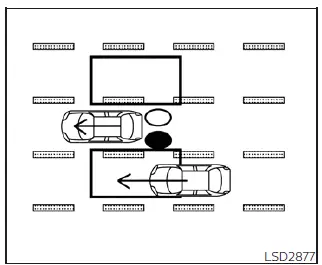
Illustration 1 - Approaching from behind
Illustration 1: The side indicator light is programmed to illuminate as a proactive warning if another vehicle enters the BSW detection zone from the rear in an adjacent lane.
Indicator active (Vehicle detected)

Indicator inactive (Clear lane)

Indicator flashing (Active warning)

NOTE:
- The radar sensors may occasionally fail to detect vehicles that are approaching your Nissan Leaf from behind at a very high speed, as these vehicles may be in the detection zone for too short a time to trigger the warning system.
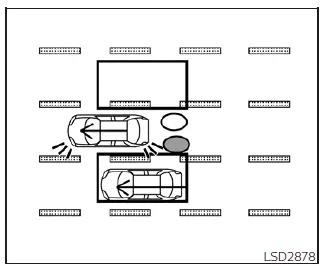
Illustration 2 - Approaching from behind
Another vehicle approaching from behind
Illustration 2: In a scenario where another vehicle is rapidly closing in from the rear, if you activate the turn signal while that vehicle is already positioned within the blind spot detection zone, your Nissan Leaf will escalate the alert: the system will emit a double audible chime, and the side indicator light will begin to flash to draw your immediate attention to the hazard.
NOTE:
- The radar-based BSW sensors may occasionally struggle to detect vehicles that are approaching your Nissan Leaf from behind at a very high velocity, as the time window for detection is significantly compressed.
- If you activate the turn signal before another vehicle has entered the designated detection zone, the side indicator light will flash upon detection, but the system will suppress the audible chime to avoid unnecessary distraction during your maneuver.
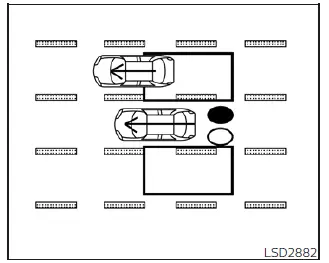
Illustration 3 - Overtaking another vehicle
Overtaking another vehicle
Illustration 3: When you initiate an overtaking maneuver, the side indicator light will illuminate steadily to inform you that a vehicle is present in your blind spot, provided that the vehicle remains within the radar's detection zone for a duration of approximately 2 seconds.
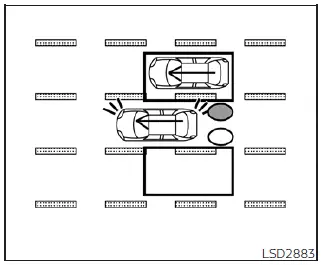
Illustration 4 - Overtaking another vehicle
Illustration 4: If you attempt to signal a lane change while you are in the process of overtaking and another vehicle is still lingering within the detection zone, the BSW system will chime twice and flash the side indicator light to warn you against merging until the path is entirely clear.
NOTE:
- When your Nissan Leaf is overtaking a column of multiple vehicles traveling in a tight formation, the radar sensors might only reliably detect the first vehicle; vehicles following immediately behind in the same lane may not be detected if they are spaced too closely together.
- The radar sensors may not register slower-moving vehicles if they are passed by your vehicle at a very high rate of speed.
- If the turn signal is engaged prior to a vehicle entering the detection zone, the side indicator light will flash as soon as the vehicle is detected, but the audible chime will not sound.
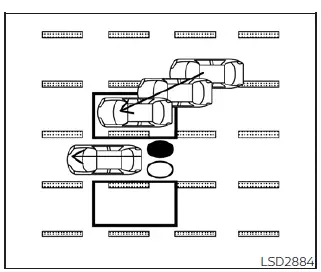
Illustration 5 - Entering from the side
Entering from the side
Illustration 5: The BSW side indicator light will illuminate if a vehicle enters the monitored detection zone from either the left or right side of your Nissan Leaf.
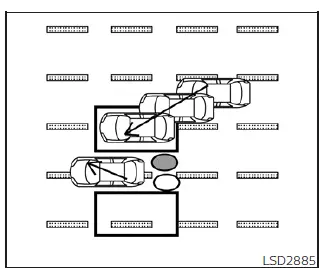
Illustration 6 - Entering from the side
Illustration 6: Should you activate the turn signal while another vehicle is merging into the detection zone from the side, the BSW system will provide a double chime and flash the side indicator light as a clear warning to hold your current lane.
NOTE:
- If you activate the turn signal before the merging vehicle enters the detection zone, the side indicator light will flash to warn you, but the audible chime will be suppressed.
- The radar sensors may experience difficulty detecting a vehicle that enters the detection zone while traveling at a speed almost perfectly synchronized with the speed of your Nissan Leaf, as this creates a lack of relative motion for the sensors to track.
 BSW system operation
Side Indicator Light (located on the A-pillar or mirror housing).
BSW System Status Indicator (located in the instrument cluster).
The BSW system au ...
 System temporarily unavailable
When the system detects that the radar sensors are blocked, it will automatically deactivate to prevent inaccurate warnings. During this state, the BSW indicator (1) will blink i ...
Other materials:
When traveling or registering your vehicle in another country
When planning to travel in another country, you should first find out if the
fuel available is suitable for your vehicle’s engine.
Using fuel with an octane rating that is too low may cause engine damage. All
gasoline vehicles must be operated with unleaded gasoline.
Therefore, avoid taking ...
Multiport Fuel Injection System or Engine Control System
• Before connecting or disconnecting any harness connector for the
multiport fuel injection system or ECM:
Turn ignition switch to “OFF� position.
Disconnect negative battery terminal. Otherwise, there may be damage to ECM.
• Before disconnecting pressurized fuel line from fuel pump to ...
Component parts
Body control system
BODY CONTROL SYSTEM : Component Parts Location
RHD MODELS
1. BCM
A. Behind of glove box (Left side)
LHD MODELS
1. BCM
A. Behind of instrument lower panel LH
(Left side)
Power consumption control system
POWER CONSUMPTION CONTROL SYSTEM : Component Parts Location
1 ...
