
Nissan Leaf 2018-2025 (ZE1) Owner's Manual : Headlight switch
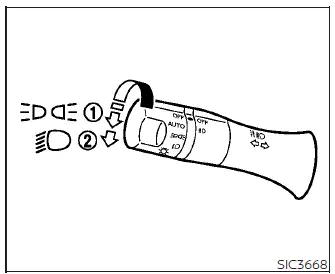
Type A (if so equipped)
- Rotate the switch to the
 position; this activates the front parking lights, tail lights, license plate illumination, and the interior instrument panel lighting.
- Rotate the switch to the
 position to engage the main headlights, while all other previously mentioned exterior and interior lights remain illuminated.
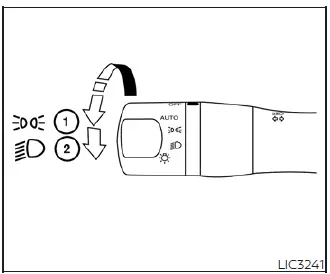
Type B (if so equipped)
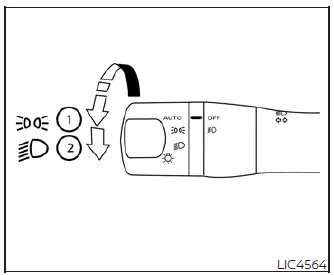
Type C (if so equipped)
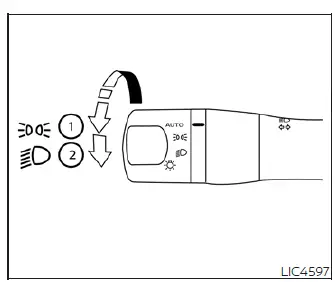
Type D (if so equipped)
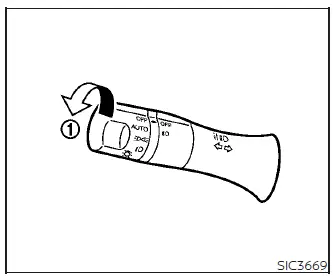
Autolight system
The intelligent Autolight system allows your Nissan Leaf to automatically manage headlight and tail light activation, seamlessly turning them on or off based on external lighting conditions.
To activate the Autolight system, follow these steps:
1. Ensure the headlight control switch is rotated to the AUTO position (labeled 1).
2. Set the vehicle power switch to the ON position.
3. The system will now autonomously detect ambient light levels and manage your exterior lighting accordingly.
To manually disable the Autolight system, simply rotate the switch out of the AUTO setting and move it to the OFF,
 or
or
 position.
The Autolight system is designed to trigger your lights automatically when the sensors detect dark conditions and extinguish them once sufficient natural light returns.
For US-market models: The system includes enhanced safety logic, meaning your headlights and tail lights will also activate automatically during twilight hours or in inclement weather, specifically when the windshield wipers are engaged in continuous operation.
If you turn the power switch to OFF and open any door while the headlights are active, they will remain illuminated for a 45-second period to provide lighting as you exit the vehicle.
Automatic headlights off delay
You can extend visibility after parking your Nissan Leaf by utilizing the headlight delay feature, which keeps your headlights active for up to 180 seconds after the power switch is turned OFF, provided you open and then close the doors.
The duration of this delay can be customized from 0 seconds (disabled) up to 180 seconds. The factory default setting is configured to 45 seconds.
NOTE:
For detailed instructions on how to modify the automatic headlight off delay timing, please refer to the "Vehicle information display" section of your owner's manual.
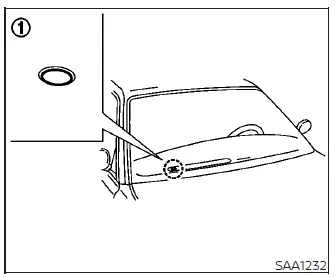
Please ensure that no items are placed on top of the photo sensor located at the base of the windshield on the instrument panel. This sensor is the "eyes" of the Autolight system; if it is obscured, the sensor will perceive the condition as dark and unnecessarily trigger the headlights to illuminate.
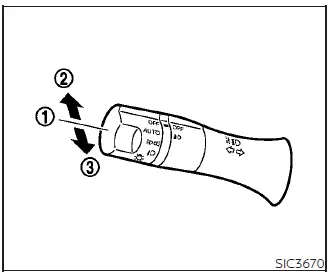
Headlight beam select
- To engage the low beams, ensure the lever is in the neutral position and the switch is rotated to the headlamp ON position.
- To engage the high beams, push the lever forward while the switch is in the
 position. The high beams will activate, and the blue high beam indicator
 will appear on the instrument cluster. Pull the lever back toward the steering wheel to return to low beam operation.
- Pulling the lever fully toward you acts as a "flash-to-pass" feature, momentarily illuminating the high beams even if the primary headlight switch is set to OFF.
High Beam Assist
The High Beam Assist system in the Nissan Leaf enhances nighttime safety by operating at speeds of approximately 19 mph (30 km/h) or higher. When the high beams are active, the system continuously monitors for oncoming traffic or vehicles traveling ahead; if a vehicle is detected, the headlights will automatically and smoothly dip to low beam to prevent glare for other drivers.
WARNING
- High Beam Assist is an advanced convenience feature, but it does not replace the necessity for attentive, safe driving. The driver must remain vigilant at all times, maintaining correct driving practices and manually overriding to low beam whenever traffic or environmental conditions require it.
- Automatic switching between high and low beams may not occur as expected under the following circumstances, requiring you to switch manually:
- During adverse weather such as heavy rain, fog, snowfall, or high winds.
- When external light sources closely resembling vehicle lights are present in the environment.
- When an oncoming or leading vehicle has damaged or dirty lights, has one light out, or when the light source is improperly aligned.
- When there is a sudden, extreme, or continuous change in environmental brightness.
- When driving on winding or highly curved roads.
- When traversing steep hills or roads with significant elevation changes.
- When traffic signs or mirror-like surfaces reflect intense light back toward your Nissan Leaf.
- When a towed trailer or container reflects excessive light forward.
- When one of your own vehicle's headlights is dirty, obstructed, or damaged.
- When the vehicle's attitude is skewed due to a flat tire, uneven cargo weight, or while being towed.
- The responsiveness of the automatic beam switching may vary based on:
- The relative brightness of the other vehicle's headlights.
- The movement, speed, and approach angle of oncoming or leading traffic.
- If an oncoming vehicle or leading vehicle is utilizing only a single functional light.
- If the detected vehicle is a two-wheeled vehicle (motorcycle or bicycle).
- Complex road geometries, such as sharp inclines or variations in the road surface.
- The current weight distribution, including the number of passengers and the volume of cargo in your Nissan Leaf.
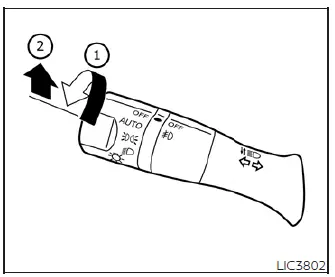
High Beam Assist operations
To enable the intelligent High Beam Assist system on your Nissan Leaf, rotate the headlight switch to the AUTO position (marked 1) and push the lever forward into the high beam position (marked 2). Once activated, the dedicated High Beam Assist indicator light will illuminate on the instrument cluster whenever the headlights are powered on.
If the High Beam Assist indicator fails to illuminate under these conditions, it may indicate a potential system fault or sensor obstruction. Should this occur, we recommend having the system inspected by a qualified technician at a NISSAN certified LEAF dealer to restore proper functionality.
When the driving speed of your Nissan Leaf drops below approximately 12 mph (20 km/h), the system will automatically revert the headlights to low beam to ensure appropriate illumination for slower speeds.
To deactivate the High Beam Assist system, simply rotate the headlight switch to the
 position, or manually select the low beam setting by returning the lever to the neutral position.
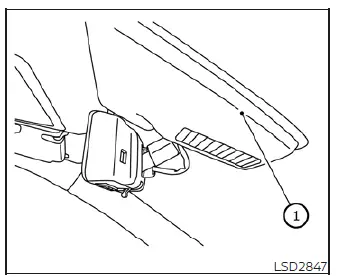
Ambient image sensor maintenance
The specialized ambient image sensor required for the High Beam Assist system is integrated into the housing in front of the interior rearview mirror (marked 1). To maintain the high level of accuracy and reliability expected from your Nissan Leaf safety features and to prevent unexpected system malfunctions, please adhere to the following maintenance guidelines:
- Ensure the windshield area in front of the sensor remains consistently clean and free of debris.
- Do not attach any stickers, decals, or transparent films, nor install any aftermarket accessories in the immediate vicinity of the sensor, as these can interfere with the camera's field of view.
- Avoid striking, applying pressure, or damaging the housing surrounding the ambient image sensor.
If you suspect the ambient image sensor has been compromised, for instance due to a collision or accidental impact, it is essential to visit a NISSAN certified LEAF dealer for a professional inspection and calibration.
Battery saver system
- When the headlight switch is left in the
 position while the vehicle power switch is in the ON position, the system is designed to automatically extinguish the lights 45 seconds after you transition the vehicle power switch to the OFF position, helping to prevent unnecessary battery drain.
- If the headlight switch remains in the
 or
or
 position after the automatic shut-off, the lights will reactivate the next time you place the Nissan Leaf power switch in the ON position.
CAUTION
- Be aware that if you manually toggle the headlight switch on again after the battery saver system has automatically turned the lights off, the automatic shut-off logic will no longer engage. You must remember to manually return the light switch to the AUTO or OFF position when parking your Nissan Leaf for extended periods; otherwise, the auxiliary battery may eventually discharge.
- Even with the automatic saver system in place, you should never intentionally leave the light switch in an active position while the power switch is in OFF, ACC, or ON for long durations, as this may place unnecessary stress on the vehicle's electrical systems.

 LED Daytime Running Lights (DRL) system (Type A)
The LED Daytime Running Lights (DRL) on your Nissan Leaf are designed for enhanced visibility, automatically illuminating at 100% intensity whenever the power switch is in the READY to drive position, ...
Other materials:
The braking distance is long
Description
Brake stopping distance is long when ABS function is operated.
Diagnosis Procedure
CAUTION:
Brake stopping distance on slippery road like rough road, gravel road or snowy
road may become
longer when ABS is operated than when ABS is not operated.
1.CHECK BRAKING FORCE
Check bra ...
Diagnosis system (audio unit)
Models with usb connection function
MODELS WITH USB CONNECTION FUNCTION : On Board Diagnosis Function
Self-diagnosis mode can check the following items.
METHOD OF STARTING
1. Start the engine.
2. Turn OFF audio.
3. While pressing the “SET UP� switch, turn the MENU dial counterclockwise
...
Main power supply and ground circuit
Diagnosis Procedure
1.CHECK TCM POWER CIRCUIT 1
1. Turn the ignition switch OFF.
2. Disconnect the TCM connector.
3. Check the voltage between the TCM harness connector terminals and ground.
Is the inspection result normal?
YES >> GO TO 2.
NO >> GO TO 4.
2.CHECK TCM POWER C ...
