
Nissan Juke Service and Repair Manual : B2628 outside antenna
DTC Logic
DTC DETECTION LOGIC

DTC CONFIRMATION PROCEDURE
1.PERFORM DTC CONFIRMATION PROCEDURE
1. Disconnect outside key antenna (rear bumper) connector.
2. Perform “INTELLIGENT KEY� Self Diagnostic Result.
Is outside key antenna DTC detected? YES >> Refer to DLK-240, "Diagnosis Procedure".
NO >> Outside key antenna (rear bumper) is OK.
Diagnosis Procedure
1.CHECK OUTSIDE KEY ANTENNA INPUT SIGNAL 1
1. Turn ignition switch OFF.
2. Check signal between BCM harness connector and ground using oscilloscope.
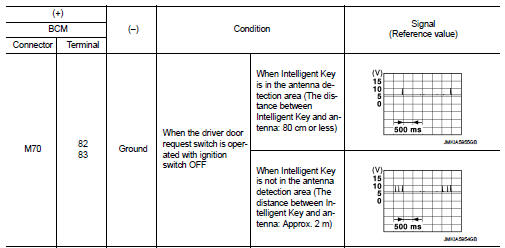
Is the inspection result normal? YES >> Replace BCM. Refer to BCS-93, "Removal and Installation".
NO >> GO TO 2.
2.CHECK OUTSIDE KEY ANTENNA CIRCUIT
1. Disconnect BCM connector and outside key antenna (rear bumper) connector.
2. Check continuity between BCM harness connector and outside key antenna (rear bumper) harness connector.

3. Check continuity between BCM harness connector and ground.

Is the inspection result normal? YES >> GO TO 3.
NO >> Repair or replace harness.
3.CHECK OUTSIDE KEY ANTENNA INPUT SIGNAL 2
1. Replace outside key antenna (rear bumper). (New antenna or other
antenna)
2. Connect BCM and outside key antenna (rear bumper) connector.
3. Check signal between BCM harness connector and ground using oscilloscope.
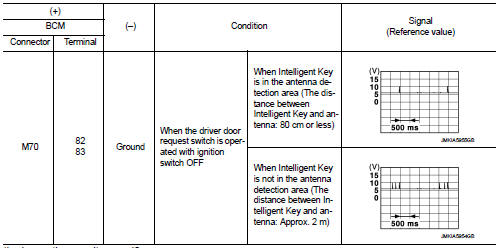
Is the inspection result normal? YES >> Replace outside key antenna (rear bumper).
NO >> Replace BCM. Refer to BCS-93, "Removal and Installation".
 B2627 outside antenna
DTC Logic
DTC DETECTION LOGIC
DTC CONFIRMATION PROCEDURE
1.PERFORM DTC CONFIRMATION PROCEDURE
1. Disconnect outside key antenna (passenger side) connector.
2. Perform “INTELLIGENT KEY� Self ...
 Back door opener actuator
Component Function Check
1.CHECK FUNCTION
1. Select “INTELLIGENT KEY� of “BCM� using CONSULT-III.
2. Select “TRUNK/BACK DOOR� in “ACTIVE TEST� mode.
3. Check that the function oper ...
Other materials:
Component parts
CVT control system : Component Parts Location
1. Multi display unit (MDU)*
Refer to DMS-3, "Component Parts
Location".
2. Combination meter 3. Manual mode indicator
(On the combination meter)
4. Shift position indicator
(On the combination meter)
5. Malfunction indicator lamp (MI ...
Cylinder block
Exploded View
1. Crankshaft position sensor (POS) cover
2. Crankshaft position sensor (POS)
3. O-ring
4. Drain plug
5. Cylinder block
6. Oil level gauge
7. Oil level gauge guide
8. O-ring
9. Knock sensor
10. Oil temperature sensor
11. Oil pressure sensor
12. Oil jet
13. Top rin ...
Fuel injector
Component Function Check
1.INSPECTION START
Turn ignition switch to START.
Is any cylinder ignited?
YES >> GO TO 2.
NO >> Proceed to EC-400, "Diagnosis Procedure".
2.CHECK FUEL INJECTOR FUNCTION
With CONSULT-III
1. Start engine.
2. Perform “POWER BALANCE� in ...
