
Nissan Juke Service and Repair Manual : B210D starter relay
DTC Logic
DTC DETECTION LOGIC
NOTE
:
• If DTC B210D is displayed with DTC U1000, first perform the trouble diagnosis
for DTC U1000. Refer to
PCS-59, "DTC Logic".
• If DTC B210D is displayed with DTC B209F, first perform the trouble diagnosis for DTC B209F. Refer to SEC-209, "DTC Logic".
• If DTC B210D is displayed with DTC B20A0, first perform the trouble diagnosis for DTC B20A0. Refer to SEC-211, "DTC Logic".
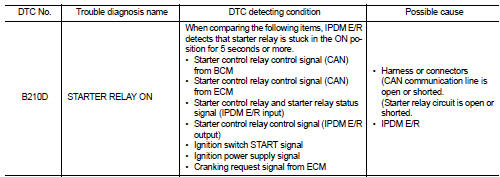
DTC CONFIRMATION PROCEDURE
1.PERFORM DTC CONFIRMATION PROCEDURE
1. Press push-button ignition switch under the following conditions to start engine, and wait 5 seconds or more.
- Selector lever: In the P position - Brake pedal: Depressed 2. Check DTC in “Self Diagnostic Result� mode of “IPDM E/R� using CONSULT-III.
Is DTC detected? YES >> Go to SEC-218, "Diagnosis Procedure".
NO >> GO TO 2.
2.PERFORM DTC CONFIRMATION PROCEDURE 2
1. Stop engine.
2. Perform DTC CONFIRMATION PROCEDURE for DTC P1650. Refer to EC-366, "DTC Logic" (MR16DDT) or EC-725, "DTC Logic" (HR16DE).
3. Turn ignition switch ON.
4. Check DTC in “Self Diagnostic Result� mode of “IPDM E/R� using CONSULT-III.
Is DTC detected? YES >> Refer to SEC-218, "Diagnosis Procedure".
NO >> INSPECTION END
Diagnosis Procedure
1.CHECK STARTER RELAY CONTROL SIGNAL
1. Turn ignition switch ON.
2. Check voltage between IPDM E/R harness connector and ground.

Is the inspection result normal? YES >> GO TO 4.
NO >> GO TO 2.
2.CHECK CRANKING REQUEST SIGNAL CIRCUIT
1. Turn ignition switch OFF.
2. Disconnect IPDM E/R connector.
3. Disconnect ECM connector.
4. Check continuity between IPDM E/R harness connector and ECM harness connector.

5. Check continuity between BCM harness connector and ground.

Is the inspection result normal? YES >> GO TO 3.
NO >> Repair or replace harness.
3.REPLACE ECM
Replace ECM.
Refer to EC-447, "Removal and Installation" (MR16DDT) or EC-805, "Removal and Installation" (HR16DE).
>> INSPECTION END
4.PERFORM DTC CONFIRMATION PROCEDURE AGAIN
1. Turn ignition switch ON.
2. Select “Self Diagnostic Result� mode of “IPDM E/R� using CONSULT-III.
3. Touch “ERASE�.
4. Perform DTC CONFIRMATION PROCEDURE for DTC B210D. Refer to SEC-218, "DTC Logic".
Is DTC detected? YES >> Replace IPDM E/R. Refer to PCS-34, "Removal and Installation".
NO >> INSPECTION END
 B210C starter control relay
DTC Logic
DTC DETECTION LOGIC
NOTE:
• If DTC B210C is displayed with DTC U1000, first perform the trouble diagnosis
for DTC U1000. Refer to
PCS-30, "DTC Logic".
• When IPDM E/R po ...
 B210E starter relay
DTC Logic
DTC DETECTION LOGIC
NOTE:
• If DTC B210E is displayed with DTC U1000, first perform the trouble diagnosis
for DTC U1000. Refer to
PCS-59, "DTC Logic".
• If DTC B210E is ...
Other materials:
Tail lamp circuit
Without daytime running light system
WITHOUT DAYTIME RUNNING LIGHT SYSTEM : Component Function
1.CHECK TAIL LAMP OPERATION
CONSULT-III ACTIVE TEST
1. Select “EXTERNAL LAMPS� of IPDM E/R active test item.
2. With operating the test items, check that the tail lamp is turned ON.
TAIL : Tail L ...
P0575 ASCD steering switch
DTC Logic
DTC DETECTION LOGIC
Diagnosis Procedure
1.CHECK ASCD STEERING SWITCH CIRCUIT
1. Check ASCD steering switch circuit.
ASCD steering switch>>Refer to EC-1011, "Component Function Check" and EC-1011,
"Diagnosis Procedure".
ASCD main switch>>Refer t ...
Connector Symbols
Most of connector symbols in wiring diagrams are shown from the terminal
side.
• Connector symbols shown from the terminal side are enclosed by
a single line and followed by the direction mark.
• Connector symbols shown from the harness side are enclosed by
a double line and followed by ...
