
Nissan Juke Service and Repair Manual : Air breather hose
Exploded View
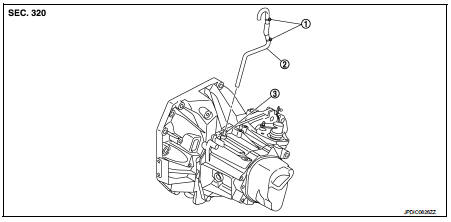
1. Clip
2. Air breather hose
3. 2 way connector
Removal and Installation
REMOVAL
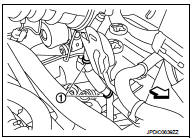
1. Remove clips (1).
 : Vehicle front
2. Remove air breather hose from the 2 way connector.
CAUTION:
When removing air breather hose, be sure to hold 2 way
connector securely.
INSTALLATION
Note the following, and install in the reverse order of removal.
CAUTION:
• Install air breather hose, preventing crush and clogging caused by bending.
• Insert the allowance of air breather hose to the spool of the 2 way connector.
• Install air breather hose to the 2 way connector with the paint mark faced forward of the vehicle.
• Securely engage the clips in the mounting hole.
 Control linkage
Exploded View
1. Bracket
2. Selector cable
3. Shifter lever A
4. Selector lever
5. Cable mounting bracket
6. Tapping bolt
7. Shifter cable
8. Grommet
9. M/T shift selector assembly
1 ...
 5TH main gear assembly
Removal and Installation
REMOVAL
1. Shift the shifter lever to the 3rd gear position.
2. Disconnect the shifter cable and the selector cable from shifter lever A and
selector lever. Refer to TM-2 ...
Other materials:
Back door opener switch
Component Function Check
1.CHECK FUNCTION
1. Select “TRUNK� of “BCM� using CONSULT-III.
2. Select “TRNK OPNR SW� in “DATA MONITOR� mode.
3. Check that the function operates normally according to the following
conditions.
Is the inspection result normal?
YES >> Back do ...
P0014 EVT control
DTC Logic
DTC DETECTION LOGIC
NOTE:
If DTC P0014 is displayed with DTC P0078, first perform trouble diagnosis for
DTC P0078. Refer to EC-
585, "DTC Logic".
DTC CONFIRMATION PROCEDURE
1.PRECONDITIONING
If DTC Confirmation Procedure has been previously conducted, always perform
...
Unit removal and installation
TRANSMISSION ASSEMBLY
Exploded View
1. Transaxle assembly
A: : For the tightening torque, refer to TM-508, "Removal and Installation".
Removal and Installation
REMOVAL
WARNING:
Never open the radiator cap or drain plug when the engine is hot. Hot liquid may
spray out, causing
s ...
