
Nissan Leaf 2018-2025 (ZE1) Owner's Manual : Steering Assist display and indicators
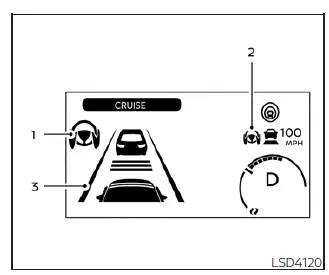
1. Steering Assist indicator
This primary indicator provides a visual reference for the current operational state of the Steering Assist system, distinguished by its color:
- Gray: Steering Assist is in standby mode and ready to be engaged.
- Green: Steering Assist is actively providing steering input to assist with lane centering.
- Yellow: A system malfunction has been detected, requiring attention.
2. Steering Assist status indicator/warning
The system status is mirrored through this secondary indicator/warning, which uses a consistent color-coded logic to communicate status changes to the driver:
- Gray: Steering Assist is currently in standby mode.
- Green: Steering Assist is actively operational.
- Yellow: An error or system fault has occurred.
3. Lane marker indicator
This indicator provides real-time feedback regarding the system's ability to perceive your surroundings:
- Gray: Lane markers are not currently detected by the camera sensors.
- Green: Lane markers are being clearly tracked by the system.
- Yellow: A potential lane departure is detected, signaling that the vehicle is drifting out of its lane.
When the Steering Assist feature in your Nissan Leaf is successfully engaged, the status indicator (1), the system indicator (2), and the lane marker indicator (3) on your vehicle information display will all illuminate in green. You will hear a single chime as confirmation the moment the system initially activates.
Conversely, when the Steering Assist deactivates, these three indicators transition to gray, and a double chime will sound to alert you that the system is no longer providing active steering guidance.
Intelligent Lane Intervention (I-LI)
In scenarios where challenging road geometry, such as sharp curves, or severe environmental factors like strong crosswinds exceed the limits of the Steering Assist, the vehicle may approach the edge of the travel lane. In these instances, a warning chime will trigger, and the orange I-LI indicator on the instrument panel will flash to grab your attention. Following this alert, the Intelligent Lane Intervention system will automatically apply brief, measured braking force to help nudge your Nissan Leaf back toward the center of the lane. This automated intervention works in tandem with the Steering Assist to prioritize your safety.
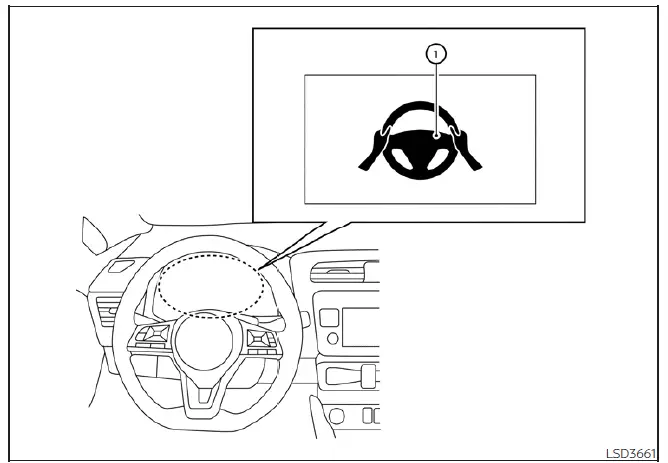
Hands-on detection
To ensure safety while Steering Assist is activated, the system continuously monitors your interaction with the steering wheel.
If the system detects that you are not actively steering or that you have removed your hands from the wheel for a prolonged period, an initial warning message (Warning 1) will appear on the information display.
If you fail to provide steering input after this initial warning, an audible alert will sound, the visual warning on your Nissan Leaf display will begin to flash, and the vehicle will initiate a quick, short application of the brakes to prompt you to retake control.
Should you remain unresponsive, the ProPILOT Assist system will automatically activate your hazard flashers and safely decelerate the vehicle until it comes to a complete, controlled stop.
You can cancel this deceleration sequence at any time by simply steering, applying the brakes, accelerating, or interacting with the ProPILOT Assist switch.
WARNING
Steering Assist is strictly an assistance feature and is not a system designed for hands-free driving. Always maintain a firm grip on the steering wheel and operate your vehicle with full attention. Failure to keep your hands on the wheel while using the system could lead to a collision, resulting in serious personal injury or even death.
Note: If you only lightly touch the steering wheel rather than maintaining a firm grip, the torque sensors may fail to detect your presence, triggering a sequence of warnings. Once you resume a proper, firm hold on the steering wheel and provide active input, these warnings will automatically cancel.
 Steering Assist
WARNING
Failure to strictly adhere to these safety warnings and operational guidelines for the Steering Assist system in your Nissan Leaf could lead to a serious accident, personal injury, or dea ...
 Steering Assist limitations
WARNING
In the following situations, the front-facing camera may fail to identify lane markers accurately or misinterpret road features, which may result in the Steering Assist system f ...
Other materials:
Intelligent key low battery warning does not operate
Diagnosis Procedure
1.CHECK DTC WITH BCM AND COMBINATION METER
Check that DTC is not detected with BCM and combination meter.
Is the inspection result normal?
YES >> GO TO 2.
NO-1 >> Refer to BCS-67, "DTC Index". (BCM)
NO-2 >> Refer to MWI-36, "DTC Index&qu ...
B1153 curtain air bag module LH
DTC Logic
DTC DETECTION LOGIC
DTC CONFIRMATION PROCEDURE
1.CHECK SELF-DIAG RESULT
With CONSULT-III
1. Turn ignition switch ON.
2. Perform “Self Diagnostic Result� mode of “AIR BAG� using CONSULT-III.
Without CONSULT-III
1. Turn ignition switch ON.
2. Check the air bag warning la ...
Hood
WARNING
• Make sure the hood is completely closed and latched before driving.
Failure to do so could cause the hood to fly open and result in an accident.
• If you see steam or smoke coming from the engine compartment, to avoid injury
do not open the hood.
When opening the hood:
1. Pull ...
