
Nissan Juke Service and Repair Manual : Rear fender cover
Exploded View
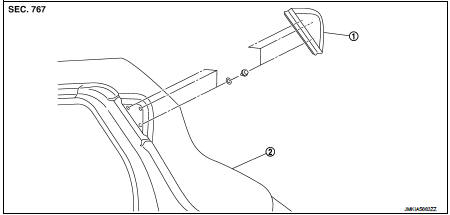
1. Rear fender cover 2. Rear fender
Removal and Installation
REMOVAL
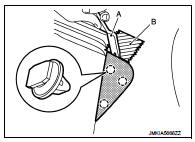
Disengage rear fender cover fixing clips using remover tool (A), and then remove rear fender cover.
CAUTION:
Apply protective tape (B) to the body side to protect from damage
.
 : Clip
INSTALLATION
Note the following item, and install in the reverse order of removal.
CAUTION:
When installing rear fender cover, check that clips are securely fitted in body
panel holes, and then
press them it.
 Door sash tape
Exploded View
1. Front door panel
2. Front door sash tape
3. Rear door sash tape
4. Rear door panel
: Do not reuse
Front door sash tape
FRONT DOOR SASH TAPE : Removal and Installation
REMO ...
 Back door finisher
Exploded View
1. Rear view camera
2. Back door opener request switch
3. Emblem
4. Back door finisher
: Clip
: Pawl
: Do not reuse
Removal and Installation
REMOVAL
1. Remove back door tri ...
Other materials:
B27A6, B27A7, B27A8, B27A9 mode door motor
DTC Logic
DTC DETECTION LOGIC
NOTE:
• If DTC is displayed along with DTC U1000, first perform the trouble diagnosis
for DTC U1000. Refer to HAC-
51, "DTC Logic".
• If DTC is displayed along with DTC U1010, first perform the trouble diagnosis
for DTC U1010. HAC-52,
"DTC L ...
P0420 three way catalyst function
DTC Logic
DTC DETECTION LOGIC
The ECM monitors the switching frequency ratio of air fuel ratio (A/F)
sensor 1 and heated oxygen sensor 2.
A three way catalyst (manifold) with high oxygen storage capacity
will indicate a low switching frequency of heated oxygen sensor 2.
As oxygen storage c ...
System description
VENTILATION SYSTEM
System Description
OUTLINE
Ventilation system is controlled by A/C auto amp. (AUTOMATIC AIR
CONDITIONING) or A/C control (MANUAL
AIR CONDITIONING and MANUAL HEATER). For details of air conditioner system,
refer to HAC-17,
"System Description" (AUTOMATIC AIR COND ...
