
Nissan Leaf 2018-2025 (ZE1) Owner's Manual : Passenger Compartment
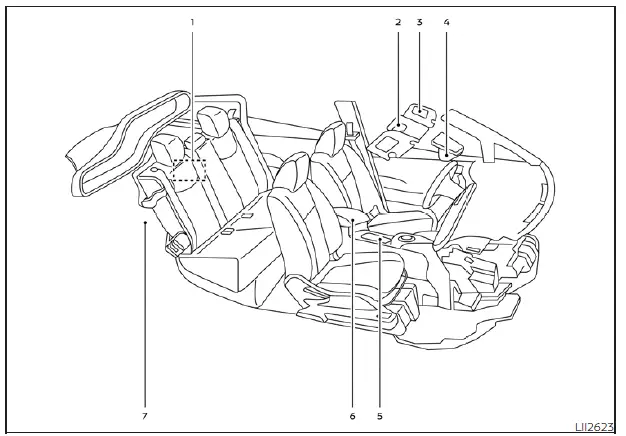
- Emergency tire puncture repair kit: Compact, convenient solution for quick fixes on the road.
- Map lights: Overhead lighting console housing the Bluetooth Hands-Free Phone System microphone and a convenient sunglasses storage compartment.
- Sun visors: Adjustable glare protection for both front-seat occupants.
- Inside rearview mirror: Auto-dimming functionality for reduced glare during night driving.
- Front cup holders: Ergonomically placed for driver and passenger convenience.
- Console box: Central storage area including a dedicated USB/iPod charging port for mobile connectivity.
- Cargo area: Versatile storage space featuring a removable tonneau cover and dedicated storage for your Nissan Leaf EVSE (Electric Vehicle Supply Equipment) charging cable.
*For additional configuration information, please refer to the comprehensive NissanConnect Manual.
Cockpit Interface
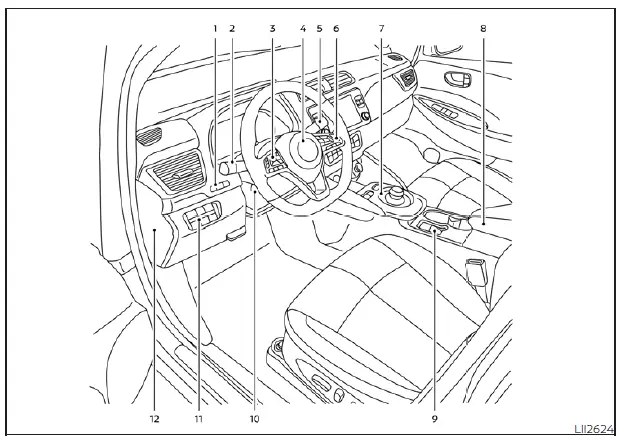
- TRIP RESET switch: Allows you to toggle between twin trip odometers and adjust instrument cluster brightness for better visibility.
- Lighting and signal stalks: Integrated controls for headlamps, fog lamps, and turn signals.
- Left-hand steering wheel controls: Centralized interface for audio settings and navigating the vehicle information display.
- Steering wheel: Multi-function steering wheel housing the horn, driver’s side airbag, and power steering system controls.
- Wiper/Washer stalk: Simplified, intuitive controls for all windshield cleaning functions.
- Right-hand steering wheel controls: Command center for cruise control, Intelligent Cruise Control (ICC), ProPILOT Assist, and Bluetooth hands-free phone integration.
- Shift lever: Electronically controlled shifter with dedicated ECO mode and e-Pedal activation for one-pedal driving efficiency.
- Console box: Easily accessible center storage.
- Parking brake: Electronic switch-type parking brake for effortless engagement.
- Tilt and telescopic steering wheel lever: Customizes the steering column position to suit your preferred driving posture.
- Lower instrument panel switches: Quick-access bank for the charge port lid, immediate charging, heated steering wheel, and advanced driver assistance systems like Steering Assist.
- Fuse box cover: Easily removable panel for essential electrical system maintenance.
*For further details on system settings and connectivity, refer to your NissanConnect Manual.
 Seats, seat belts, and the Supplemental Restraint System (SRS)
Rear head restraints: Adjustable for optimal support and whiplash protection.
Child restraint anchor points: Secure attachment points specifically designed for ...
 Instrument Panel
Vents: Adjustable climate control outlets for personalized cabin airflow.
Meters and gauges: Comprehensive digital driver information display providing real-ti ...
Other materials:
P1212 TCS communication line
Description
This CAN communication line is used to control the smooth engine operation
during the TCS operation. Pulse
signals are exchanged between ECM and “ABS actuator and electric unit (control
unit)�.
Be sure to erase the malfunction information such as DTC not only for “ABS
ac ...
P0525 ASCD system
DTC Logic
DTC DETECTION LOGIC
Diagnosis Procedure
1.CHECK GROUND CONNECTIONS
1. Turn ignition switch OFF and wait at least 20 seconds.
2. Check ground connection E38. Refer to Ground inspection in GI-44, "Circuit
Inspection".
Is the inspection result normal?
YES >> GO TO ...
Headlamp
Exploded View
REMOVAL
1. Headlamp assembly
2. EPT sealer [2.8 mm (0.110 in)]
: Do not reuse
: N·m (kg-m, in-lb)
DISASSEMBLY
1. Back cover
2. Halogen bulb
3. Headlamp housing assembly
4. Retaining spring
5. EPT sealer [2.8 mm (0.110 in)]
: Do not reuse
Removal and Installation
...
