
Nissan Juke Service and Repair Manual : P0846 transmission fluid pressure SEN/SW B
DTC Logic
DTC DETECTION LOGIC
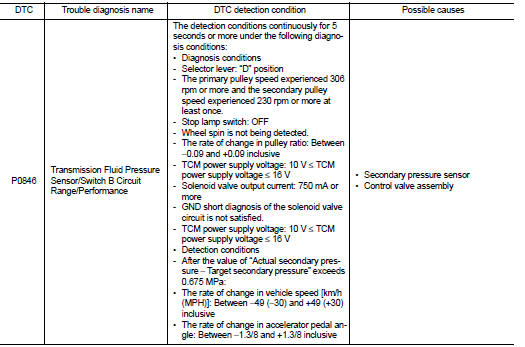
DTC CONFIRMATION PROCEDURE
CAUTION:
Be careful of the driving speed.
1.PREPARATION BEFORE WORK
If another "DTC CONFIRMATION PROCEDURE" occurs just before, turn ignition switch OFF and wait for at least 10 seconds, then perform the next test.
>> GO TO 2.
2.CHECK DTC DETECTION
1. Start the engine.
2. Shift the selector lever to “D� position.
3. Drive the vehicle at a constant velocity of 40 km/h (25 MPH) at lease for 10 seconds.
CAUTION:
At the same time, the accelerator pedal angle must be maintained constant.
4. Stop the vehicle.
5. Check the first trip DTC.
Is “P0846�detected? YES >> Go to TM-425, "Diagnosis Procedure".
NO >> INSPECTION END
Diagnosis Procedure
1.CHECK TCM INPUT SIGNAL
1. Start the engine.
2. Check the voltage between TCM connector terminal and ground.

Is the inspection result normal? YES >> Check intermittent incident. Refer to GI-42, "Intermittent Incident".
NO >> There is a malfunction of the secondary pressure sensor value. Replace the transaxle assembly.
Refer to TM-508, "Removal and Installation".
 P0746 pressure control solenoid A
DTC Logic
DTC DETECTION LOGIC
NOTE:
DC stands for "DRIVING CYCLE" and indicates a series of driving cycle of
"Ignition switch OFF → ON → driving
→ OFF".
...
 P0847 transmission fluid pressure SEN/SW B
DTC Logic
DTC DETECTION LOGIC
DTC CONFIRMATION PROCEDURE
1.PREPARATION BEFORE WORK
If another "DTC CONFIRMATION PROCEDURE" occurs just before, turn ignition
switch OFF and wait for a ...
Other materials:
Install
1. Align the head restraint/headrest stalks with the holes in the seat. Make
sure that the head restraint/headrest is facing the correct direction. The stalk
with the adjustment notch1 must be installed in the hole with the lock knob2 .
2. Push and hold the lock knob and push the head restrai ...
Engine idle speed too high
Description
CHART 5: ENGINE IDLE SPEED TOO HIGH
Diagnosis Procedure
1.CHECK ECM POWER SUPPLY AND GROUND CIRCUIT
Check ECM power supply and ground circuit. Refer to EC-885, "Diagnosis
Procedure".
Is the inspection result normal?
YES >> GO TO 2.
NO >> Repair or repla ...
Cold weather driving
CAUTION
To maintain the long-term integrity and health of your Nissan Leaf Li-ion battery, it is crucial that you do not store the vehicle in ambient temperatures below -13ºF (-25ºC) for a duration exceeding seven days. When the external temperature reaches -13ºF (-25ºC) or lower, the batte ...
