
Nissan Juke Service and Repair Manual : P0037, P0038 HO2S2 heater
DTC Logic
DTC DETECTION LOGIC

DTC CONFIRMATION PROCEDURE
1.PRECONDITIONING
If DTC Confirmation Procedure has been previously conducted, always perform the following procedure before conducting the next test.
1. Turn ignition switch OFF and wait at least 10 seconds.
2. Turn ignition switch ON.
3. Turn ignition switch OFF and wait at least 10 seconds.
TESTING CONDITION:
Before performing the following procedure, confirm that battery voltage is more
than 11 V at idle.
>> GO TO 2.
2.PERFORM DTC CONFIRMATION PROCEDURE
 With CONSULT-III
1. Turn ignition switch ON and select “DATA MONITOR� mode of “ENGINE� using CONSULT-III.
2. Start engine and warm it up to normal operating temperature.
3. Turn ignition switch OFF and wait at least 10 seconds.
4. Start engine and keep the engine speed between 3,500 and 4,000 rpm for at least 1 minute under no load.
5. Let engine idle for 1 minute.
6. Check 1st trip DTC.
 With GST
Follow the procedure “With CONSULT-III� above.
Is 1st trip DTC detected? YES >> Proceed to EC-580, "Diagnosis Procedure".
NO >> INSPECTION END
Diagnosis Procedure
1.CHECK HO2S2 POWER SUPPLY CIRCUIT
1. Turn ignition switch OFF.
2. Disconnect heated oxygen sensor 2 (HO2S2) harness connector.
3. Turn ignition switch ON.
4. Check the voltage between HO2S2 harness connector and ground.

Is the inspection result normal? YES >> GO TO 2.
NO >> Repair or replace error-detected parts.
2.CHECK HO2S2 OUTPUT SIGNAL CIRCUIT
1. Turn ignition switch OFF.
2. Disconnect ECM harness connector.
3. Check the continuity between HO2S2 harness connector and ECM harness connector.
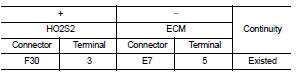
4. Also check harness for short to ground and short to power.
Is the inspection result normal? YES >> GO TO 3.
NO >> Repair or replace error-detected parts.
3.CHECK HEATED OXYGEN SENSOR 2 HEATER
Check the heated oxygen sensor 2 heater. Refer to EC-581, "Component Inspection".
Is the inspection result normal? YES >> Check intermittent incident. Refer to GI-42, "Intermittent Incident".
NO >> GO TO 4.
4.REPLACE HEATED OXYGEN SENSOR 2
Replace heated oxygen sensor 2. Refer to EX-5, "Exploded View".
CAUTION:
• Discard any sensor which has been dropped from a height of more than 0.5 m
(19.7 in) onto a hard
surface such as a concrete floor; use a new one.
• Before installing new sensor, clean exhaust system threads using Oxygen Sensor Thread Cleaner [commercial service tool (J-43897-18 or J43897-12)] and approved Anti-seize Lubricant (commercial service tool).
>> INSPECTION END
Component Inspection
1.CHECK HEATED OXYGEN SENSOR 2 HEATER
1. Turn ignition switch OFF.
2. Disconnect heated oxygen sensor 2 (HO2S2) harness connector.
3. Check resistance between HO2S2 terminals as per the following.
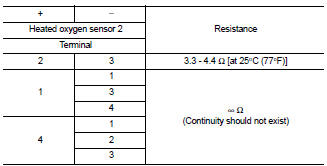
Is the inspection result normal?
YES >> INSPECTION END
NO >> GO TO 2.
2.REPLACE HEATED OXYGEN SENSOR 2
Replace heated oxygen sensor 2. Refer to EX-5, "Exploded View".
CAUTION:
• Discard any sensor which has been dropped from a height of more than 0.5 m
(19.7 in) onto a hard
surface such as a concrete floor; use a new one.
• Before installing new sensor, clean exhaust system threads using Oxygen Sensor Thread Cleaner [commercial service tool (J-43897-18 or J43897-12)] and approved Anti-seize Lubricant (commercial service tool).
>> INSPECTION END
 P0031, P0032 A/F sensor 1 heater
DTC Logic
DTC DETECTION LOGIC
DTC CONFIRMATION PROCEDURE
1.PRECONDITIONING
If DTC Confirmation Procedure has been previously conducted, always turn
ignition switch OFF and wait wait
at least ...
 P0075 IVT control solenoid valve
DTC Logic
DTC DETECTION LOGIC
DTC CONFIRMATION PROCEDURE
1.PRECONDITIONING
If DTC Confirmation Procedure has been previously conducted, always turn
ignition switch OFF and wait at
least 10 se ...
Other materials:
Information display (speed limiter)
Component Function Check
1.CHECK INFORMATION DISPLAY (SPEED LIMITER) FUNCTION
1. Start engine.
2. Press speed limiter MAIN switch.
3. Drive the vehicle at more than 30 km/h (20 MPH).
CAUTION:
Always drive vehicle at a safe speed.
4. Press SET/COAST switch.
5. Perform a test drive on a flat ...
P1585 G sensor
Description
• G sensor is installed to floor under instrument lower cover.
• G sensor detects longitudinal G and inclination that affects the vehicle and
outputs to ECM using analog voltage.
ECM converts the analog voltage value to digital signal and transmits the signal
to TCM via CAN ...
U1010 control unit (CAN)
Description
CAN (Controller Area Network) is a serial communication line for real time
application. It is an on-vehicle multiplex
communication line with high data communication speed and excellent malfunction
detection ability.
Many electronic control units are equipped onto a vehicle, and ...
