
Nissan Leaf 2018-2025 (ZE1) Owner's Manual : Li-ion battery available charge gauge
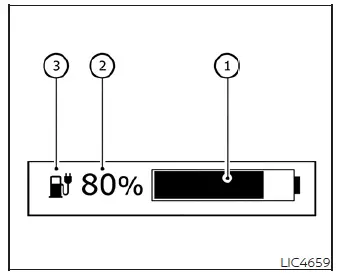
- This gauge provides an accurate real-time indication of the available energy stored in the Li-ion battery, which is necessary to power your Nissan Leaf.
- This figure represents the current state of charge (SOC) of the battery expressed as a percentage.
- Low battery charge indicator
 :
This indicator illuminates in yellow when the available charge in your Nissan Leaf's battery pack has reached a low level.
:
This indicator illuminates in yellow when the available charge in your Nissan Leaf's battery pack has reached a low level.
To ensure optimal vehicle operation, it is recommended to charge the Li-ion battery before the blue bar of the gauge (1) disappears completely.
The low battery charge indicator
 (3) illuminates yellow to alert you that the available energy is diminishing. We recommend locating a charging station and replenishing the battery as soon as it is convenient, ideally before the blue bar (1) is no longer visible on the display.
When the blue bar (1) disappears from the gauge and the charge indicator
 (3) remains illuminated, your Nissan Leaf is operating on a very limited reserve of battery capacity.
NOTE:
- The visual length of the blue bar (1) is dynamically determined by both the actual available charge and the current storage capacity of the Li-ion battery, which can be influenced by the battery's temperature.
- Ambient and battery temperature significantly affect the amount of energy the Li-ion battery is capable of storing. The battery capacity effectively decreases when temperatures are cold, and increases when temperatures are warm. Consequently, the length of the blue bar (1) may shift even if the total energy output remains constant. For example, in colder conditions, you may see a longer blue bar because the remaining energy represents a larger portion of the battery's current reduced storage capacity. Conversely, in warmer conditions, the same amount of energy may appear as a shorter blue bar because it represents a smaller percentage of the battery's total increased storage capability.
Estimated Charge Time
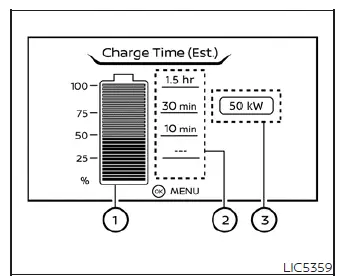
The Estimated Charge Time mode conveniently calculates the approximate duration required to reach a full battery charge. Please note that immediately after the power switch is set to the ON position, the display may briefly show a duration that is longer than the actual time required to complete the charging cycle.
Not charging
How to read the display:
The projected charging time is calculated based on the electrical power settings selected in the [Charge Time Screen] within the EV Settings menu of your Nissan Leaf. The display provides the following data:
- The current remaining charge level of the Li-ion battery.
- The estimated time required to reach specific capacity milestones (25%, 50%, 75%, and 100%).
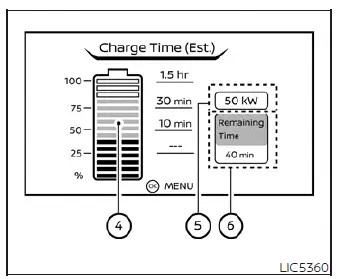
While charging (quick charge)
- If the calculation determines that the total charging time will exceed 24 hours, the display will indicate [Over 24hr].
- Once the current charge level of the Li-ion battery surpasses a specific milestone percentage, the estimated time for that level will be displayed as [---].
- Upon reaching a full charge, all specific milestone timing information will be cleared and replaced with [---].
- The currently configured electrical power input (supplied to the charger).
- The estimated battery charge percentage that will be reached by the end of the remaining charging time.
- The actual real-time electrical power being supplied during a quick charging session.
- The time remaining until the quick charger automatically shuts off.
When the vehicle is not actively charging, you can easily access the [Charge Time Screen] by simply pressing the OK button on your steering wheel. This interface allows you to manually select the specific electrical power input level that you wish to view within the Estimated Charge Time display, tailoring the information to your current charging setup.
NOTE:
- During an active charging session, the estimated time provided is dynamically calculated based on the actual electrical power currently being delivered to the charger.
- For standard home or normal charging sessions, the Nissan Leaf displays electrical power as a fixed, pre-configured value. Because of this, the figure shown on your dashboard may occasionally differ slightly from the actual amount of power being supplied by your wall box or charging cable.
- In contrast, when utilizing quick charging stations, the power display is highly responsive and will shift to show the real-time electrical intake while charging is underway. If the charging process is interrupted or the power supply is severed—such as by unplugging the cable—the display will revert to the default selected electrical power setting.
- The charging durations indicated for each percentage milestone are current estimations. Please understand that the actual time required to reach a full charge will naturally fluctuate based on your Nissan Leaf's specific battery condition, thermal management status, and overall state of charge.
- Immediately after you begin or conclude a charging session, the estimated time calculation may require a moment to calibrate; as such, it might initially differ from the actual duration. The system will refresh to display the precise timing after a brief period of data stabilization.
Li-ion battery capacity level gauge
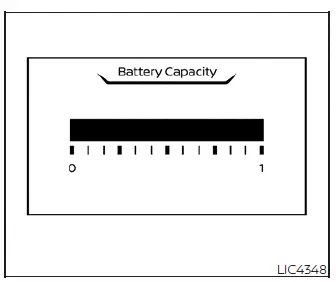
This dedicated gauge provides you with an overview of your Li-ion battery’s current health, specifically displaying the remaining capacity available to store electrical power over the lifespan of the vehicle.
To monitor this capacity metric, simply navigate to the gauge within your trip computer’s digital menu system.
Outside air temperature
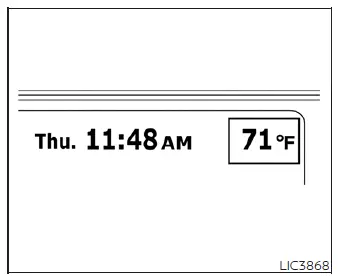
The current outside air temperature is conveniently presented in either ºF or ºC, depending on your preferred system settings.
Please note that the temperature detected by your Nissan Leaf may vary slightly from readings shown on local community signs, billboards, or other external thermometers due to the specific placement of the vehicle's sensor.
Clock
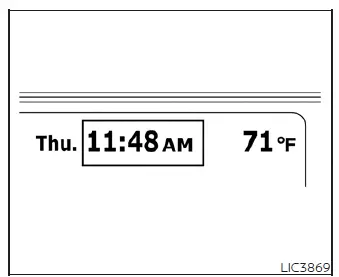
You can effortlessly adjust the clock via the settings interface on your vehicle information display. For detailed instructions on navigation and customization, please refer to the "Settings" section of your owner's manual.
In the event that the 12-volt battery power supply is disconnected for maintenance or other reasons, the internal clock will lose its time synchronization. Simply access the menu to manually readjust the time once power is restored.
ECO mode indicator
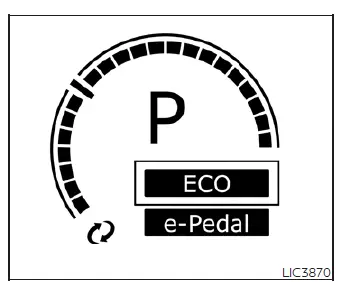
The ECO mode indicator illuminates clearly on the vehicle information display whenever this efficiency-focused mode is engaged. The Nissan Leaf uses ECO mode to intelligently optimize energy consumption, helping to extend your overall driving range by moderating power delivery and auxiliary system usage.
e-Pedal system indicator
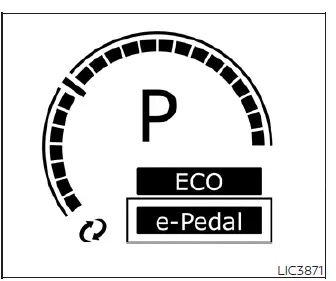
The "e-Pedal" text will illuminate within your vehicle information display to confirm that the advanced e-Pedal system is active, allowing for one-pedal driving convenience. Conversely, the "e-Pedal OFF" indicator will appear to keep you informed when the system has been deactivated.
 Power meter
This dynamic gauge provides a clear visual representation of your Nissan Leaf's energy flow. It specifically monitors the actual traction motor power consumption (A) and tracks t ...

Other materials:
Precaution for Disposal
• Before disposing of air bag module, pop-up roll bar and seat belt pre-tensioner,
or vehicles equipped with
such systems, deploy the systems. If such systems have already been deployed due
to an accident, dispose
of them as indicated in Disposing of Air Bag Module, Pop-up Roll Bar and Seat ...
Diagnosis system (BCM) (without intelligent key system)
Common item : consult-III Function (BCM - COMMON ITEM)
APPLICATION ITEM
CONSULT-III performs the following functions via CAN communication with BCM.
SYSTEM APPLICATION
BCM can perform the following functions for each system.
NOTE:
It can perform the diagnosis modes except the following for ...
Components
• THE LARGE ILLUSTRATIONS are exploded views (see the following) and
contain tightening torques, lubrication
points, section number of the PARTS CATALOG (e.g. SEC. 440) and other
information necessary to
perform repairs.
The illustrations should be used in reference to service matters onl ...
