
Nissan Juke Owners Manual : Intelligent Key battery discharge
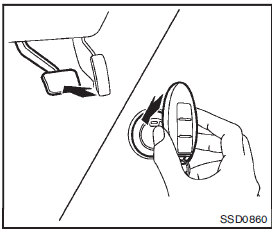
If the battery of the Intelligent Key is discharged, or environmental conditions interfere with the Intelligent Key operation, start the engine according to the following procedure:
1. Move the shift lever to the P (Park) position (for Continuously Variable Transmission models) or the shift lever to the N (Neutral) position (for manual transmission models).
2. Firmly apply the foot brake.
3. Touch the ignition switch with the Intelligent Key as illustrated. (A chime will
sound.)
4. Push the ignition switch while depressing the brake pedal within 10 seconds after
the chime sounds. The engine will start.
After step 3 is performed, when the ignition switch is pushed without depressing the brake pedal, the ignition switch position will change to ACC.
NOTE:
• When the ignition switch is pushed to the ACC or ON position or the engine is started by the above procedures, the Intelligent Key system warning light may blink in yellow even if the Intelligent Key is inside the vehicle. This is not a malfunction. To stop the warning light from blinking, touch the ignition switch with the Intelligent Key again.
• If the Intelligent Key system warning light in the meter is blinking in green, replace the battery as soon as possible.
(See “Key battery replacement� (P.8- 22).)
 Emergency engine shut off
To shut off the engine in an emergency situation while driving, perform the following
procedure:
• Rapidly push the push-button ignition switch 3 consecutive times in less than
1.5 seconds, or
...
 Before starting the engine
• Make sure the area around the vehicle is clear.
• Check fluid levels such as engine oil, coolant, brake fluid, and window washer
fluid as frequently as
possible, or at least whenever you re ...
Other materials:
Refrigerant pressure sensor
Component Function Check
1.CHECK REFRIGERANT PRESSURE SENSOR OVERALL FUNCTION
1. Start engine and warm it up to normal operating temperature.
2. Turn A/C switch and blower fan switch ON.
3. Check the voltage between ECM harness connector and ground.
Is the inspection result normal?
YES >& ...
B1152 curtain air bag module LH
DTC Logic
DTC DETECTION LOGIC
DTC CONFIRMATION PROCEDURE
1.CHECK SELF-DIAG RESULT
With CONSULT-III
1. Turn ignition switch ON.
2. Perform “Self Diagnostic Result� mode of “AIR BAG� using CONSULT-III.
Without CONSULT-III
1. Turn ignition switch ON.
2. Check the air bag warning la ...
Periodic maintenance
GEAR OIL
Inspection
OIL LEAKAGE
Make sure that gear oil is not leaking from transaxle or around it.
OIL LEVEL
1. Remove filler plug (1) and gasket from transaxle case.
2. Check the oil level from filler plug mounting hole as shown in the
figure.
CAUTION:
Never start engine while checkin ...
