
Nissan Juke Service and Repair Manual : Intelligent key battery
Removal and Installation
1. Release the lock knob at the back of the Intelligent Key and remove the mechanical key.
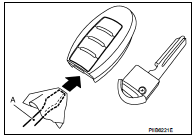
2. Insert a flat-blade screwdriver (A) wrapped with a cloth into the slit of the corner and twist it to separate the upper part from the lower part.
CAUTION:
• Do not touch the circuit board or battery terminal.
• The key fob is water-resistant. However, if it does get wet, immediately wipe it dry.
3. Replace the battery with new one.
Battery replacement :Coin-type lithium battery (CR2025)
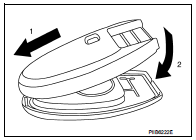
4. Align the tips of the upper and lower parts, and then push them together until it is securely closed.
CAUTION:
• When replacing battery, keep dirt, grease, and other foreign
materials off the electrode contact area.
• After replacing the battery, check that all Intelligent Key functions work normally.
 Remote keyless entry receiver
Removal and Installation
REMOVAL
1. Remove the glove box assembly. Refer to IP-13, "Removal and
Installation".
2. Remove the remote keyless entry receiver (1) mounting bolt (A),
and th ...

Other materials:
B1130 side air bag module RH
DTC Logic
DTC DETECTION LOGIC
DTC CONFIRMATION PROCEDURE
1.CHECK SELF-DIAG RESULT
With CONSULT-III
1. Turn ignition switch ON.
2. Perform “Self Diagnostic Result� mode of “AIR BAG� using CONSULT-III.
Without CONSULT-III
1. Turn ignition switch ON.
2. Check the air bag warning la ...
P060B ECM
DTC Logic
DTC DETECTION LOGIC
Diagnosis Procedure
1.INSPECTION START
1. Turn ignition switch ON.
2. Erase DTC.
3. Turn ignition switch OFF and wait for 20 seconds.
4. Turn ignition switch ON and perform the self-diagnosis.
Is the DTC P060B displayed again?
YES >> GO TO 2.
NO &g ...
Foreword
This manual contains maintenance and repair procedures for the NISSAN
JUKE, model F15 series.
In order to assure your safety and the efficient functioning of the vehicle,
this manual should be read thoroughly. It is especially important that the
PRECAUTIONS in the GI section be completely unde ...
