
Nissan Leaf 2018-2025 (ZE1) Owner's Manual : Driving with a discharged Li-ion battery
To help you reach your destination safely, the onboard navigation system (if equipped) is designed to monitor your remaining range. If you set a destination that exceeds the current estimated distance, the system will proactively search for nearby public charging stations. When these locations appear, we advise that you plan to charge your Nissan Leaf at the earliest opportunity.
As your Li-ion battery energy levels become low, the vehicle provides clear visual cues. Warning lights will illuminate on the instrument panel, accompanied by informative alerts on the vehicle information display. Furthermore, if you are utilizing the integrated navigation system, the screen will provide guided routing to the nearest available charging stations to ensure you are not left without power.
Please be aware that vehicle range is extremely limited once these warning indicators appear. It is critical to heed all alerts on the navigation screen and proceed immediately to the closest charging station to avoid a total loss of motive power.
The system utilizes three distinct stages of alerts as the Li-ion battery approaches full discharge:
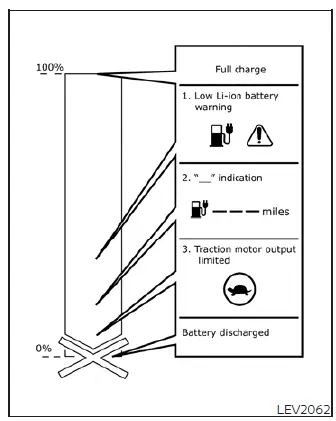
1. At the initial stage of low energy, the following indicators will activate simultaneously to alert the driver:
- The low battery charge indicator

- The master warning light

- A clear text prompt reading "Battery charge is low, Charge now" will appear on the vehicle information display.
- If equipped, the navigation system will provide additional guidance and prompts on its screen.
- For more comprehensive details, please refer to the section covering the "Low battery charge indicator."
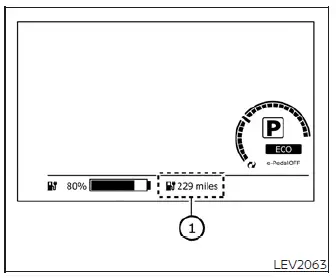
- The estimated driving range display will begin to flash to emphasize the urgency of the situation.
NOTE:
Traffic conditions can significantly impact your travel time. If your Nissan Leaf battery is reaching a near-complete state of discharge, prioritize driving directly to the nearest charging location rather than attempting to reach a more distant station suggested by the navigation system.
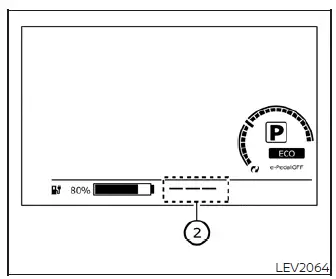
2. Should you continue driving as the Li-ion battery discharge deepens, the estimated driving range display on the instrument panel will change to "- - -" to signal critical range status.
Additional advisory messages will also be shown on your navigation system screen if your vehicle is so equipped.
For more specific details, please see the section dedicated to the "Li-ion battery available charge gauge."
3. When the power limitation indicator light
 illuminates, the traction motor output is intentionally restricted to preserve remaining energy. This will result in noticeably reduced vehicle speed and acceleration. You must stop the vehicle in a safe location immediately before the battery is fully depleted and the vehicle loses all motive power.
If you find yourself in an emergency, please contact the Roadside Assistance Service detailed in your NISSAN Warranty Information Booklet. For additional guidance, refer to the section titled "If the Li-ion battery becomes completely discharged."
Charging the 12-volt battery
Your Nissan Leaf automatically maintains the charge of the auxiliary 12-volt battery using energy stored in the main Li-ion battery.
During the active charging process, the charge status indicator light on the instrument panel will flash. Note that this light does not flash while the main Li-ion battery is being charged or when the power switch is in the "READY" to drive position.
For further information, please see the section regarding "Charging status indicator lights."
While the vehicle is being driven
The Li-ion battery will replenish the 12-volt battery as required whenever the power switch is set to the "READY" to drive position.
Please note that the 12-volt battery will not charge under the following specific conditions:
- When the power switch is set to the ACC (Accessory) position.
- When the power switch is in the ON position, but the transmission shift selector is set to the N (Neutral) position.
While the vehicle is not in use
When the Nissan Leaf EV system remains powered off for an extended period, the vehicle may automatically activate a short charging cycle for the 12-volt battery on a regular, intermittent basis to maintain its health.
 Li-ion battery
WARNING
Your Nissan Leaf is equipped with a high-voltage, sealed lithium-ion (Li-ion) battery. Improper handling, disposal, or tampering with this battery poses significant risks, including sever ...
 Li-ion battery warmer
For models equipped with a 40 kWh battery
CAUTION
The Li-ion battery warmer system is designed to maintain optimal battery health; however, it will not operate if the available battery charg ...
Other materials:
P1641 thermoplunger control unit
DTC Logic
DTC DETECTION LOGIC
Diagnosis Procedure
1.CHECK THERMOPLUNGER CONTROL UNIT POWER SUPPLY CIRCUIT
1. Turn ignition switch OFF.
2. Disconnect thermoplunger control unit harness connector.
3. Check the voltage between thermoplunger control unit harness connector and
ground.
Is the ...
P1745 line pressure control
Description
The line pressure solenoid valve regulates the oil pump discharge pressure to
suit the driving condition in
response to a signal sent from the TCM.
DTC Logic
DTC DETECTION LOGIC
DTC CONFIRMATION PROCEDURE
NOTE:
If “DTC CONFIRMATION PROCEDURE� has been previously performed, ...
Tire Pressure Monitoring System (TPMS)
This vehicle is equipped with the Tire Pressure Monitoring System (TPMS). It
monitors tire pressure of all tires except the spare. When the low tire pressure
warning light is lit, and the CHECK TIRE PRES (pressure) warning message is displayed
in the vehicle information display, one or more of ...
