
Nissan Juke Service and Repair Manual : Draining
WARNING:
• Never remove radiator cap when engine is hot. Serious burns may occur from
high-pressure engine
coolant escaping from radiator.
• Wrap a thick cloth around the radiator cap. Slowly turn it a quarter of a turn to release built-up pressure.
Then turn it all the way.
1. Remove engine under cover.
2. Open radiator drain plug (A) at the bottom of radiator, and then remove radiator cap.
 : Vehicle front
CAUTION: Perform this step when engine is cold.
• When draining all of engine coolant in the system, open water drain plugs on cylinder block. Refer to EM-228, "Disassembly and Assembly".
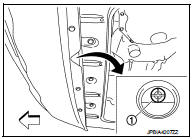
3. Remove reservoir tank if necessary, and drain engine coolant and clean reservoir tank before installing.
Refer to CO-42, "Exploded View".
4. Check drained engine coolant for contaminants such as rust, corrosion or discoloration. If contaminated, flush the engine cooling system. Refer to CO-39, "Flushing".
 Inspection
LEVEL
• Check that the reservoir tank engine coolant level is within the
“MIN� to “MAX� when the engine is cool.
A : MAX
B : MIN
• Adjust the engine coolant level if necessary.
LEA ...
 Refilling
1. Install reservoir tank if removed and radiator drain plug.
CAUTION:
Be sure to clean drain plug and install with new O-ring.
Radiator drain plug : Refer to CO-42, "Exploded View".
â ...
Other materials:
Yaw rate/side/decel G sensor
Exploded View
1. Yaw rate/side/decel G sensor
2. Yaw rate/side/decel G sensor harness
connector
3. Bracket
: Vehicle front
: N·m (kg-m, in-lb)
Removal and Installation
REMOVAL
CAUTION:
Never drop or strike yaw rate/side/decel G sensor, because it has little
endurance to impact. Never ...
Idle speed
Description
This describes how to check the idle speed. For the actual procedure, follow
the instructions in “BASIC
INSPECTION�.
Special Repair Requirement
1.CHECK IDLE SPEED
With CONSULT-III
Check idle speed in “DATA MONITOR� mode with CONSULT-III.
With GST
Check idle speed wit ...
Location of plastic parts
Precautions for Plastics
CAUTION:
• When repairing and painting a portion of the body adjacent to plastic parts,
consider their characteristics (influence of heat
and solvent) and remove them if necessary or take suitable measures to protect
them.
• Plastic parts should be repaired and ...
