
Nissan Leaf 2018-2025 (ZE1) Owner's Manual : Displaying climate control system status screen (models with navigation system)
The specialized climate control system status screen on the Nissan Leaf can be conveniently displayed on your central infotainment panel as a dynamic widget. For detailed instructions on how to customize and arrange this interactive widget layout, please refer to the comprehensive NissanConnect Manual provided with your vehicle.
NOTE:
- If the prominent green READY to drive indicator light is actively illuminated on your dashboard and the EVSE (Electric Vehicle Supply Equipment) charging cable is physically connected to the vehicle port, the power switch will instantly cycle to the standard ON position. At the exact same moment, the active heating or cooling of the climate control system will cease operating as a safety override. However, the mechanical circulation fan will continue to run and blow air. If you wish to manually re-engage full climate control functions under these circumstances, place the power switch into the complete OFF position and then cycle it back into the ON position, ensuring you have first verified that the Nissan Leaf has successfully re-initiated its high-voltage battery charging sequence.
- When the power switch is held in the active ON position, if the incoming electrical power feed from the connected EVSE (Electric Vehicle Supply Equipment) is suddenly cut off or interrupted due to an unexpected neighborhood grid outage or station fault, the onboard control modules will manage the climate systems in the following precise ways:
- If the power interruption occurs while an active battery charging session is being performed:
The complete climate control system will temporarily shut down to protect the electrical architecture. If the primary power supply is successfully restored to the charging station within a window of approximately 5 minutes, the climate control system will automatically resume its previous settings and restart.
However, if more than 5 minutes have elapsed without grid restoration, the climate control system will remain completely inactive and will not restart automatically until user intervention occurs.
- If the power interruption occurs after the battery charging cycle has already finished naturally: The climate control system will immediately stop operating to preserve the remaining high-voltage charge inside the battery pack.
- If the power interruption occurs while an active battery charging session is being performed:
The complete climate control system will temporarily shut down to protect the electrical architecture. If the primary power supply is successfully restored to the charging station within a window of approximately 5 minutes, the climate control system will automatically resume its previous settings and restart.
Operating tips
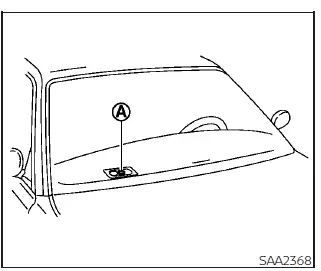
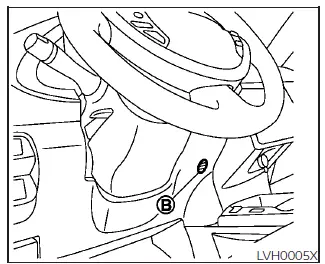
- The automatic climate control system of your Nissan Leaf is engineered with sensitive thermal and solar sensors as highlighted in the technical illustration. The integrated sensor A and sensor B work continuously to monitor conditions and maintain a perfectly constant cabin temperature. To prevent system errors or incorrect temperature adjustments, do not place clothing, papers, or any other items directly on top of or around these sensor housings.
- The continuous electrical power consumption of the climate control system fluctuates significantly depending on the ambient outside temperature and the specific target temperature set by the driver. Total power consumption escalates rapidly if the interior cabin is cooled down excessively during summer heatwaves or warmed up aggressively during winter freezes. Because this energy is drawn directly from the main high-voltage traction battery, heavy usage will inevitably result in a reduced driving range on your Nissan Leaf.
- Relying on the intelligent built-in AUTO mode allows the onboard computer to optimize fan speeds and air distribution, which will actively help reduce the auxiliary power consumption of the climate control components.
- The moment the physical AUTO button is pressed on the dash, the corresponding AUTO indicator light will illuminate. Simultaneously, the dedicated
 HEAT button indicator or the standard A/C compressor button indicator will light up automatically based on what the real-time processing algorithm determines is necessary to balance the cabin climate.
- If any manual override inputs such as the MODE selector, the A/C toggle switch, the
 HEAT switch, the
 fan speed control buttons, or the
 front defroster button are actively pressed while the automatic program is running, the green AUTO indicator will immediately turn off as the system hands full manual control over to the operator.
- If the main charge connector is plugged into the vehicle charging port while the Nissan Leaf is sitting in its active READY to drive mode with the air conditioner or heater actively blowing, the vehicle power switch will automatically transition into the standard ON position. To allow a proper charging sequence to begin, manually place the power switch into the true OFF position. Once charging has commenced, you may then safely turn back on any desired climate control pre-conditioning functions.
- When utilizing a standard normal charge (Level 1 or Level 2 AC charging), the climate control system remains fully operative and available after the battery charging operation is completely finished. For a high-speed quick charge (DC fast charging) session, however, the climate control system is programmed to stop operating the exact moment the fast charging cycle stops.
- Pre-activating your vehicle cabin via the integrated climate control timer or using the smartphone remote climate control system (available on select models with the Navigation System upgrade) may cause temporary window fogging depending on the variance between your target temperature setting and the extreme outside weather conditions.
- When you turn on the physical seat heater switches (if your vehicle package is so equipped) prior to configuring or operating the automated climate control timer or the remote climate control system via the mobile app, the heated seats will also automatically activate ahead of your departure when the vehicle detects that the outside temperature is exceptionally low.
In-cabin microfilter
To preserve passenger health and comfort, the Nissan Leaf climate control system is equipped with a high-efficiency in-cabin microfilter designed to capture environmental dirt, pollen, airborne dust, and particulate matter. To ensure that your air conditioner continues to heat, defog the glass, and ventilate the cabin at peak structural efficiency, you must replace this filtration media regularly as part of your scheduled maintenance. To complete a professional replacement of the internal filter, it is recommended that you visit a NISSAN certified LEAF dealer service center.
As an important operational rule, the microfilter assembly should be replaced immediately if you notice that the maximum air flow volume from the vents decreases significantly, or if the interior windows begin to fog up easily when operating the climate control system under normal conditions.
 Heater and air conditioner (automatic)
WARNING
The advanced air conditioning cooling function in your Nissan Leaf operates exclusively when the power switch is in the fully active ON position or when the green READY to drive ...
 Automatic climate control
(models without Navigation System)
Automatic climate control
(models without Navigation System)
fan speed control dial
intake air control
button
front defroster button
...
Other materials:
Types of charge and how to charge the Li-ion battery
*1: V2X (Vehicle to everything); The EV supplies electric power to a home or a building, etc. (e.g., Vehicle to Home (V2H), Vehicle to Building (V2B), Vehicle to Grid (V2G), Vehicle to Load (V2L), and Vehicle to Vehicle (V2V)).
As a fully electric veh ...
P1212 TCS communication line
Description
This CAN communication line is used to control the smooth engine operation
during the TCS operation. Pulse
signals are exchanged between ECM and “ABS actuator and electric unit (control
unit)�.
Be sure to erase the malfunction information such as DTC not only for “ABS
ac ...
Fuel injector
Component Function Check
1.INSPECTION START
Turn ignition switch to START.
Is any cylinder ignited?
YES >> GO TO 2.
NO >> Go to EC-778, "Diagnosis Procedure".
2.CHECK FUEL INJECTOR FUNCTION
With CONSULT-III
1. Start engine.
2. Perform “POWER BALANCE� in “AC ...
