
Nissan Juke Service and Repair Manual : Diagnosis system (BCM)
Common item
COMMON ITEM : CONSULT-III Function (BCM - COMMON ITEM)
APPLICATION ITEM
CONSULT-III performs the following functions via CAN communication with BCM.
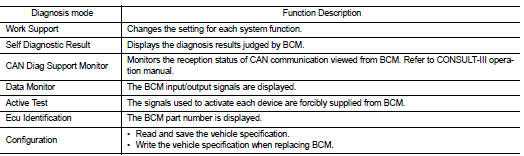
SYSTEM APPLICATION
BCM can perform the following functions for each system.
NOTE
:
It can perform the diagnosis modes except the following for all sub system
selection items.
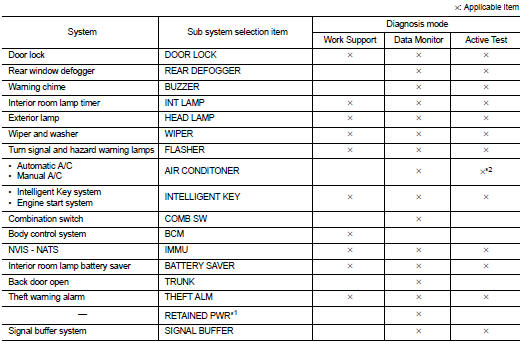
NOTE
:
• *1: This item is displayed, but not used.
• *2: For models with automatic A/C, this diagnosis mode is not used.
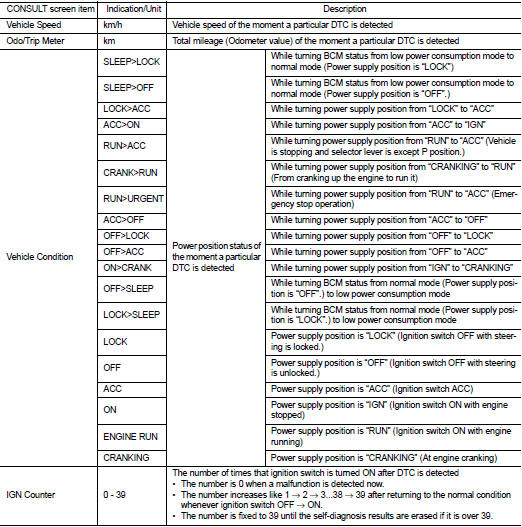
FREEZE FRAME DATA (FFD)
The BCM records the following vehicle condition at the time a particular DTC is detected, and displays on CONSULT-III.
Intelligent key
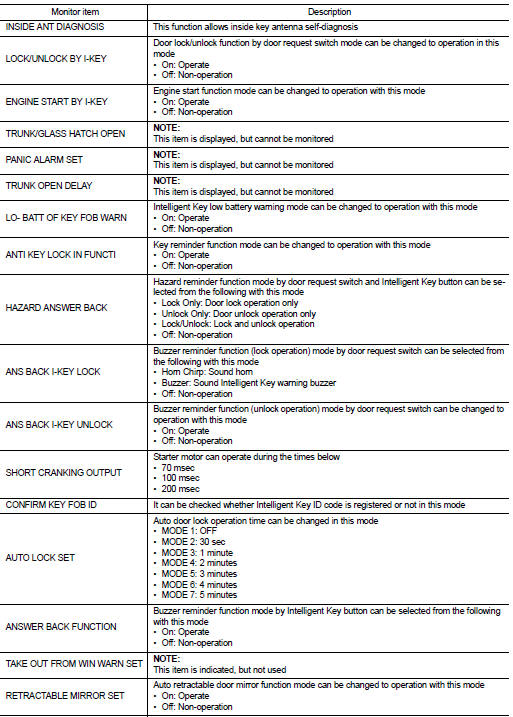
INTELLIGENT KEY : CONSULT-III Function (BCM - INTELLIGENT KEY) (With Super Lock)
WORK SUPPORT
SELF-DIAG RESULT
Refer to BCS-67, "DTC Index".
DATA MONITOR
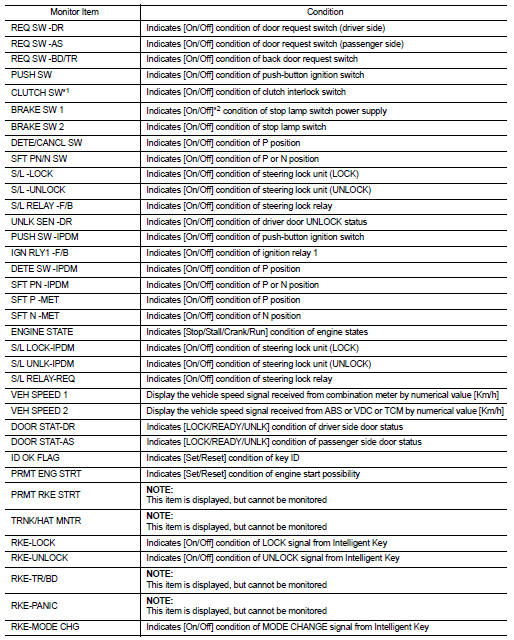

*1: It is displayed but does not operate on CVT models.
*2: OFF is displayed when brake pedal is depressed while brake switch power supply is OFF.
ACTIVE TEST
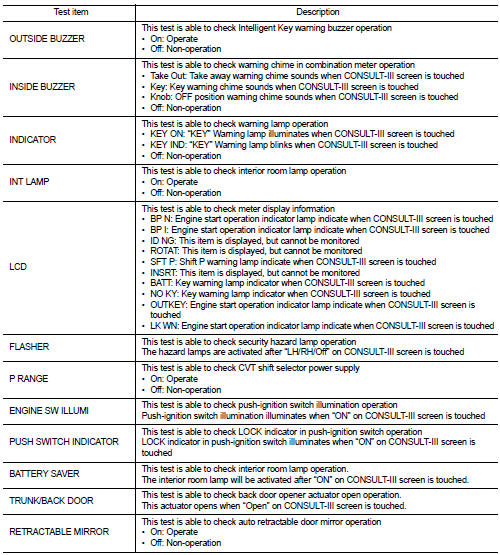
INTELLIGENT KEY : CONSULT-III Function (BCM - INTELLIGENT KEY) (Without Super Lock)
WORK SUPPORT
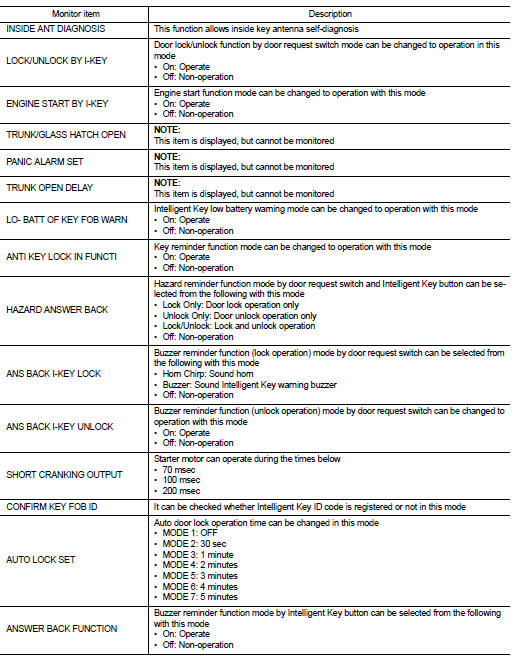

SELF-DIAG RESULT
Refer to BCS-67, "DTC Index".
DATA MONITOR
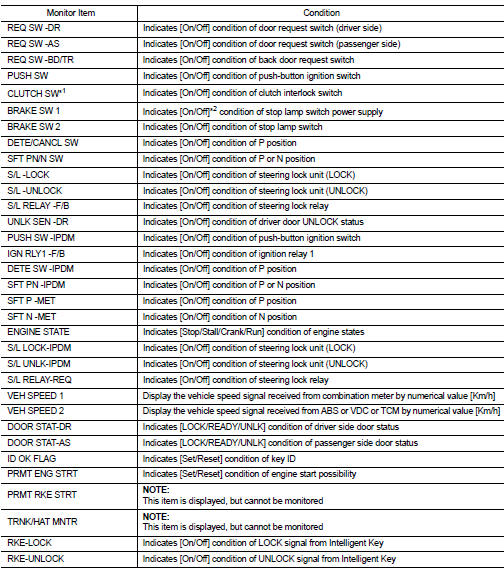
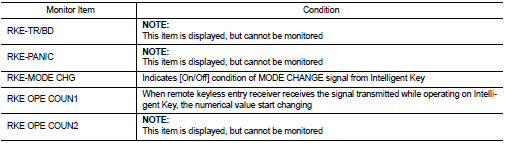
*1: It is displayed but does not operate on CVT models.
*2: OFF is displayed when brake pedal is depressed while brake switch power supply is OFF.
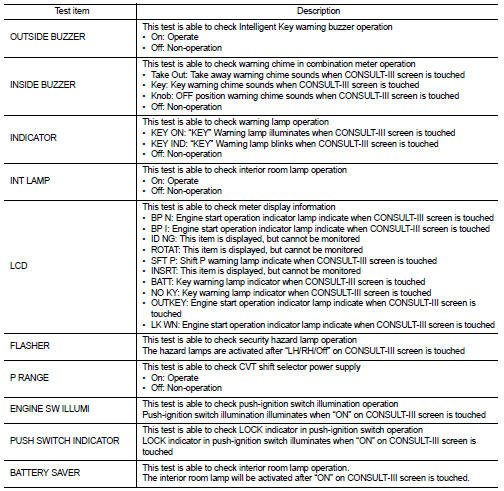
ACTIVE TEST

Theft ALM
THEFT ALM : CONSULT-III Function (BCM - THEFT)
WORK SUPPORT

DATA MONITOR
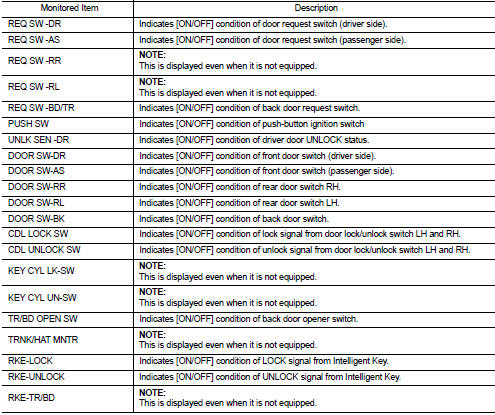
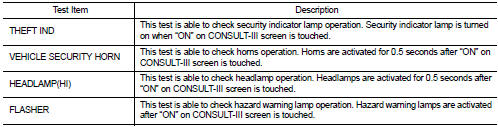
ACTIVE TEST
IMMU
IMMU : CONSULT-III Function (BCM - IMMU)
WORK SUPPORT

DATA MONITOR
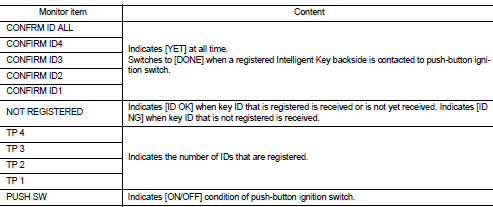
ACTIVE TEST

 System
Intelligent key system/engine start function
INTELLIGENT KEY SYSTEM/ENGINE START FUNCTION : System Diagram
INTELLIGENT KEY SYSTEM/ENGINE START FUNCTION : System
SYSTEM DESCRIPTION
• The engine ...
 Diagnosis system (IPDM E/R)
Consult-III Function (IPDM E/R)
APPLICATION ITEM
CONSULT-III performs the following functions via CAN communication with IPDM
E/R.
SELF DIAGNOSTIC RESULT
Refer to PCS-25, "DTC Index" ...
Other materials:
P1652 starter motor system COMM
Description
ECM controls ON/OFF state of the starter relay, according to the engine and
vehicle condition. Models with no
Intelligent Key System transmit a control signal directly to IPDM E/R. On the
other hand, models with the Intelligent
Key System transmit a control signal to IPDM E/R by w ...
Key interlock cable
Exploded View
1. CVT shift selector assembly
2. Key interlock cable
A: Key cylinder
B: Clip
C: Clip
Removal and Installation
REMOVAL
CAUTION:
Always apply the parking brake before performing removal and installation.
1. Shift the selector lever to the “P� position.
2. Remove the ...
Forward-facing child restraint installation using LATCH
Refer to all Warnings and Cautions in the “Child safety� and “Child restraints�
sections before installing a child restraint.
Follow these steps to install a forward-facing child restraint using the LATCH
system:
1. Position the child restraint on the seat.
Always follow the child res ...
