
Nissan Leaf 2018-2025 (ZE1) Owner's Manual : Cockpit
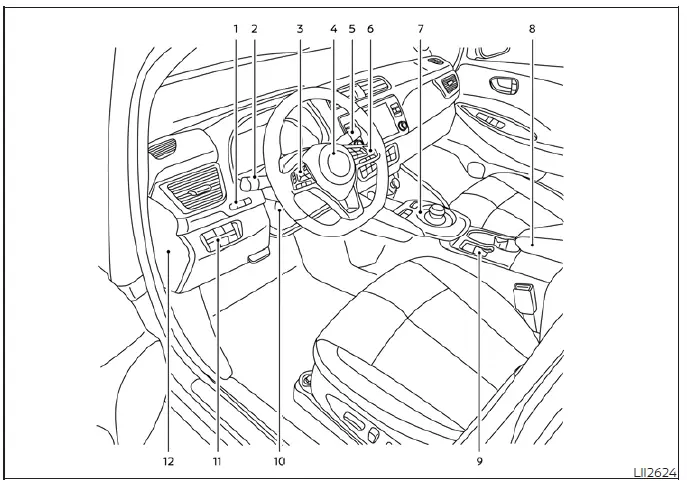
- TRIP RESET switch for twin trip odometer
Instrument brightness control switch - Headlight, fog light (if so equipped), and turn signal switch
- Steering-wheel-mounted controls (left side):
Audio control system*
Vehicle information display controls - Steering wheel:
Power steering system
Horn activation
Driver's supplemental air bag - Wiper and washer control switch
- Steering-wheel-mounted controls (right side):
Cruise control switches (if so equipped)
Intelligent Cruise Control (ICC) switches (if so equipped)
ProPILOT Assist activation switch (if so equipped)
Bluetooth Hands-Free Phone System controls* - Shift lever:
ECO mode switch
e-Pedal operation switch - Central console storage box
- Parking brake (electronic switch type, if so equipped)
- Tilt and telescopic steering wheel adjustment lever
- Lower instrument panel switches:
Charge port lid release switch
Immediate charge activation switch
Heated steering wheel switch (if so equipped)
Steering Assist switch (if so equipped)
Dynamic driver assistance feature switch (if so equipped) - Fuse box access cover
*For further details regarding these functions, please refer to the specific NissanConnect Manual provided with your Nissan Leaf.

 Instrument Panel
Air ventilation vents
Meters and gauges cluster:
Vehicle information display
Center multi-function control panel*
Hazard warning ...
Other materials:
U1000 can comm circuit
Description
CAN (Controller Area Network) is a serial communication line for real time
application. It is an on-vehicle multiplex
communication line with high data communication speed and excellent error
detection ability. Many electronic
control units are equipped onto a vehicle, and each co ...
IGN off interlock door unlock function does not operate
Diagnosis Procedure
1.CHECK “AUTOMATIC LOCK/UNLOCK SELECT� SETTING IN “WORK SUPPORT�
1. Select “DOOR LOCK� of “BCM� using CONSULT-III.
2. Select “AUTOMATIC LOCK/UNLOCK SELECT� in “WORK SUPPORT� mode.
3. Check “AUTOMATIC LOCK/UNLOCK SELECT� in “WORK SUPPORT�.
Re ...
System malfunction
If the AEB with Pedestrian Detection system encounters a technical error or internal fault, it will automatically deactivate to ensure vehicle safety. When this occurs, you will hear an audible chime, the AEB with Pedestrian Detection system warning light will illuminate in ora ...
