
Nissan Leaf 2018-2025 (ZE1) Owner's Manual : Charging status indicator lights
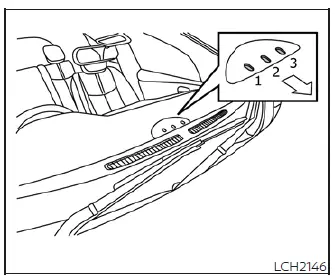
The Nissan Leaf features a intuitive trio of charging status indicator lights—labeled (1) through (3)—designed to provide you with immediate visual feedback. These lights are conveniently positioned so that you can monitor your vehicle's charging progress whether you are seated inside the cabin or approaching the vehicle from the outside.
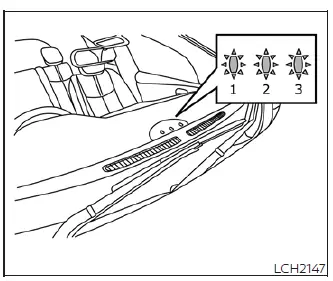
When the normal charge connector lock is unlocked
If you need to verify that your charge port is ready for access, pushing the charge connector lock switch on your Intelligent Key or the physical switch on the charge port lid will trigger all three indicator lights, (1) through (3), to flash in unison accompanied by a triple audible beep.
When the normal charge connector is connected incorrectly
Should the charge connector fail to seat properly within the normal charge port, the system will alert you within 30 seconds; you will see all three indicators (1) to (3) flash while a three-tone warning beep sounds, prompting you to reseat the connector.
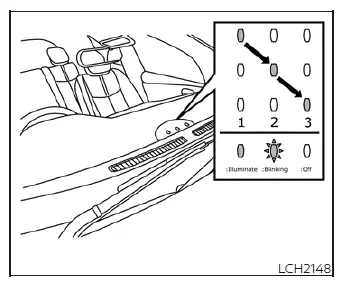
Ready for charging timer
When you have a scheduled charging timer active, the Nissan Leaf confirms the setting by illuminating the status lights in a sequential "chasing" pattern from (1) to (3). These lights will remain active for approximately 5 minutes before automatically turning off to conserve energy.
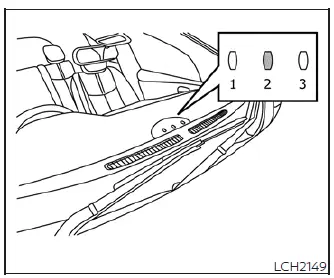
Ready for immediate charge
With the power switch in the OFF position and the charge cable disconnected, pushing the immediate charge switch will cause the center indicator light (2) to illuminate. This signifies that your Nissan Leaf is primed for an immediate charging session.
Once this light is on, you have a 15-minute window to securely connect the charge connector to the vehicle. If the cable is not plugged in within these 15 minutes, the indicator light (2) will deactivate, and you will need to re-engage the immediate charge mode to initiate the replenishment of your Li-ion battery.
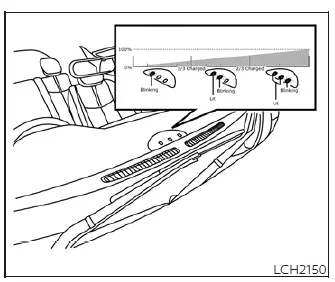
When charging
As your Li-ion battery gains energy, the charging status indicator lights will adapt their pattern based on the current state of charge, providing a real-time progress update. These segments correlate directly with the battery charge gauge displayed on your main vehicle information screen.
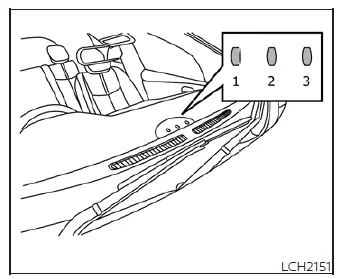
When fully charged
Once the Li-ion battery has achieved a full charge according to your selected mode, all three indicators (1) through (3) will illuminate steadily. They will remain visible for approximately 5 minutes or until you physically disconnect the charge connector.
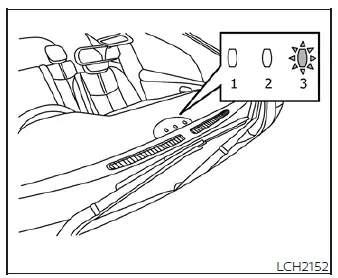
When the indicator light (3) flashes
If you notice the third indicator light flashing, it typically signifies that the 12-volt battery is currently being charged. Additionally, this light will blink for up to 5 minutes if there is an unexpected power interruption from your EVSE or charging device. If the charge connector remains connected, the Nissan Leaf will intelligently resume charging as soon as power is restored, though no confirmation beep will sound when the process restarts.
The third indicator also flashes when specific auxiliary systems are active:
- Climate Control Timer
- Remote climate control (if equipped)
- Li-ion battery warmer (if equipped)
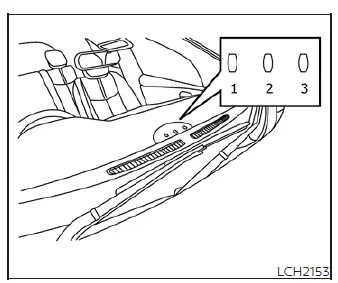
When not charging
When the system is idle and neither the Li-ion battery nor the 12-volt battery requires a charging session, all indicator lights will remain dark.

 EVSE (Electric Vehicle Supply Equipment) control box indicator light
During the charging process, the EVSE control box provides dedicated status updates through its own indicator lights. These lights serve as your primary diagnostic tool to verify ...
Other materials:
Child safety
WARNING
Never allow children to play with the seat belts in your Nissan Leaf. Most seating positions are equipped with Automatic Locking Retractor (ALR) mode seat belts designed for child restraint installation. If a seat belt becomes wrapped around a child's neck while the ALR mode is engaged, ...
Tire Pressure Monitoring System
(TPMS)
Each individual tire equipped on the vehicle, including the spare tire assembly (if provided), should be meticulously checked at least once a month when cold and inflated to the specific inflation pressure recommended by the vehicle manufacturer on the official vehicle placard or the dedicated tire ...
P1220 fuel pump control module
(FPCM)
DTC Logic
DTC DETECTION LOGIC
DTC CONFIRMATION PROCEDURE
1.PRECONDITIONING
1. Turn ignition switch OFF and wait at least 10 seconds.
2. Turn ignition switch ON.
3. Turn ignition switch OFF and wait at least 10 seconds.
TESTING CONDITION:
• Before performing the following procedure, con ...
