
Nissan Juke Service and Repair Manual : Brake pedal
Exploded View
WITHOUT ESP
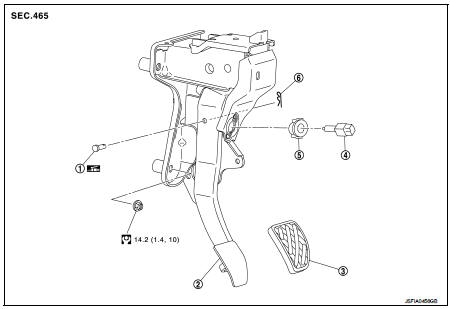
1. Clevis pin
2. Brake pedal assembly
3. Brake pedal pad
4. Stop lamp switch
5. Clip
6. Snap pin
 : Apply multi-purpose grease.
 : N·m (kg-m, ft-lb)
WITH ESP
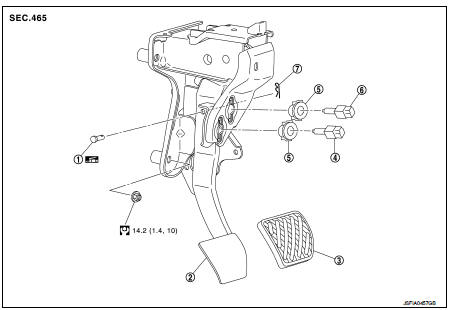
1. Clevis pin
2. Brake pedal assembly
3. Brake pedal pad
4. Brake switch/brake pedal position
switch
5. Clip
6. Stop lamp switch
7. Snap pin
 : Apply multi-purpose grease.
 : N·m (kg-m, ft-lb)
Removal and Installation
REMOVAL
1. Remove instrument lower panel. Refer to IP-13, "Removal and Installation".
2. Disconnect the stop lamp switch and the brake switch/brake pedal position switch harness connectors.
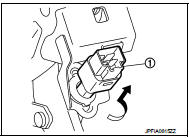
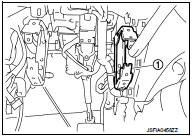
3. Rotate the stop lamp switch and the brake switch/brake pedal position switch (1) counter clockwise to remove.
4. Disconnect the accelerator pedal harness connector and harness clip.
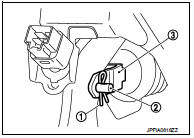
5. Remove snap pin (1) and clevis pin (2) from clevis (3) of brake booster.
6. Remove the steering member stay (1).
7. Remove the brake pedal assembly.
CAUTION:
Hold the brake booster and master cylinder assembly so as
not to drop out or contact them other parts.
8. Remove accelerator pedal from brake pedal assembly. Refer to ACC-3, "Removal and Installation".
9. Perform inspection after removal. Refer to BR-22, "Inspection and Adjustment".
INSTALLATION
Note the following, and install in the reverse order of removal.
• Apply the multi-purpose grease to the clevis pin and the mating faces. (Not necessary if grease has been already applied) NOTE
:
The clevis pin may be inserted in either direction.
• Perform adjustment after installation. Refer to BR-22, "Inspection and Adjustment".
Inspection and Adjustment
INSPECTION AFTER REMOVAL
• Check for the following items and replace the brake pedal assembly if necessary.
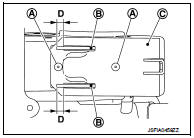
- Check the brake pedal upper rivet (made by aluminum) (A) for deformation.
- Check the brake pedal for bend, damage, and cracks on the welded parts.
- Check the lapping length (D) of sub-bracket (B) and slide plate (C).
D : 6.5 mm (0.256 in) or more
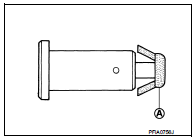
• Check clevis pin and plastic stopper (A) for damage and deformation.
If any is found, replace clevis pin.
ADJUSTMENT AFTER INSTALLATION
• Adjust each item of brake pedal after installing the brake pedal assembly to the vehicle. Refer to BR-9, "Inspection and Adjustment".
• Perform the release position learning of the accelerator pedal.
- MR16DDT: Refer to EC-134, "Work Procedure".
- HR16DE: Refer to EC-542, "Work Procedure".

 Brake piping
Front : Exploded View
WITHOUT ESP
1. Brake tube
2. ABS actuator and electric unit (control
unit)
3. Connector
4. Connector bracket
5. Master cylinder assembly
6. Brake booster
7. Lock pl ...
Other materials:
Blower fan on signal
Component Function Check
1.CHECK BLOWER FAN ON SIGNAL
With CONSULT-III
1. Turn ignition switch ON.
2. Select “AIR CONDITIONER� of “BCM� using CONSULT-III.
3. Select “FAN ON SIG� in “DATA MONITOR� mode.
4. Check blower fan ON signal when the fan switch is operated.
Is the ins ...
Can communication
CAN COMMUNICATION : System Description
CAN (Controller Area Network) is a serial communication line for real time
application. It is an on-vehicle multiplex
communication line with high data communication speed and excellent error
detection ability. Many electronic
control units are equipped ...
Precaution Necessary for Steering Wheel Rotation after Battery Disc
NOTE:
• Before removing and installing any control units, first turn the ignition
switch to the LOCK position, then disconnect
both battery cables.
• After finishing work, confirm that all control unit connectors are connected
properly, then re-connect both
battery cables.
• Always us ...
