
Nissan Juke Service and Repair Manual : Air conditioner filter
Exploded View
LHD models
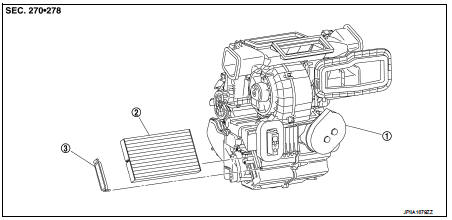
1. A/C unit assembly 2. Air conditioner filter 3. Filter cover
Removal and Installation (LHD models)
REMOVAL
1. Remove glove box assembly. Refer to IP-13, "Removal and Installation".
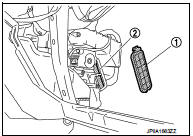
2. Remove filter cover (1), and then remove air conditioner filter (2) from A/C unit assembly.
CAUTION:
If the filter is deformed/damaged when removing, replace it
with a new one. Deformed/damaged filter may deteriorate
the dust collecting performance.
INSTALLATION
Note the following item, and install in the reverse order of removal.
CAUTION:
When installing, handle the filter with extreme care to avoid
deforming/damaging.
Removal and Installation (RHD models)
REMOVAL
NOTE
:
When removing air conditioner filter, visually check the operation through glove
box mask opening.
1. Open glove box lid. Remove glove box mask.
 : Pawl
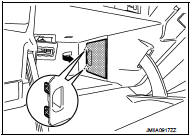
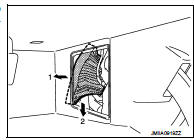
2. Remove filter cover according to the numerical order as shown in the figure, while putting a hand through bottom of glove box and pressing pawl (A) of filter cover.
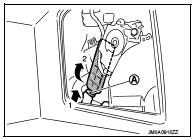
3. Pull out air conditioner filter from A/C unit assembly according to the numerical order as shown in the figure. Remove air conditioner filter through bottom of glove box.
CAUTION:
If the filter is deformed/damaged when removing, replace it with a new one.
Deformed/damaged filter
may deteriorate the dust collecting performance.
INSTALLATION
NOTE
:
When removing air conditioner filter, visually check the operation through glove
box mask opening.
CAUTION:
When installing, handle the filter with extreme care to avoid
deforming/damaging.
Replacement
Replace Air conditioner filter.
Refer to VTL-20, "Air Conditioner Filter".
 Blower motor
Exploded View
2WD models
1. A/C unit assembly
2. Fan control amp.*1
3. Blower fan resistor*2
4. Blower motor
5. Blower motor cover
• *1: Automatic air conditioner
• *2: Manual air con ...
 Service data and specifications (SDS)
Air Conditioner Filter
...
Other materials:
Environmental factors influence the rate of corrosion
Moisture
Accumulation of sand, dirt and water on the vehicle body underside can accelerate
corrosion.
Wet floor coverings will not dry completely inside the vehicle, and should be
removed for drying to avoid floor panel corrosion.
Relative humidity
Corrosion will be accelerated in areas of h ...
Periodic maintenance
REAR WHEEL HUB
Inspection
COMPONENT PART
Check the mounting conditions (looseness, back lash) of each component and
component conditions (wear,
damage) are normal.
WHEEL HUB ASSEMBLY (BEARING-INTEGRATED TYPE)
Check the following items, and replace the part it necessary.
• Move wheel h ...
P0711 transmission fluid temperature sensor A
DTC Logic
DTC DETECTION LOGIC
DTC CONFIRMATION PROCEDURE
1.PREPARATION BEFORE WORK
If another "DTC CONFIRMATION PROCEDURE" occurs just before, turn ignition
switch OFF and wait for at
least 10 seconds, then perform the next test.
>> GO TO 2.
2.PERFORM DTC CONFIRMATION ...
