
Nissan Juke Service and Repair Manual : Adjustment of steering angle sensor neutral position
Description
Always adjust the neutral position of steering angle sensor before driving when the following operation is performed.
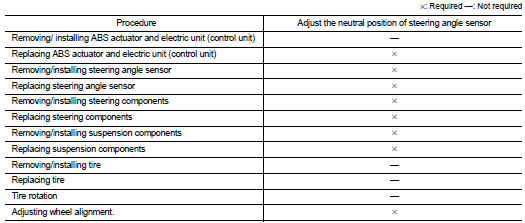
Work Procedure
ADJUST THE NEUTRAL POSITION OF STEERING ANGLE SENSOR
CAUTION:
Always use CONSULT-III when adjusting the neutral position of steering angle
sensor. (It cannot be
adjusted other than with CONSULT-III.)
1.CHECK THE VEHICLE STATUS
Stop vehicle with front wheels in the straight-ahead position.
Does the vehicle stay in the straight-ahead position? YES >> GO TO 2.
NO >> Steer the steering wheel to the straight-ahead position. Stop the vehicle.
2.ADJUST NEUTRAL POSITION OF STEERING ANGLE SENSOR
 With CONSULT-III.
1. Turn the ignition switch ON.
CAUTION:
Never start engine.
2. Select “ABS�, “WORK SUPPORT� and “ST ANGLE SENSOR ADJUSTMENT� in this order.
3. Select “START�.
CAUTION:
Never touch steering wheel while adjusting steering angle sensor.
4. After approx. 10 seconds, select “END�.
5. Turn ignition switch OFF, and then turn it ON again.
CAUTION:
Be sure to perform the operation above.
>> GO TO 3.
3.CHECK DATA MONITOR
 With CONSULT-III.
1. The vehicle is either pointing straight ahead, or the vehicle needs to be moved. Stop when it is pointing straight ahead.
2. Select “ABS�, “DATA MONITOR�, “ECU INPUT SIGNALS� and “STR ANGLE SIG� in the order. Check that the signal is within the specified value.
STR ANGLE SIG : 0±2.5°
Is the inspection result normal? YES >> GO TO 4.
NO >> GO TO 1.
4.ERASE SELF-DIAGNOSIS MEMORY
With CONSULT-III.
Erase Self-diagnosis result of “ABS�.
Are the memories erased? YES >> INSPECTION END
NO >> Check the items indicated by the self-diagnosis.
 Additional service when replacing ABS actuator and electric
unit (control unit)
Additional service when replacing ABS actuator and electric
unit (control unit)
Description
When replaced the ABS actuator and electric unit (control unit), Perform
decel G sensor calibration. Refer to
BRC-149, "Work Procedure". ...

Other materials:
Air fresheners
Most air fresheners use a solvent that could affect the vehicle interior. If
you use an air freshener, take the following precautions:
• Hanging-type air fresheners can cause permanent discoloration when they contact
vehicle interior surfaces. Place the air freshener in a location that allows ...
Information display (speed limiter)
Component Function Check
1.CHECK INFORMATION DISPLAY (SPEED LIMITER) FUNCTION
1. Start engine.
2. Press speed limiter MAIN switch.
3. Drive the vehicle at more than 30 km/h (20 MPH).
CAUTION:
Always drive vehicle at a safe speed.
4. Press SET/COAST switch.
5. Perform a test drive on a flat ...
System malfunction
If the AEB with Pedestrian Detection system encounters a technical error or internal fault, it will automatically deactivate to ensure vehicle safety. When this occurs, you will hear an audible chime, the AEB with Pedestrian Detection system warning light will illuminate in ora ...
