
Nissan Juke Service and Repair Manual : Wiring diagram
CAN SYSTEM
Wiring Diagram
For connector terminal arrangements, harness layouts, and alphabets in a
 (option abbreviation; if not
described in wiring diagram), refer to GI-12, "Connector Information/Explanation
of Option Abbreviation".
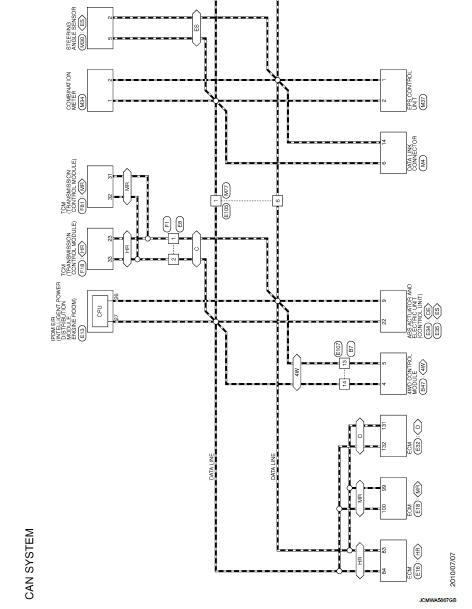
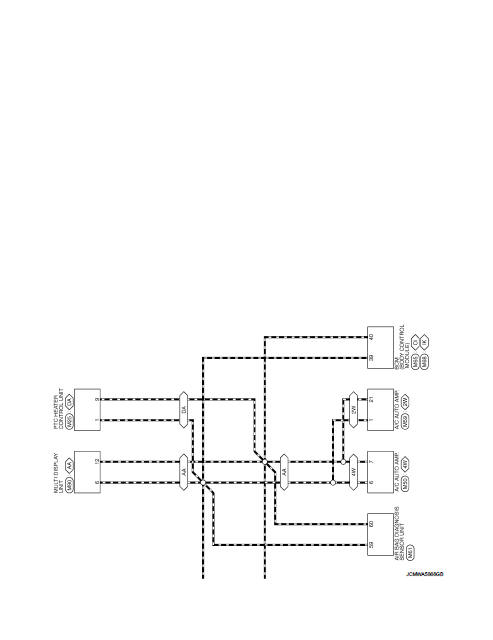
 System
Can communication system
CAN COMMUNICATION SYSTEM : System Diagram
CAN COMMUNICATION SYSTEM : System Description
Description
• CAN (Controller Area Network) is a serial communication line for ...
 Basic inspection
DIAGNOSIS AND REPAIR WORKFLOW
Interview Sheet
NOTE:
Refer to LAN-17, "Trouble Diagnosis Procedure" for how to use interview sheet.
...
Other materials:
Radiator
Exploded View
1. Reservoir tank cap
2. Reservoir tank
3. Clamp
4. Reservoir tank hose
5. Mounting rubber (upper)
6. Reservoir tank hose
7. Radiator
8. Mounting rubber (lower)
9. Drain plug
10. O-ring
11. Cooling fan assembly
12. Radiator hose (upper)
13. Radiator hose (lower)
...
Draining
1. Run the vehicle to warm up the transfer unit sufficiently.
2. Stop the engine and remove the drain plug (1) and gascket to
drain the transfer oil.
3. Before installing drain plug, set a new gasket. Install drain plug
on the transfer and tighten to the specified torque. Refer to DLN-
113, &qu ...
Structure and operation
Positive Crankcase Ventilation
This system returns blow-by gas to the intake manifold.
The positive crankcase ventilation (PCV) valve is provided to conduct crankcase
blow-by gas to the intake
manifold.
During partial throttle operation of the engine, the intake manifold sucks the
blow ...
