
Nissan Leaf 2018-2025 (ZE1) Owner's Manual : System temporarily unavailable
Condition A:
The Intelligent Lane Intervention (I-LI) system's automated warning and steering assist functions are programmed to pause or remain inactive under the following specific driving scenarios:
- When you engage the turn signal indicator to intentionally initiate a lane change in the direction of that signal. In this case, the I-LI system gracefully deactivates its intervention logic to allow for driver-initiated maneuvers and will remain in standby mode for approximately 2 seconds after the turn signal lever has been returned to the neutral position.
- When the travel speed of your Nissan Leaf drops below the minimum operational threshold of approximately 37 mph (60 km/h).
Once the aforementioned conditions have concluded and the vehicle has returned to an environment where the necessary operational parameters are met, both the warning and active steering assist functions will automatically resume their monitoring and intervention duties.
Condition B:
The active steering assist function of the I-LI system is intentionally designed to yield control back to the driver under the following conditions (note that the visual and haptic warning functions remain fully operational to ensure your awareness):
- When the driver applies pressure to the hydraulic brake pedal, signaling a priority intent to decelerate or stop.
- When the steering wheel is rotated to the angle necessary to perform an intentional lane change maneuver.
- When the driver depresses the accelerator pedal while the I-LI system is in the middle of an intervention sequence.
- When the Intelligent Cruise Control (ICC) system triggers an approach warning, indicating that the system's priority has shifted to distance management.
- When the vehicle's hazard warning flashers are activated, indicating a non-standard driving situation or emergency.
- When the Nissan Leaf is navigating a tight curve at higher speeds where active braking intervention might interfere with dynamic cornering stability.
Immediately after these conditions subside and the system determines that the driving path is once again appropriate for automated assistance, the I-LI system's capacity to apply selective braking forces to center the vehicle will seamlessly resume.
Condition C:
Should the following diagnostic messages appear on the central vehicle information display, the system will trigger an audible chime to get your attention and will automatically deactivate the I-LI system for safety:
- "Not Available - Poor Road Conditions": This message indicates that the Vehicle Dynamic Control (VDC) system (specifically excluding the Traction Control System [TCS] function) or the Anti-lock Braking System (ABS) has detected a loss of traction or is actively managing vehicle stability.
- "Currently not available": This alert displays when the VDC system has been manually switched off by the driver.
Action to take:
Once the environmental factors or manual settings that triggered the system interruption have been resolved and the road conditions have stabilized, you may reactivate the system. Toggle the Intelligent Lane Intervention system back to its active status by pressing the ProPILOT Assist switch (on equipped models) or the dynamic driver assistance switch (on models without ProPILOT Assist) to resume normal operation.
Temporary disabled status at high temperature:
In cases where the Nissan Leaf has been parked in direct, intense sunlight for an extended period, leading to cabin temperatures exceeding approximately 104ºF (40ºC), the I-LI system may temporarily disable itself to protect sensitive internal electronics. This is a normal safety protocol. Once the cabin air has been adequately cooled by the vehicle's climate control system, the system will perform a self-check and automatically restore its monitoring functions without requiring further driver input.
If your Nissan Leaf has been parked in direct, intense sunlight under high-temperature conditions—specifically exceeding approximately 104ºF (40ºC)—and you attempt to engage the Intelligent Lane Intervention (I-LI) system, the system may automatically deactivate itself as a protective measure for its onboard electronic components. In such an event, the vehicle information display will alert you with the message: "Unavailable: High Cabin Temperature." This is a standard safety protocol; once the interior cabin temperature has been sufficiently reduced through ventilation or air conditioning, the system will perform a diagnostic check and resume normal operations automatically.
System malfunction
In the unlikely event of a technical fault within the I-LI system, it will automatically cancel its monitoring functions to prevent erroneous interventions. The I-LI status indicator will illuminate in orange, and a "Malfunction: See Owner's Manual" warning notification will appear prominently on your instrument display.
If the orange I-LI indicator persists on your dash, carefully pull off the road to a safe, level location and bring the Nissan Leaf to a complete stop. Power down the EV system entirely, wait for a few moments, and then restart the vehicle to allow the system to re-initialize. Should the orange I-LI indicator remain illuminated after a restart, it is essential to have the system inspected by a professional. We strongly recommend visiting a certified NISSAN LEAF dealer to ensure your safety systems are serviced correctly.
System maintenance
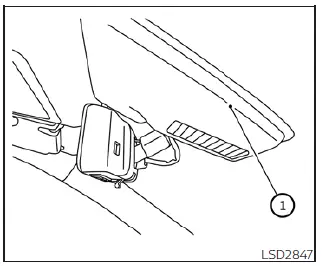
The high-precision lane camera unit 1, which serves as the "eyes" of the I-LI system, is strategically mounted behind the windshield just above the interior rearview mirror. To guarantee the reliable operation of the Intelligent Lane Intervention system and avoid any unnecessary malfunctions, please adhere to these maintenance guidelines:
- Maintain a clean, smudge-free windshield at all times to ensure the camera has a clear, unobstructed view of the road ahead.
- Do not attach any stickers, adhesive film, or window-tinting material—even if the material is transparent—near the camera housing, as this can severely interfere with image clarity and sensor accuracy.
- Avoid placing any reflective objects or materials, such as white documents, metallic accessories, or mirrors, on the surface of the instrument panel. Strong sunlight reflecting off these items can create glare or "blind spots" that prevent the camera from effectively identifying lane markers.
- Exercise caution around the camera unit; do not strike, apply pressure to, or physically damage the area surrounding the camera mount. You must never touch the delicate camera lens or attempt to remove the factory-installed screw on the unit. If the camera housing sustains damage from a collision or road debris, it is vital to have the unit professionally inspected and serviced at a certified NISSAN LEAF dealer.
 I-LI system limitations
WARNING
The following points outline the critical operational boundaries and inherent limitations of the Intelligent Lane Intervention (I-LI) system. Failure to adhere strictly to these warnings ...
 Blind Spot Warning (BSW)
WARNING
Failure to strictly adhere to the safety warnings and operational instructions for the proper use of the Blind Spot Warning (BSW) system could result in a collision, potentially causing s ...
Other materials:
Precaution for Supplemental Restraint System (SRS) "AIR BAG" and "SEAT BELT
PRE-TENSIONER"
The Supplemental Restraint System such as “AIR BAG� and “SEAT BELT PRE-TENSIONER�,
used along
with a front seat belt, helps to reduce the risk or severity of injury to the
driver and front passenger for certain
types of collision. Information necessary to service the system safely is
...
Clutch disc and clutch cover
Except for K9K : Exploded View
HR16DE
1. Flywheel
2. Clutch disc
3. Clutch cover
4. Input shaft
A. First step
B. Final step
: N·m (kg-m, ft-lb)
: Apply lithium-based grease
including molybdenum disulphide.
MR16DDT
1. Flywheel
2. Clutch disc
3. Clutch cover
4. Input shaft
A ...
Power supply and ground circuit
Diagnosis Procedure
1.CHECK FUSES AND FUSIBLE LINK
Check that the following IPDM E/R fuses or fusible links are not blown.
Is the fuse fusing?
YES >> Replace the blown fuse or fusible link after repairing the affected
circuit if a fuse or fusible link is
blown.
NO >> GO TO 2. ...
