
Nissan Juke Service and Repair Manual : Rear wiper arm
Exploded View
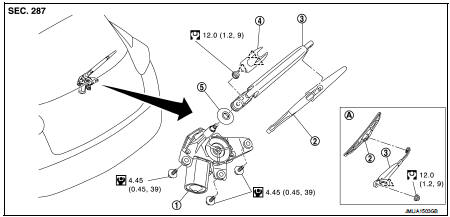
1. Rear wiper motor
2. Rear wiper blade
3. Rear wiper arm
4. Rear wiper arm cover
5. Rear wiper pivot seal
A : Model for cold areas
 : Pawl
 : N·m (kg-m, in-lb)
 : N·m (kg-m, ft-lb)
Removal and Installation
REMOVAL
1. Operate rear wiper to the auto stop position.
2. Remove rear wiper arm cover.
3. Remove rear wiper arm mounting nut.
4. Remove wiper arm from the vehicle.
INSTALLATION
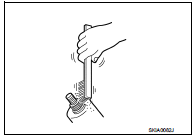
1. Clean wiper arm mount as shown in the figure to prevent nut from being loosened.
2. Operate the rear wiper motor to the auto stop position.
3. Adjust the rear wiper blade position. Refer to WW-84, "Adjustment".
4. Install the rear wiper arm by tightening the mounting nut.
5. Inject the washer fluid.
6. Operate the rear wiper to the auto stop position.
7. Check that the rear wiper blades stop at the specified position.
8. Install the rear wiper arm cover.
Adjustment
REAR WIPER BLADE POSITION ADJUSTMENT
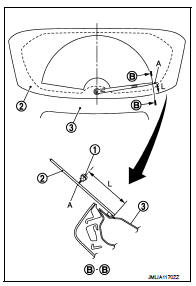
Set the wiper blade top on the defrosting wire (A) (clearance between the end of back door glass and the top of wiper blade center).
Standard clearance
1. Rear wiper blade
2. Back door window glass
3. Back door panel
A : Rear defogger wire print
L : 67.5 ± 7.5 mm (2.657 ± 0.295in)
 Wiper and washer switch
Exploded View
The washer level switch must be replaced together with the washer tank as an
assembly. Refer to WW-67,
"Removal and Installation". ...
 Rear wiper motor
Exploded View
1. Rear wiper motor
2. Rear wiper blade
3. Rear wiper arm
4. Rear wiper arm cover
5. Rear wiper pivot seal
A : Model for cold areas
: Pawl
: N·m (kg-m, in-lb)
: N·m (kg-m ...
Other materials:
Intelligent key
Component Function Check
1.CHECK FUNCTION
1. Select “INTELLIGENT KEY� of “BCM� using CONSULT-III.
2. Select “RKE OPE COUN1� in “DATA MONITOR� mode.
3. Check that the function operates normally according to the following
conditions.
Is the inspection result normal?
YES >& ...
ABS actuator and electric unit (control unit)
Exploded View
LHD
1. ABS actuator and electric unit (control
unit)
2. ABS actuator and electric unit (control
unit) harness connector
3. Bracket
A. To master cylinder secondary side
B. To master cylinder primary side
C. To front LH caliper
D. To rear RH caliper
E. To rear LH caliper ...
Insufficient heating
Description
Symptom
• Insufficient heating
• No warm air comes out. (Air flow volume is normal.)
Diagnosis Procedure
NOTE:
Perform self-diagnosis with CONSULT-III before performing symptom diagnosis. If
any malfunction result or
DTC is detected, perform the corresponding diagnosis.
1 ...
