
Nissan Leaf 2018-2025 (ZE1) Owner's Manual : Push-button power switch
WARNING
- Do not attempt to operate or cycle the push-button power switch while actively driving the vehicle except in a verified, extreme emergency situation. (The primary EV powertrain system completely shuts down and cuts propulsion when the power switch is pushed rapidly three consecutive times within a short window, or if the power switch is pushed and held down continuously for more than 2 seconds.) If the high-voltage EV system suddenly stops delivering power while your Nissan Leaf is being driven at speed, this could lead to an immediate crash, loss of vehicle control, and serious personal injury.
- When manually turning off the power switch to park, always make sure to push the physical P (Park) position switch located directly on the electronic shift lever assembly, even if the vehicle is currently maintaining a complete stop and hold state automatically using the intelligent e-Pedal system. This structural fallback will prevent the vehicle from moving or rolling unexpectedly on an incline, which could otherwise result in serious personal injury or severe property damage.
Before ever operating the main power switch to turn on the vehicle, make absolutely sure the Nissan Leaf transmission layout is explicitly locked in the P (Park) position.
NISSAN Intelligent Key system
The advanced NISSAN Intelligent Key system allows the driver to seamlessly unlock, access, and start the EV system without ever taking the physical key fob out of a pocket, jacket, or purse. Please note that the surrounding electromagnetic operating environment and localized radio frequency conditions may heavily affect or temporarily limit the Intelligent Key system's wireless operation.
Some critical operational status indicators and safety warnings for proper key pairing are dynamically displayed on the main vehicle information display screen within the instrument cluster.
CAUTION
- Be sure to always carry the registered Intelligent Key fob with you on your person when operating or sitting inside the vehicle.
- Never leave the Intelligent Key fob forgotten inside the cabin or cargo area when you permanently exit and leave the vehicle unattended.
Operating range for EV start function
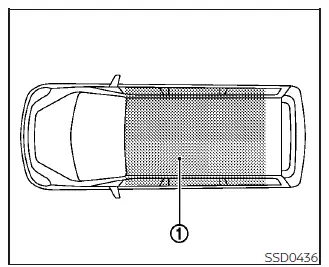
The advanced Intelligent Key function can only be successfully used for starting the high-voltage EV system when the registered Intelligent Key fob is physically located within the specified interior operating range 1 as shown in the provided technical manual layout diagram.
When the internal coin-cell Intelligent Key battery is almost completely discharged, or if strong environmental radio waves and cell signals are present near the operating location, the Intelligent Key system's effective wireless operating range naturally becomes narrower, and the push-button ignition may fail to function properly on the first press.
If the Intelligent Key is located anywhere within the active interior operating range bounds, it is technically possible for anyone inside the vehicle, even someone who does not personally carry or own the Intelligent Key fob, to push the dash power switch and successfully start the EV system.
- The rear cargo area is not officially included in the optimized starting operating range boundary, but the sensitive Intelligent Key fob may still occasionally function depending on structural interference levels.
- If the Intelligent Key fob is placed directly on top of the instrument panel cowl, inside the deep glove box assembly, or tucked deep within a lower door storage pocket, the electronic sensors may block the signal and the Intelligent Key may fail to function.
- If the Intelligent Key is placed near an open door structure or right against a glass window outside the vehicle profile, the internal antenna array may misinterpret its location and the Intelligent Key system may not function.
Power switch operation
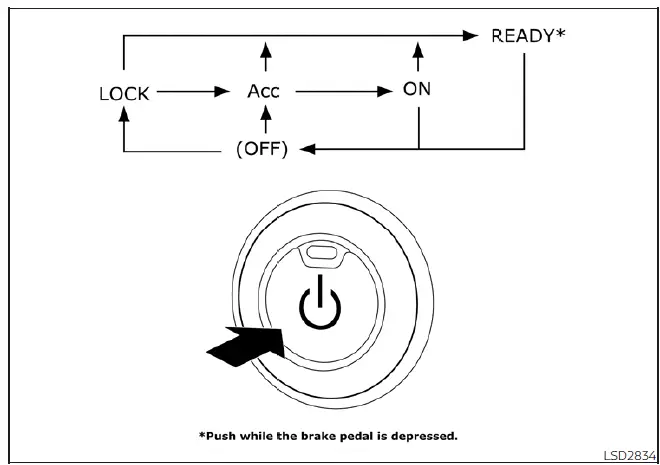
When the standalone power switch is pushed sequentially without manually depressing the foot brake pedal, the vehicle power switch positions will cycle in a strict loop as follows:
- Push the button once from the off state to change the vehicle network to ACC (Accessories).
- Push the button two times sequentially to change the system state to ON.
- Push the button three times sequentially to change the master status to OFF.
- Push the button four times sequentially to cycle back and return to the ACC position.
- Simply open or close any passenger door to safely return the steering column to the secure LOCK position while the system is sitting in the OFF position.
The physical text on the face of the power switch illuminates softly when the vehicle logic is actively sitting in either the ACC or ON position status.
The integrated electronic power lock is safely engineered so that the underlying power switch position cannot be switched back to the locked LOCK position until the Nissan Leaf shifter has been completely placed in the primary P (Park) position.
In the rare event that the power switch cannot be placed into the final LOCK position during your shutdown sequence, proceed exactly as follows:
1. Push the physical P (Park) position switch located on the top surface of the shift lever to place the vehicle explicitly in the P (Park) position.
2. Push the push-button power switch to transition the vehicle state into the OFF position.
The text backlighting on the power switch will completely turn off and will not illuminate.
3. Physically open the driver's side front door. The internal steering columns and power switch configuration will automatically change over to the mechanical LOCK position.
Power switch positions
The vehicle power switch mechanism can only be securely locked and immobilized when resting in this initial position.
The master power switch will be automatically unlocked when it is placed into the active ACC position, provided the driver is actively carrying the registered Intelligent Key within the cabin.
ACC (Accessories)
This accessory position activates low-voltage electrical accessories, such as the infotainment unit, clock, and radio, when the primary high-voltage EV powertrain system is completely turned off.
ON
This technical position turns on the main EV diagnostic systems, dashboard clusters, and all high-draw electrical accessories, but does not enable vehicle movement.
READY (Normal operating position)
This primary position successfully initializes the high-voltage EV powertrain system, engages the main contactors, powers all electrical accessories, illuminates the READY green icon indicator, and confirms the vehicle can now be safely driven.
OFF
This system position completely turns off the EV powertrain and shuts down propulsion mechanics.
The dashboard power switch cannot be safely placed back into the physical LOCK position until the vehicle is firmly registered in the P (Park) position.
CAUTION
Do not leave your Nissan Leaf parked with the power switch sitting in the ACC position for an extended period of time. Doing so will rapidly discharge the auxiliary 12-volt lead-acid battery, as it will be isolated from the main high-voltage charging loop.
NOTE:
If the push-button power switch is pressed too quickly in rapid succession or is tapped twice in under a second, the internal electronic control module may fail to register the inputs correctly even if a soft interior chime sound is heard.
Always push the ignition switch again firmly and more slowly to allow the vehicle computers to cycle positions properly.
Emergency EV shut off
To safely shut off the high-voltage EV system in a critical emergency situation while the vehicle is actively moving down the road, carefully perform the following override procedure:
- Rapidly push the dashboard power switch three consecutive times in less than 1.5 seconds, or
- Push down and hold the power switch continuously for more than 2 full seconds.
NISSAN Intelligent Key battery discharge
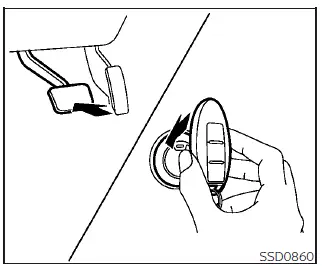
If the Intelligent Key internal battery is completely discharged or if intense localized environmental radio waves interfere with the standard wireless key transmission, you can still start the EV system and enter the READY to drive mode according to the following manual fallback procedure:
1. Push the P (Park) position switch directly on the shift lever to ensure the vehicle is anchored.
2. Firmly depress and hold down the foot brake pedal.
3. Physically touch the face of the power switch with the back end of the Intelligent Key fob housing as explicitly illustrated in the technical graphic. (A diagnostic feedback chime will immediately sound in the cabin.)
4. Firmly push the power switch with your hand while continuing to depress the foot brake pedal within 10 seconds after the initial chime sounds. The vehicle power switch position will then change directly over to the operational READY to drive mode.
After step 3 is completed, if the power switch is pushed manually without depressing the foot brake pedal, the vehicle power switch position will only change over to the ACC position instead of starting the powertrain.
NOTE:
- When the power switch is successfully placed in the ACC, ON, or READY to drive mode via the emergency key proximity procedure above, a specific warning indicator denoting a discharged Intelligent Key system may still appear on the main vehicle information display for a few moments even if the key is inside the vehicle cabin.
This behaviour is a normal automated system alert and is not a vehicle malfunction. To stop the warning indicator from blinking on your dash, simply touch the face of the power switch with the Intelligent Key fob body once again.
- If the low Intelligent Key battery discharge indicator icon appears on the main vehicle information display during normal start-up, make plans to replace the internal CR2032 battery as soon as possible to restore regular range.
NISSAN Vehicle Immobilizer System
The integrated NISSAN Vehicle Immobilizer System provides security by preventing the power switch from being placed into the active READY to drive position without the explicit presence of a factory-registered, digitally paired key fob.
If the power switch fails to place the vehicle into the operational READY to drive position while using your registered key fob, it may be due to temporary electronic signal interference caused by another registered key fob, a passive automated toll road transponder, or a contactless automated payment device attached closely to the same key ring. Restart the EV system using the following multi-step clear procedure:
1. Leave the power switch resting in the ON position for approximately 5 seconds to let the system finish scanning.
2. Cycle the power switch back to the complete OFF position and wait approximately 10 seconds for the relays to clear.
3. Repeat steps 1 and 2 once more in sequence.
4. Finally, place the power switch into the active READY to drive position while physically holding any secondary electronic device (which may have caused the signal interference) completely separate from the registered Nissan Leaf key fob.
If this manual procedure successfully allows the power switch to be placed in the READY to drive mode, NISSAN strongly recommends placing your registered key fob on a separate, standalone key ring to permanently avoid wireless data interference from other active devices.
Before starting the EV system
- Always perform a quick walkaround to make sure that the entire area immediately surrounding the vehicle exterior is completely clear of obstacles.
- Regularly check fluid levels such as the electric powertrain inverter coolant, brake fluid reservoir, and windshield-washer fluid as frequently as possible.
- Check to confirm that all glass windows, optical sensors, and exterior driving lights are clean and unblocked.
- Visually inspect all four tires for their structural appearance, sidewall condition, and tread wear. Additionally, verify all tires are inflated to the proper recommended COLD psi specifications.
- Double-check that all passenger doors and the rear hatch are securely closed.
- Properly position the driver's seat and manually adjust the head restraints/headrests to the correct ergonomic height.
- Adjust both the inside rearview mirror and the outside side-view mirrors for optimal blind-spot coverage.
- Securely fasten your three-point seat belt and explicitly ask all onboard passengers to do likewise before starting out.
- Verify the baseline operation of all diagnostic warning lights on the instrument cluster when the power switch is initially pushed over to the ON position.
 Avoiding collision and rollover
WARNING
Failure to operate this vehicle in a safe, alert, and prudent manner significantly increases the risk of a dangerous situation and may result in an immediate loss of control or a severe a ...
 Starting the EV system
1. Confirm that the electronic parking brake is fully applied and the brake indicator light is illuminated on the dashboard cluster.
2. Ensure and confirm that the vehicle transmission ...
Other materials:
Wheelarch Height
2WD
Measure value under unladen* conditions.
*: Fuel, engine coolant and lubricant are full. Spare tire, jack, hand tools and
mats are in designated positions.
4WD
Measure value under unladen* conditions.
*: Fuel, engine coolant and lubricant are full. Spare tire, jack, hand t ...
B257B, B257C ambient sensor
DTC Logic
DTC DETECTION LOGIC
NOTE:
• If DTC is displayed along with DTC U1000, first perform the trouble diagnosis
for DTC U1000. Refer to HAC-
51, "DTC Logic".
• If DTC is displayed along with DTC U1010, first perform the trouble diagnosis
for DTC U1010. HAC-52,
"DTC L ...
Rear sonar system (RSS)
The Rear Sonar System (RSS) is designed to enhance your parking confidence by providing audible tones that alert you to the presence of obstacles located near the rear bumper of your Nissan Leaf.
Whenever the "DISPLAY" key is engaged, the sonar detection view wil ...
