
Nissan Juke Service and Repair Manual : Normal operating condition
Description
RELATED TO AUDIO
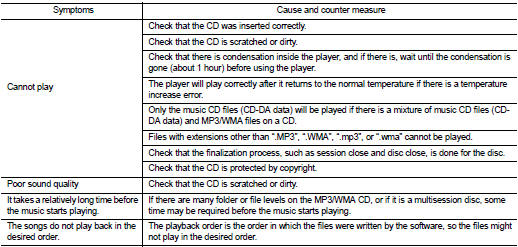
• The majority of the audio malfunctions are the result of outside causes (bad CD, electromagnetic interference, etc.). Check the symptoms below to diagnose the malfunction.
• The vehicle itself can be a source of noise if noise prevention parts or electrical equipment is malfunctioning.
Check that noise is caused and/or changed by engine speed, ignition switch turned to each position, and operation of each piece of electrical equipment. Then determine the cause.
NOTE
:
• CD-R is not guaranteed to play because they can contain compressed audio (MP3,
WMA) or could be incorrectly
mastered by the customer on a computer.
• Check that the CDs carry the Compact Disc Logo. If not, the disc is not mastered to the red book Compact Disc Standard and may not play.
Noise resulting from variations in field strength, such as fading noise and multi-path noise, or external noise from trains and other sources, is not a malfunction.
NOTE
:
• Fading noise: This noise occurs because of variations in the field strength in
a narrow range due to mountains or buildings blocking
the signal.
• Multi-path noise: This noise results from a time difference between the broadcast waves directly from the station arriving at the antenna and the waves reflected by mountains or buildings.
RELATED TO TELEPHONE
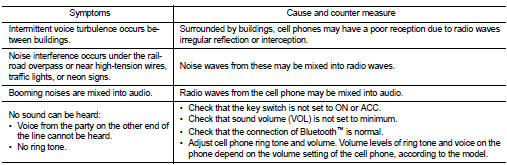
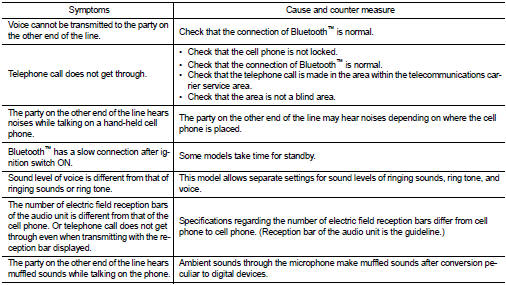
 Audio system symptoms
Models with USB connection function
MODELS WITH USB CONNECTION FUNCTION : Symptom Table
AUDIO SYSTEM
RELATED TO HANDS-FREE PHONE
• Check that the cellular phone is the corresponding type (Blue ...

Other materials:
Compression pressure
Inspection
1. Warm up engine thoroughly. Then, stop it.
2. Release fuel pressure. Refer to EC-551, "Work Procedure".
3. Remove ignition coil and spark plug from each cylinder. Refer to EM-53,
"Exploded View".
4. Connect engine tachometer (not required in use of CONSULT-II ...
Vehicle security system cannot be set
Key fob
KEY FOB : Description
Armed phase is not activated when door is locked using keyfob.
NOTE:
Check that vehicle is under the condition shown in “CONDITIONS OF VEHICLE
(OPERATING CONDITIONS)�
before starting diagnosis, and check each symptom.
CONDITION OF VEHICLE (OPERATING COND ...
Precautions on child restraints
WARNING
• Failure to follow the warnings and instructions for proper use and installation
of child restraints could result in serious injury or death of a child or other
passengers in a sudden stop or collision:
— The child restraint must be used and installed properly. Always follow all o ...
