
Nissan Juke Owners Manual : Map lights (if so equipped)
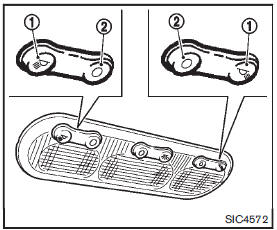
Operate the map light switch to turn the map light on or off.
1 : ON position
2 : OFF position
 Interior lights
CAUTION
Do not use for extended periods of time with the engine stopped. This could
result in a discharged battery. ...
 Map light control switch (if so equipped)
The map lights control switch has three positions: ON1 , OFF2 and center.
ON position
When the switch is in the ON position 1 , the map lights will illuminate.
OFF position
When the switch is in ...
Other materials:
Door mirror (open/close motor)
Component Function Check
1.CHECK DOOR MIRROR RETRACT FUNCTION
1. Turn ignition switch ON.
2. Operate open/close switch. Check that door mirror operates normally.
Is the inspection result normal?
YES >> INSPECTION END
NO >> Refer to MIR-25, "Diagnosis Procedure".
Diagno ...
U1000 can comm circuit
Description
CAN (Controller Area Network) is a serial communication system for real time
application. It is an on-vehicle
multiplex communication system with high data communication speed and excellent
error detection ability.
Many electronic control units are equipped onto vehicles, and ea ...
Brake booster
Exploded View
2WD
1. Master cylinder assembly
2. Vacuum pipe
3. Brake booster
4. Lock nut
5. Clevis
6. Gasket
7. Spacer
: N·m (kg-m, ft-lb)
4WD
1. Master cylinder assembly
2. Brake booster
3. Lock nut
4. Clevis
5. Gasket
6. Spacer
: N·m (kg-m, ft-lb)
Removal and insta ...
